• The move to the new server is done. There are some software and database maintenance updates in process. This has us passing the hat around to help out. We appreciate any donations. Seriously, even a dollar helps. The payment page may be found here - https://www.audiokarma.org/support.html

New house in FM dead zone, need FM streaming advice please

Ok I really appreciate the responses, I think I'm starting to understand the options.

I thought I would need a stand alone DAC to run the audio from my phone. But I just need to get a simple USB C to RCA adaptor cable and use the phone's DAC for a wired solution, or Bluetooth for wireless. I'll try this first knowing it may not have the best audio quality.

While I don't need the standalone DAC, I can still connect a decent quality one like a Schitt Modi 5 to my phone and into the receiver and this should give me better audio quality than using the phone's DAC right?

A streaming device/DAC like the WiiM Pro Plus sounds like a pretty flexible setup that should deliver even better audio if needed.

Am I getting this right? Thank you.
I may be wrong. But, I think when phones eliminated thier 3.5mm earphone sockets. They no longer have an analog audio wired output option.
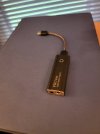
I have to use a wired DAC with my Galaxy S21, for headphones use. Whether an $8 version or fancier unit like this.
Check your phone manual.

EDIT: I see you have figured it out. After seeing post above.
 

Attachments
  • 20260810_082217.jpg
    20260810_082217.jpg
    59.7 KB · Views: 9
Last edited:
I may be wrong. But, I think when phones eliminated thier 3.5mm earphone sockets. They no longer have an analog audio wired output option.
I have to use a wired DAC with my Galaxy S21, for headphones use. Whether an $8 version or fancier unit like this.
Check your phone manual.

EDIT: I see you have figured it out. After seeing post above.
Right, and doh, I just realized my Samsung galaxy lacks the 3.5 headphone jack!

So if I go tethered, I can't used the phone's dac then.
 
My old pre-amp, an Adcom GFP-815, had a 3.5mm jack on the front panel and I played music -including streaming my favorite FM station- that way.

I'm currently using the USB output of my phone to feed a Topping DAC.
 
Right, and doh, I just realized my Samsung galaxy lacks the 3.5 headphone jack!

So if I go tethered, I can't used the phone's dac then.
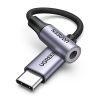
The USB-C (or lightning if you use an older iPhone) to 3.5mm adapters have their own little tiny DAC built into them.
for example, this $10 adapter has a DAC chip built into it:
1786369396615.png
What kind of phone do you have?
 
I would think a lot of people have older PCs lying around, just go from audio out right into receiver. Maybe you have a little laptop that you could just leave dedicated for this purpose. It’s the method I used at work for many years. Then I got a dedicated streamer. Can’t say I noticed it night and day difference.
 
That's initially why I asked about a computer with a DAC. I had assumed that OP accessed AK on a computer, but that assumption could have been incorrect (i.e. he does everything on his phone). In my experience, built in sound capabilities on computers (be they desktop or laptop) are somewhat lacking. An inexpensive external USB DAC gets around this issue.
 
I recommend using the radio stations website vs a station app. I’ve had better luck that way.
Also if you do it a lot, an old pc is worth it. Use the pc to go to the stations website and then use the USB out from the pc, setting the pc up to “exclusive mode” so you don’t get pc sounds. Then run the USB to a DAC.
Phone out to the receiver works, but PC/USB/DAC is worth it.
I’m using a pc that shipped with Vista and a DAC from Craigslist, so low $$ works fine.
 
I would think a lot of people have older PCs lying around, just go from audio out right into receiver. Maybe you have a little laptop that you could just leave dedicated for this purpose. It’s the method I used at work for many years. Then I got a dedicated streamer. Can’t say I noticed it night and day difference.
Samsung galaxy a16 with USB C
 
Once you get your connection method set, check out Radio Garden. Listen to the whole world.
 
Hi folks - I'm an old audiophile, but a complete digital streaming newb. Looking for advice on the best way to stream my favorite FM station via my android smartphone into my vintage receiver. Looking for the option that will have the best audio quality in hopes of getting close to the sound I've enjoyed through my analog tuners.

Background - for years I've enjoyed one FM community radio station in our area. A true gem - 89.5 KVMR for those of you in the sierra foothills. Other than using CD players on occasion, I'm an analog person - vinyl and FM. Never tried to stream anything with my phone or other devices. So am clueless about what the best options are. In the old house I could pick up that station in stereo with a moderately strong signal on all of my vintage receivers.

We recently moved to a new house that is actually closer to my local community radio station tower. So I thought I'd get an even better signal. But to my horror, when I set up my various TOTL vintage receivers with awesome FM sections, I am unable to get anything from my station due to the new house being behind a large hill. When I drive to the new house I get great reception in the car, then when I'm a block away dropping down a hill, all static. Bummer.. So I assume my only option now is to stream my station through my phone, or some other device.

I see some simple USB C to RCA adaptors with a built in DAC for cheap, under $30. But that is probably going to sound pretty terrible compared to what I'm used to hearing through my TOTL analog tuners right? Is there another option/device that either uses my phone, or not, and would provide high fi sound comparable to what I'm used to?

Appreciate your recommendations, and remember, I'm a digital streaming newb!
I don't know where in the Sierra's you live in, but I lived at around the 3200ft elevation in the northern Sierra mountains for years. FM was dismal. Too many hills and mountains, even when I used an outdoor antenna.
8 years ago I moved down into the northern end of the central valley. The town I live in has two rivers wrapping around it, so there are levels all around the town.
FM is bad here as well unless you get an antenna on a tower or tall pole to get above the levees. I've thought about buying a low powered FM transmitter and connect it to a Bluetooth receiver and stream from a smart phone to the transmitter. I could then listen to my tuners. I have four tuners, but only one is used in my main system. Even with the outdoor antenna I have setup on an eve of my house I have a poor choise of stations to listen to.
I woukd setup the other tuners to some of my other systems like the one in my garage if I had a transmitter.
 
Once you get the hardware situation solved and assuming you enjoy jazz, I highly recommend Radio Swiss Jazz - CD quality sound and no commercials. As it is funded by the Swiss government, they feature about 50 percent European artists, who are quite good. Radio Swiss Pop and Radio Swiss Classic (classical music) are also available.
 
You could just get a usb c to split rca cable. See if it's convenient enough for you and if you like the sound. You could always add a separate DAC or wireless streamer if you feel the need. I'm somewhat envious that there's FM you want to listen to near (sort of) you. I haven't unpacked my tuner since I moved.
 
I recommend either a Wiim Pro or Wiim Pro Plus. They both stream, have integrated DACs and are less than $200 USD.
You don't need the Pro PLUS version, the Pro version has the same capabilities. The PLUS version is advertised as having a "better" DAC. Both versions have COAX and Optical outputs if you decide to try a different DAC. Both versions can be controlled from your phone or computer using the Wiim Home App. Both versions have Blu Tooth inputs and can be reached over Wifi or Ethernet.

To tune into an Internet Radio Station:

1. Open the WiiM Home App, go to the Browse tab. Under Music Services select Customize to manage your Music Services and Toggle on Tuneln.
2. Return to Music Services and select Tuneln.
3. Press the "Search" icon on the Wiim Home App. Search for your station and select. It will be added to your profile.

When you want to stream your station from the Wiim Home App:
1. Open the App on your phone or computer
2. Select Browse.
3. Select Music Services.
4. Select Tuneln.
5. Select your desired station.

The Wiim Home App can also play files stored on your computer and NAS.

You can Demo either product by virtue of Amazon's generous return policy.
 
Last edited:
I really appreciate all the info. I think I have a handle on my options now.

I'm going to start with a cheap $20 USB c to rca adaptor with built-in dac and see how it sounds. Tethering the phone does seem inconvenient, so when I want something better, I'll probably go with the Wiim Pro instead of an external DAC.

In the process of moving into the new house so still don't have wifi service. Of course the first thing I moved up there was one of my sound systems!
 
That r sounds like a plan.
That $20 DAC. You could buy with 3.5mm stereo socket out. Which likely most are this way. And, get a separate, 3.5mm to RCA ends cable.
This DAC could also be used for headphones with your phone. After you move on to better DAC. The cheap DACs are great for Doc office waiting rooms.
 
Back
Top Bottom