One channel on my AR XB table is not producing sound, I have narrowed down the problem to the contacts between the headshell and the tone arm. I read here on AK that some AR headshells have stationary pins, and others were spring loaded, mine appear to be stationary. I say "appear to be" as there is also a bit of glue that someone put on the inside of the headshell, if the pins are spring loaded it is possible that the glue would prevent them from moving. I will never get the glue off without causing damage, it all seems so delicate. Assuming that the pins are in fact stationary, what can I do to get the one pin that is not contacting with the pins in the arm to make contact?


You are using an out of date browser. It may not display this or other websites correctly.
You should upgrade or use an alternative browser.
You should upgrade or use an alternative browser.
AR XB Headshell Issue
- Thread starter Charles218
- Start date
Register to hide this ad

One side always has "Pogo Pins".
Either the head shell or the tonearm needs them.
I see new 3D printed ones on the bay... 80$ Gulp...
Either the head shell or the tonearm needs them.
I see new 3D printed ones on the bay... 80$ Gulp...
Buck, thanks for your input, unfortunately I do not have much input on the history of this table, and so do not know if the headshell is original to this table or not. If you look closely at the attached photo you can see the glue that is surrounding the connectors, there is likely enough that it is preventing the Pogo Pins from moving. I tried to scrape the glue off, but it is just too small of a space to do much without damaging the connectors. I am hoping that someone has a solution to getting the one pin that is not contacting a pin on the tonearm to make contact.
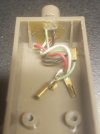
Before you do any damage take a tooth pick and try pressing the Pins inside the tonearm and see if they move.
AR's are known for having broken tonearm wires.
I'd also take an Ohm meter and measure continuity from the RCA's to the arm pins.
Good luck~~
AR's are known for having broken tonearm wires.
I'd also take an Ohm meter and measure continuity from the RCA's to the arm pins.
Good luck~~

I would conjecture that the glue is a sign of the problem. Why would someone put glue inside the headshell? It might be that there was a problem with the attachment of the leads to pins of the headshell. As @Buck Rogers said, a meter (a DMM) might help to diagnose the problem. I do wonder if someone tried to reconnect one of the leads to the pins of the headshell. I am not sure why else someone would use glue there. If you could find a solvent that would dissolve the glue, you might be able to see what is going on.
One of the first things that I did was to check continuity all of the way out to the RCA plug and all seemed okay, though I may have only checked from both sides of the headshell, and then from the tonearm to the RCA connector. I will do a little more checking for that in the morning. What I did do was to install a cartridge in a junker AR headshell that I have, it gave me sound on both channels so the headshell does seem to be the problem.
Is it correct that some of their headshells had pins that are stationary? If so, is there a way to determine if this headshell is intended to be stationary? Trying to break up the glue seems a bit risky, I will try again tomorrow after heating it up a bit. I just don't want to damage it only to find out that the pins are stationary by design.
Is it correct that some of their headshells had pins that are stationary? If so, is there a way to determine if this headshell is intended to be stationary? Trying to break up the glue seems a bit risky, I will try again tomorrow after heating it up a bit. I just don't want to damage it only to find out that the pins are stationary by design.
[Hello?]
Take a tooth pick and try pressing the Pins inside the tonearm and see if they move.
Do ANY of the head-shell pins move?
I don't see how they can with that glue...
Take a tooth pick and try pressing the Pins inside the tonearm and see if they move.
Do ANY of the head-shell pins move?
I don't see how they can with that glue...


Glue like that is a sign someone has no clue.
Or possibly that this one is broken, and the repair was done in the long era of no headshell availability, before aftermarket came to be and after spares were long gone.
The aftermarket headshells have springy pins, about 99% sure my original does as well.
Well after too much time dealing with this headshell setup, I am ready to throw in the towel. After multiple continuity checks, it just seems that the connection between the headshell and the tonearm is the issue. I get good checks from the RCA plug through the tonearm, and from the outside to the inside of the headshell. Where it fails is when I measure from the RCA through the headshell. I do have a couple of extra headshells, though they are both pretty beat up. Both have holes drilled through the top for mounting bolts, and one is missing the finger lever. Despite their faults, hooking them up to the tonearm results in a nice clean sound on both channels.
So apparently the glue is the problem, causing the contacts to not spring in and out and make contact with the tonearm. Buck, it is clear that the contacts on the arm do not have any spring action at all, they are 100% stationary. As time allows, I may come back to it and see if I can free up the contacts on the headshell, but for now I will move on unless there is something obvious that I am overlooking.
So apparently the glue is the problem, causing the contacts to not spring in and out and make contact with the tonearm. Buck, it is clear that the contacts on the arm do not have any spring action at all, they are 100% stationary. As time allows, I may come back to it and see if I can free up the contacts on the headshell, but for now I will move on unless there is something obvious that I am overlooking.
I checked my original and the pins are indeed springy.
The headshells are known issues. You may want to circumvent your frustration by picking up a new one.
The other option is swapping the arm tube for an s arm from a Technics table. More involved but then you get to use sme headshells.
The headshells are known issues. You may want to circumvent your frustration by picking up a new one.
The other option is swapping the arm tube for an s arm from a Technics table. More involved but then you get to use sme headshells.

The other option is swapping the arm tube for an s arm from a Technics table. More involved but then you get to use sme headshells.
^^^^^^^ This ^^^^^^^