pioneervato
Lunatic Member
A few days ago I bought a 20 ft stereo extension headphone cable with a 1/4" male and female end from Radio Shack for $10. Today I decided to swap the old stretched out original coiled cable on my Pioneer SE-405's I had picked up at a thrift for about $5 that were still in pretty good shape.
Two things I found out when I did the upgrade. 1) Nothing is as it first seems, and 2) Nothing goes easily back together as easily as it came apart.
After removing the driver assembly from the left ear piece I thought it looked pretty easy. From the original cable there were three wires, a red, a black, and a white. Pretty simple, or so I thought until I cut the female end of the new straight cable from Radio Shack. The wires where wrapped in some sort of sheath, maybe for shielding.
When I removed the shielding I also found 3 wires. One red, one black, and one braided silver colored bare wire. OK, must be the white wire.
I removed the plastic insulators at the paired up red and white wires and then using my soldering iron I de-soldered the red and white and then the black wire which was soldered with some other black wires. Easy enough.
Then I soldered in the new wires from the new Radio Shack cable, red to red, black to black, and the bare silver wire to the white wire leading to the left volume potentiometer. I then put it all together (not so easy to get it to fit because of the slightly thicker and stiffer new cable but I finally got it to go) and replaced the ear pad.
I connected the headphones to my Pioneer SX-636 and turned it on. I heard music but something didn't quite seem right. It seems that the left and right channels were now reversed or something.
Broke the left driver down again and switched the red and black wires and so now the black wire from the new cable was connected to the red wire inside the headphones and the red wire to the black terminal. Put it all back together again and gave them a listen. OK. I think. The right and left channels seemed right but something still didn't quite sound right to me. I played with the balance control on the receiver and then the individual volume controls on the headphones and that didn't quite seem right either.
When I adjusted the balance control from center to far right or left I could still hear music from one side or the other. Hmmmm....that shouldn't be happening.
More surgery needed and here is what I finally figured out. The old cable had three colored coded wires of red, black, and white that matched up with the same colors in the driver assembly. However, the new cable had a red and a black but no white, only the bare silver wire that I assumed was supposed to be the white.
As it turned out (a note to any of you who may do the upgrade on your Pioneer headphones similar to mine) the black wire from the new cable must be attached to the red lead inside the driver assembly, the red lead to the white wire that is connected to the volume control pot, and the bare silver wire soldered to the black terminal assembly.
The balance control works as it should and left and right channels work as they should. I am listening to them now as I type this and my SE-405's sound pretty damn good.
Check out the pics but remember that the pic showing the new wires attached is wrong. I did not reshoot the pic once I figured out the correct wiring assembly.
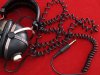
Old Coiled Cable

Left Ear Pad Removed

New Radio Shack Straight Cable

New Wire Stripped

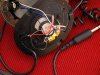
New Wires Attached. NOTE: The red goes to white, black to red, and silver to the solder terminal block

Driver Assembly Reassembled

Two things I found out when I did the upgrade. 1) Nothing is as it first seems, and 2) Nothing goes easily back together as easily as it came apart.
After removing the driver assembly from the left ear piece I thought it looked pretty easy. From the original cable there were three wires, a red, a black, and a white. Pretty simple, or so I thought until I cut the female end of the new straight cable from Radio Shack. The wires where wrapped in some sort of sheath, maybe for shielding.
When I removed the shielding I also found 3 wires. One red, one black, and one braided silver colored bare wire. OK, must be the white wire.
I removed the plastic insulators at the paired up red and white wires and then using my soldering iron I de-soldered the red and white and then the black wire which was soldered with some other black wires. Easy enough.
Then I soldered in the new wires from the new Radio Shack cable, red to red, black to black, and the bare silver wire to the white wire leading to the left volume potentiometer. I then put it all together (not so easy to get it to fit because of the slightly thicker and stiffer new cable but I finally got it to go) and replaced the ear pad.
I connected the headphones to my Pioneer SX-636 and turned it on. I heard music but something didn't quite seem right. It seems that the left and right channels were now reversed or something.
Broke the left driver down again and switched the red and black wires and so now the black wire from the new cable was connected to the red wire inside the headphones and the red wire to the black terminal. Put it all back together again and gave them a listen. OK. I think. The right and left channels seemed right but something still didn't quite sound right to me. I played with the balance control on the receiver and then the individual volume controls on the headphones and that didn't quite seem right either.
When I adjusted the balance control from center to far right or left I could still hear music from one side or the other. Hmmmm....that shouldn't be happening.
More surgery needed and here is what I finally figured out. The old cable had three colored coded wires of red, black, and white that matched up with the same colors in the driver assembly. However, the new cable had a red and a black but no white, only the bare silver wire that I assumed was supposed to be the white.
As it turned out (a note to any of you who may do the upgrade on your Pioneer headphones similar to mine) the black wire from the new cable must be attached to the red lead inside the driver assembly, the red lead to the white wire that is connected to the volume control pot, and the bare silver wire soldered to the black terminal assembly.
The balance control works as it should and left and right channels work as they should. I am listening to them now as I type this and my SE-405's sound pretty damn good.
Check out the pics but remember that the pic showing the new wires attached is wrong. I did not reshoot the pic once I figured out the correct wiring assembly.
Old Coiled Cable
Left Ear Pad Removed
New Radio Shack Straight Cable
New Wire Stripped
New Wires Attached. NOTE: The red goes to white, black to red, and silver to the solder terminal block
Driver Assembly Reassembled