
Can yo help me to DIY fix my DAC? (the USB feature)

elnaldo

Lunatic Member
Hello . I wonder if some of you have some knowledge on digital circuits to help me to DIY fix my Maverick D1 DAC. The analog part works OK, but the device is not recognized by any computer.

I've managed to replace the USB chip along with the 3.3V regulator, but it seems something else is damaged (I see an EEPROM IC beside the USB chip.)

I was thinking to take the USB part of some cheap sound card like this
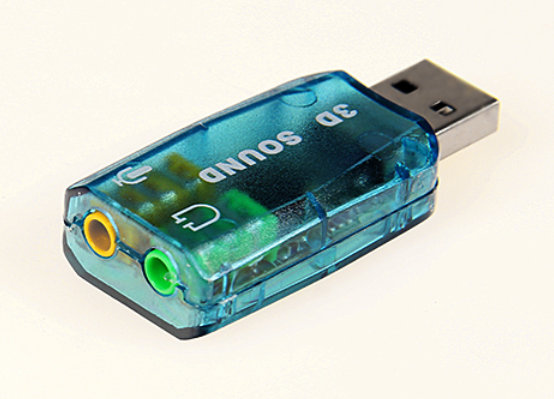
USB_Sound_Card.jpg


And send the digital audio out of it to the Maverick DAC section.

I've contacted Maverick Audio during the last year, and had no answer to my lasts e-mails, so I gave up with them, I'd try to resurrect the unit if some of you can guide me.

Worst case: I have an hybrid tube preamp, and I'll have to buy another cheaper DAC.
 
Register to hide this ad
- Does it show up as a new or unknown device in the Device Manager (Windows)?
- Have you tried deleting your USB devices in the Device Manager and plugging them back in after a reboot?
- Have you tried a different USB jack?
- Have you tried a different cable?
- Have you tried wiggling the cable you got? USB connectors are notorious for bad contacts.

All pretty basic stuff, and feel free to send me a virtual slap upside the head if I offend ... <G>

Ah ... Edit ... just noticed the "device is not recognized by any computer."
SLAP! <G>
 
check the output on the regulator first to make sure power is there ..if it is eeprom you will need to find a dump file for the new one .. i know some can be reset by shorting 2 pins . that is a last ditch thing before flashing the chip or putting a new one in .
try bad caps forums if you dont get enough help here .
 
"Unknown device" under windows, and nothing under linux. I know the usb was toasted since I' ve replaced burned resistors connected to the USB chip and the 3.3V rail was shorted to ground until I replaced the chip.

I've used a "pin to pin" compatible replacement in place of the unobtainum "Te7022 " chip, but it could be wrong too. That's why I was thinking to replace the whole USB circuit.
 
maybe try under linux and see what it reports it as being .. it should display an id for it that you can look up ... open a terminal .type sudo lsusb hit enter . put in password . hit enter ..
you could do this with live disk if you dont want to do a full install . ubuntu works well for me ..
there should be a way to this with windows but i dont know how to do it
 
"Unknown device" is a lot different than not found ... That says Windows found the DAC, but didn't know what to do with it, and it wouldn't have found it at all if the chip or USB support wasn't working. Weird.

Another potential fix ... try installing a powered USB hub between your computer and the DAC. That's been known to help solve troublesome comm issues.
 
My main system is a linux box. Before the DAC was burned, the dac worked ok in linux and windows machines. Just plug and play, detected as Maverick audio device or something like that. One day, stopped working. Nothing detected in linux, not even an Unknown device. And "Unknown device" under windows. I'll try lsusb to see the output.

Opened the unit and traced 4 burnt resistors, and a short from the 3.3V rail to ground. Started with the simplest, removed resistors and the 3.3V regulator and the short still there. Removed some caps in the 3.3V rail and the Eeprom IC, and the short still there. The only component still connected to the rail was the USB chip. Removed it and the short was solved. Reinstalled the components, a new 3.3V regulator and a new USB chip, and still not working. I suspect the Eeprom is damaged. Damaged with the 1st short circuit, or damaged in the desoldering -soldering process. But it seems it's not possible to buy a new IC. I guess it has custom instructions inside.
 
Why don't you just use the optical in instead of the USB? It's a better solution anyway.
I don't have that optical out from my computer, where the music player is. I just have USB outputs from the computer. (perhaps it's easier to get another computer than fixing this digital stuff....)
 
you should get an output like this .. just have to figure out which is the one . easy done by trying with it plugged in and without it plugged in .
should look something like this ..
p.s you can drop the sudo command ... so ctrl alt t to get terminal and type lsusb .hit enter ...
Bus 002 Device 005: ID 1bbb:0195 T & A Mobile Phones
Bus 002 Device 002: ID 8087:0024 Intel Corp. Integrated Rate Matching Hub
Bus 002 Device 001: ID 1d6b:0002 Linux Foundation 2.0 root hub
Bus 004 Device 001: ID 1d6b:0003 Linux Foundation 3.0 root hub
Bus 003 Device 002: ID 050d:0841 Belkin Components
Bus 003 Device 001: ID 1d6b:0002 Linux Foundation 2.0 root hub
Bus 001 Device 002: ID 8087:0024 Intel Corp. Integrated Rate Matching Hub
Bus 001 Device 001: ID 1d6b:0002 Linux Foundation 2.0 root hub
 
I'd not worry about fixing the TE7022 in your DAC, and instead buy a superior USB to SPDIF converter. There are plenty of affordable options which will out-do the TE7022.
 
I'd not worry about fixing the TE7022 in your DAC, and instead buy a superior USB to SPDIF converter. There are plenty of affordable options which will out-do the TE7022.

I've replaced the TE7022 with a BRAVO SA9023, wich is , according to the manufacturer, pin to pin compatible.

Datasheet here: https://dl.dropboxusercontent.com/u/1640933/SA9023-20150430-JPv1.1.pdf

Could this be related to my problem ??? I have the original EEPROM IC installed:
"I2C Slave Function
SA9023 provided an I2C slave function which is used for CPU to read information or program some registers.This mode need to enable by EEPROM that need USB descriptor software tool. Default setting is disabled. "
 
Sorry, I can't help - I don't know.

What I was suggesting is a dedicated stand-alone converter which sits outside of your DAC and feeds a signal to the SPDIF input of your DAC.
 
How could I do this?

There are some CM6631A USB to SPDIF boards with no case on eBay for under $USD35 delivered that are superior to the TE7022 in my opinion. These are USB powered and you connect the SPDIF output to the SPDIF input of your dac.

There are also versions with a metal case which are more expensive.
 
did you look at the output from lsusb yet ?

Well, this is definitely hardware related.
I discovered the Maverick's inner relays become "crazy" when I plug the USB to the computer with the Maverick powered ON. Relays click 3 or four times very quickly, and the 3 ICs related to the problem get very hot (this is: 3.3V regulator + SA9023 USB chip + 24C08N EEPROM IC. All 3 get very hot at touch. I still suspect the EEPROM is bad, since the other 2 are new.
Also, I have to admit, I didn't take any anti-static precautions, just soldered with my regular soldering iron as usual, very careful, and checked for solder bridges with a mag glass and my meter. I have another 4 new SA9023 USB chips to try it again, the factory sent me 5 free samples.

lsusb returns nothing, the same with and without the DAC (plugged it with 2 different cables, and in all 4 USB ports)

Bus 001 Device 001: ID 1d6b:0002 Linux Foundation 2.0 root hub
Bus 006 Device 001: ID 1d6b:0001 Linux Foundation 1.1 root hub
Bus 005 Device 001: ID 1d6b:0001 Linux Foundation 1.1 root hub
Bus 004 Device 001: ID 1d6b:0001 Linux Foundation 1.1 root hub
Bus 003 Device 001: ID 1d6b:0001 Linux Foundation 1.1 root hub
Bus 002 Device 001: ID 1d6b:0001 Linux Foundation 1.1 root hub


I've checked with my cheap USB sound card and got this:

Bus 001 Device 001: ID 1d6b:0002 Linux Foundation 2.0 root hub
Bus 006 Device 001: ID 1d6b:0001 Linux Foundation 1.1 root hub
Bus 005 Device 003: ID 0c76:1607 JMTek, LLC. audio controller
Bus 005 Device 001: ID 1d6b:0001 Linux Foundation 1.1 root hub
Bus 004 Device 001: ID 1d6b:0001 Linux Foundation 1.1 root hub
Bus 003 Device 001: ID 1d6b:0001 Linux Foundation 1.1 root hub
Bus 002 Device 001: ID 1d6b:0001 Linux Foundation 1.1 root hub


I think I could adapt one of those "$30" USB to SPDIF boards. I have a friend in USA, NY, for a couple of weeks, he could carry it for me if I can but on-line and make it arrive to NY fast enough.
 
Back
Top Bottom