

You are using an out of date browser. It may not display this or other websites correctly.
You should upgrade or use an alternative browser.
You should upgrade or use an alternative browser.
CD with a Virus
- Thread starter Paul-H
- Start date
Register to hide this ad

Was it a Sony-BMG CD from about 2005? Some CDs from that time period employed a form of copy protection which made use of what's referred to as a rootkit. This caused a scandal, as rootkits are typically used by viruses and other nasty programs to hide their existence. Some information about spotting affected CDs can be found here.
-Adam
-Adam

the skipper
Professional Curmudgeon
Years ago,. I picked up an Elvis CD I was preparing to copy to my computer and, when I put it in the drive, something downloaded within a second or so. Couldn't download it,
Had another look today
It looks like the AV software is objecting to some sort of Media Player included on the CD
It looks like the AV software is objecting to some sort of Media Player included on the CD
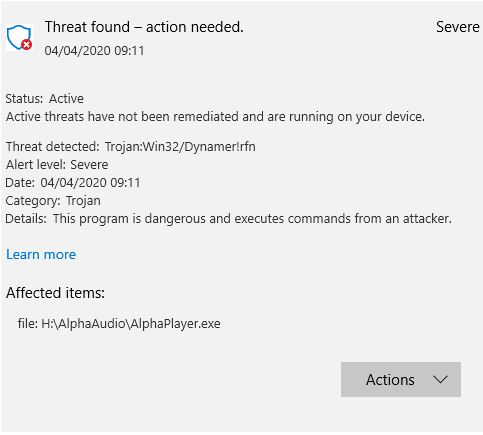

It isn't objecting just because it's a media player - the media player itself contains a trojan. Normally trojans require the infected file to be 'run' to install themselves, so at the moment it seems fairly impotent. However, I would either bin the CD - even better destroy it, so it can't be played. OR find some way to copy the CD without the media player software.
I wouldn't allow that CD any where near my system after that warning.
I wouldn't allow that CD any where near my system after that warning.

Anyone else ever found anything like it on a genuine CD copy
Pretty sure the Red Book CD specification didn't include a provision to install viruses!


cpt_paranoia
Addicted Member
This is a new one for me
My CV-19 Virus project is the RIP all my CD's to FLAC files
All going well for a few days then suddenly today when I loaded a CD my antivirus software woke up and said it had a Virus on it.
Anyone ever have that before?
Paul
Turn off AutoPlay for your CD drive. Set to 'do nothing'. Then the installer on the CD won't automatically run to try to install malware.
I'd recommend this for any computer; only run programs under direct user control, regardless of how convenient it might be to have a disc AutoPlay.