

-
Feeling lucky? Check out the AK 24th Anniversary Giveaway thread and join in the fun!
You are using an out of date browser. It may not display this or other websites correctly.
You should upgrade or use an alternative browser.
You should upgrade or use an alternative browser.
Hardwood floors and a mysterious receiver (Upgrade suggestions?)
- Thread starter Skyl3r
- Start date
I'll probably try out Optical first as I don't think I have an output on my computer for the digital RCA style connector.
lol, yeah, I probably won't. I've learned two things now that I feel like an idiot for.
1. The menus on my AVR are probably gonna show up on screen and not on the LCD panel
2. The optical port is right in front of my eyes and I didn't notice
lol, yeah, I probably won't. I've learned two things now that I feel like an idiot for.
1. The menus on my AVR are probably gonna show up on screen and not on the LCD panel
2. The optical port is right in front of my eyes and I didn't notice
Laptop or desktop? If it's a desktop get an audio card with the connectors you need. Cheap upgrade.
Desktop! It's got a pretty decent motherboard that has optical out. So I'll be able to give that a try when I get home. Are you suggesting I use the RCA connector digital cable instead of Optical?

MannyE
Exterminate!
Desktop! It's got a pretty decent motherboard that has optical out. So I'll be able to give that a try when I get home. Are you suggesting I use the RCA connector digital cable instead of Optical?
Frankly, I don't think it makes any difference which one is used. I never noticed that one was better than the other. It just comes down to ease of use. If you have the optical and you're all set up then go for it. It will be fine.
Keep in mind that in order for this equipment to sound good, you really need to go through the setup steps. Older equipment like this isn't as user friendly as the new stuff and you will be expected to setup speaker levels, speaker size, etc. It can get pretty involved. Download an audio level meter for your phone before you start and things will go a lot easier. Use "C" weighting and "Slow" to set up the levels.
Frankly, I don't think it makes any difference which one is used. I never noticed that one was better than the other. It just comes down to ease of use. If you have the optical and you're all set up then go for it. It will be fine.
Keep in mind that in order for this equipment to sound good, you really need to go through the setup steps. Older equipment like this isn't as user friendly as the new stuff and you will be expected to setup speaker levels, speaker size, etc. It can get pretty involved. Download an audio level meter for your phone before you start and things will go a lot easier. Use "C" weighting and "Slow" to set up the levels.
Okay, I'll plan on optical cable.
My first order of priority will be hooking this thing up to a display device of some sort and getting into the menus. Hopefully it'll be much more self explanatory when I have an actual menu to look at.
MannyE
Exterminate!

Seems like the image you found is for a different AVR... the 606S does NOT have an optical input. Which is why you couldn't find it... you have to use an AC3/PCM digital input which is an RCA cable if you want to go digital. Or you can just get a mini-jack to RCA converter cable and go from your PC to one of the analog inputs on the 906
You are correct and that image is what I remember mine looking like.Seems like the image you found is for a different AVR... the 606S does NOT have an optical input. Which is why you couldn't find it... you have to use an AC3/PCM digital input which is an RCA cable if you want to go digital. Or you can just get a mini-jack to RCA converter cable and go from your PC to one of the analog inputs on the 906
I actually have two minijack to RCA cables. I had one going from my front speaker out to the input on my receiver and I was hoping to run another from the rear speaker out to the rear speaker inputs on my receiver; but I've now discovered that such a thing does not exist.
Honestly, my biggest draw to digital was being able to use real 5.1 (as in not ProLogic coming up with it.) I may look into getting a sound card and setting that up, but it won't be a high priority task for me.
gpounce32768
Well-Known Member
A reasonably good soundcard sounds a <lot> better than many (most?) PC motherboard audio devices. Also a good way to set up a quadraphonic amp.

Nightwisher
Farer In The Goldilocks Zone
A more modern receiver would have multichannel analog inputs, which is where your original method would work. It would also have optical and maybe HDMI, which I would recommend over the analog method (receiver DACs are usually higher quality than surround soundcard ones).You are correct and that image is what I remember mine looking like.
I actually have two minijack to RCA cables. I had one going from my front speaker out to the input on my receiver and I was hoping to run another from the rear speaker out to the rear speaker inputs on my receiver; but I've now discovered that such a thing does not exist.
Honestly, my biggest draw to digital was being able to use real 5.1 (as in not ProLogic coming up with it.) I may look into getting a sound card and setting that up, but it won't be a high priority task for me.
You can get an optical to digital coax converter and that'll run you like $15, which is cheaper than buying a whole new soundcard. Although a soundcard with the right connector would probably work better in the long run as far as reliability and you can go with a cheap one if you're only using the digital output.
At least your receiver has digital inputs. I'm using a Kenwood Pro Logic receiver in my computer setup that lacks digital inputs. The results are still good as I can send a downmixed multichannel signal through stereo RCA and have the receiver decode it back out. But definitely not as good as native surround (but hey, my receiver was only $6.99).
Last edited:
A reasonably good soundcard sounds a <lot> better than many (most?) PC motherboard audio devices. Also a good way to set up a quadraphonic amp.
I have a custom built PC with a decently high end motherboard. My understanding of the onboard soundcard is that it is pretty good. You can see my assortment of inputs in this pic:
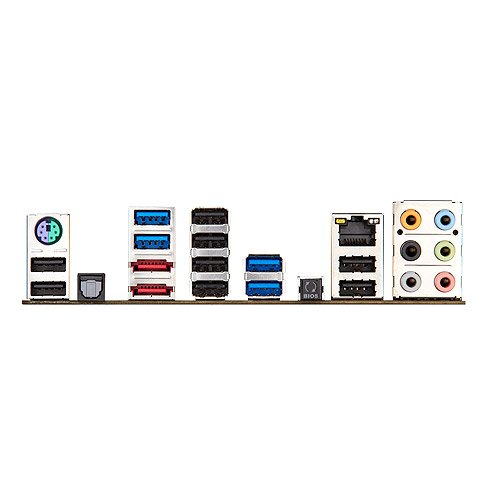
So it has the stuff for surround analog; but I guess I'd need something to go in between. Like an... ADC (Is that an acronym?)
A more modern receiver would have multichannel analog inputs, which is where your original method would work. It would also have optical and maybe HDMI, which I would recommend over the analog method (receiver DACs are usually higher quality than surround soundcard ones).
You can get an optical to digital coax converter and that'll run you like $15, which is cheaper than buying a whole new soundcard. Although a soundcard with the right connector would probably work better in the long run as far as reliability and you can go with a cheap one if you're only using the digital output.
At least your receiver has digital inputs. I'm using a Kenwood Pro Logic receiver in my computer setup that lacks digital inputs. The results are still good as I can send a downmixed multichannel signal through stereo RCA and have the receiver decode it back out. But definitely not as good as native surround (but hey, my receiver was only $6.99).
Good thought on the optical to digital cable. I'll see what I can find for soundcards and optical to digital coax cables. Both sound like acceptable routes to me.
I was reading about encoding and decoding to get surround over a stereo connection. Pretty interesting; and for $6.99 I can't blame you

MannyE
Exterminate!
Here's the thing...
Thrift stores are using old AVRs as doorstops at the moment. If you're not in a hurry, use this one for listening to stereo, it's a fine entry level two channel amp, then start looking for something a little more updated. With some patience and luck you will probably find a good working example with all the inputs you need. In the meantime, you can listen to this one and enjoy the music.
Thrift stores are using old AVRs as doorstops at the moment. If you're not in a hurry, use this one for listening to stereo, it's a fine entry level two channel amp, then start looking for something a little more updated. With some patience and luck you will probably find a good working example with all the inputs you need. In the meantime, you can listen to this one and enjoy the music.
Nightwisher
Farer In The Goldilocks Zone
An ADC is an analog to digital converter. I don't think there really is a separate unit for surround (if there is, likely expensive) and it's really not necessary at all. Like I said, if a receiver has multichannel analog inputs, you can just directly use those with a line to RCA converter for each channel. The receiver would have an ADC built in in that case, so no need for an extra one.I have a custom built PC with a decently high end motherboard. My understanding of the onboard soundcard is that it is pretty good. You can see my assortment of inputs in this pic:
So it has the stuff for surround analog; but I guess I'd need something to go in between. Like an... ADC (Is that an acronym?)
Good thought on the optical to digital cable. I'll see what I can find for soundcards and optical to digital coax cables. Both sound like acceptable routes to me.
I was reading about encoding and decoding to get surround over a stereo connection. Pretty interesting; and for $6.99 I can't blame you
For all intensive purposes, the digital signal coming out of the optical input is the same as the signal going into the DAC (digital to analog converter) of your soundcard before it is converted to multichannel analog, so using the analog outs with an ADC is a really roundabout way to get the same result. Since your Pioneer takes a digital signal, it has its own DAC built-in, so no need to use the one in the soundcard. The "pretty good" rating of your soundcard or any soundcard would be from its DAC and analog outputs. Optical outputs or digital coax outputs should be the same across the board, so that's why you can go with a cheap soundcard as the analog outputs would be superfluous for you.
I hope that makes sense.

If nobody has suggested it, break out your soldering iron and recap those old Pioneers. Will really help tame the graininess of the highs, and improve sound overall. I prefer Dayton 5% poly caps from Parts Express, because they test around 2-3% and cost next to nothing.
If nobody has suggested it, break out your soldering iron and recap those old Pioneers. Will really help tame the graininess of the highs, and improve sound overall. I prefer Dayton 5% poly caps from Parts Express, because they test around 2-3% and cost next to nothing.
I'll probably start with the Yamaha's first. The pioneers are much more valuable to me. Wouldn't wanna break them already

I got a question though. I have a video source plugged into the DVD's VIDEO IN, my computer to the AUDIO IN, and a TV on the VIDEO OUT. I was under the impression that I should be able to press buttons now and get some sort of menu on the screen. I'm not getting anything of the sort. I got the proper audio and video output but no new menus. Is there something I am missing?