Harman Kardon 730 Channel Dead

Ohm61

New Member
Hi everyone! First (real) post here so I hope I'm not violating any rules. Desperately looking for some troubleshooting advice on my HK730.
Bought a -730 from one of the auction sites. Cosmetically very good. Seller said it had some static but wasn't tested or played much, bla bla. I was hoping that some deox in the pots and switches would fix if it was an issue. That's about the extent of my current electronics troubleshooting skills.
Played great for the first 20 - 25 minutes or so before loud, obnoxious static from left channel. Out to the bench and plugged into the DBT. Same issue right at power on. Time to order some parts! Thanks to Dlucy and the rest of this community I was able to navigate subs for originals, etc. After checking the outputs using both the DMM and the $30 transistor tester, all seemed good to go. Replaced both the mica shims and silicone thermal compound for the output transistors then rebuilt the left side only (for testing) of the power amp at this time. Rebuild here is new caps and transistors. Sounds pretty good...except now the right channel is dead:mad:
1) Checked all fuses - all good and to original specs per service manual. 2) Same issue with FM, CD via Aux, all switches and pots wiggled, jiggled, in, out, etc. No help (and no static or other snaps and crackles).
3) Check power amp idle per service manual - Left side set at 35mv with new VR. Right side = 0!
4) Rebuilt the right side of the board.
5) Still same issue. Drats!
6) Started checking voltages at board transistors using the 'Transistor Elements Volt Chart' found on pg-23 of the SM. Results in the attached table.
VoltageTable.jpg
Any help would be greatly appreciated! Have spent hours now reading some excellent posts that I thought might be relevant and have tried and tested things accordingly with no luck yet. Was hoping to I.D. the issue before moving onto the rectifier & sub-rectifier boards as I have the caps and transistor for them.
 
Register to hide this ad
I just finished a 730 and the owner picked it up today.

If you replaced transistors, make sure you put the in correctly. The 'outhouse' style old ones may throw you off.

I think there are pre/power jumpers. Use that to narrow the problem.

Also make sure you have b+ and b-. If you have a scope, it should be pretty easy to narrow down the problem.
 
WO: Yes, Originally had done nothing with the right side. My dead right channel issue occurred after having rebuilt the left side only of the power amp board.

rickl: I took plenty of pre-disassy photo's before I replaced anything on the left side, marked E,C,B on the boards for the transistors and verified the pin-outs with my T7 multi-function tester before assy of new transistors. Verified the capacitor polarity board markings were correct before installing the new (left side only) caps. Compared all left vs right resistor values - all essentially equivalent.

It was at this point that the right side is dead. I decided to rebuild right side of board at this time, Result is still the same - no right channel, no voltage across right channel output collectors.

I have no scope nor know how to use one - dmm only, But I will check B+, B-. on the main rectifier board? and pwr amp board if I can figure out where to do that.

Not sure what is meant by "I think there are pre/power jumpers. Use that to narrow the problem"? Pre-outs / Main In maybe? I will try to use an RCA to swap left/right pre-outs to right/left Main In as well and see what happens.
 
Not sure what is meant by "I think there are pre/power jumpers. Use that to narrow the problem"? Pre-outs / Main In maybe? I will try to use an RCA to swap left/right pre-outs to right/left Main In as well and see what happens.
here is a pic I found on reverb

Selection_002.png

i'd suggest you:
use a RCA to 1/8" cable and connect your audio source (phone, ipad, laptop, pc, ...) to the main amp in.
turn down the volume of the audio source.
power on your receiver
slowly bring up the volume on your music source
if you hear music, you know the amp section is working. if no musc, you know where to focus your efforts.

or ask your buddy who has a scope to help. I have multiple guys in my neighborhood with scopes (and know how to use them).
 
The manual shows the pins that have the power supply input for the amp board. Likely labeled B+ and B- or on my 430 manual labels them V+ and V-.
It's easy to check.

Odd that it quit without you even touching it, perhaps something came undone.
 
Well per rickl's and WO's advice, took VDC check of B+ and B- at both the left and right side of the main rectifier board. Results as follows:
Right Side: B+ = 40V, B- = -40V
Left Side: B+ = 39.3V, B- = -39.4V

-Then pulled the Main Amp / Pre Amp jumpers and hooked up the ipad to the Main Amp in's per rickl's instructions. Still only one channel. Swapped left/right spkr wires to make sure they weren't the problem. Spkrs are fine, channel not.

-Plugged in a set of head phones. Still only one channel.
-Then for no reason the 2nd channel came to life. No static, no crackle, just came on. No idea why.
- After 20 mins of running checked and set idle current of left channel to ~35mv. Right channel checked at ~15mv (had been 0 up to this point). Brand new VR will not vary voltage and shows no response to resistance change on the DMM when turning the adjustment screw. Maybe I overheated when installing? Will pull it and order another one (and an extra) while ordering the parts per Dlucy BOM for the pre-amp / tone, etc. boards as I plan rebuild those as well.

At this point I'm inclined to think that much of the issue is related to snap-in connectors between the power amp and rectifier boards. Will re-flow the joints on both boards at those locations when I go in to replace the VR and cross my fingers. If everything seems fine then on to the next board, test then next board and so. Been wanting one of these for a while now and really want to hear it working great!
 
Your voltage shart on post #1 shows no negative voltage on Q405, Q413 and Q419. It could be a problem of connection between the boards, as you suspected.
 
I was going to ask about that after reading the same in a different post just now.

How do I actually check them and what should I be looking for?
 
Po
I was going to ask about that after reading the same in a different post just now.

How do I actually check them and what should I be looking for?
Post a photo of them.. Two wires should read less than 1 Ω across them ( shorted ) if there not tripped. If there tripped they would read infinite Ω's ( open ) .. I don't know if they are mechanically or thermally reseting. Or even if they are resetable.
 
Last edited:
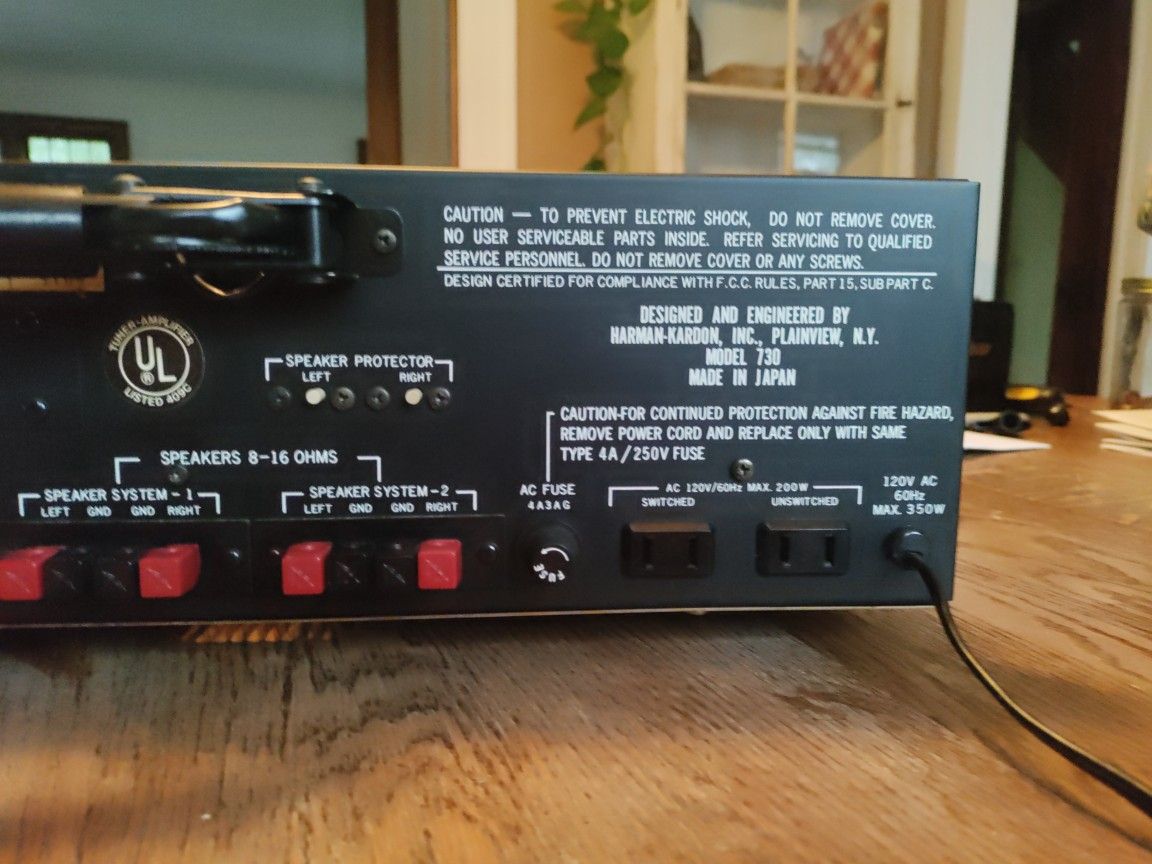
I looked in my 730 pics and didn't find them. I think they are black squares with a white button
 
Mechanically resetable .. Push in the little white plungers on the rear panel.

b2d92a57a7364e88a98d9a03d23ec2ab.jpg
 
Reset the right channel breaker. Don't hook-up speakers right away. First measure for any DC voltage out the right channel speaker binding post. If you have less than 50 millivolts you should be safe to hook up speakers.
 
Thanks guys.
Breakers checked out fine at less than 1/2 an ohm but both channels are still working at this time.

DC at speaker terminals reads 15mv or less on both channels though they both spike up to about 250mv and then settle in at around 10mv or less.
The attached is my interpretation of what a line chart might look like based upon my observations from power-on to stable DC offset.
DC Spike_Spkr.png

Doesn't strike me as something that should be normal. Wonder if that will change after I replace the bad rght side trimmer on the power amp the caps on the two rectifier boards?
 
Back
Top Bottom