Tutorial: Tube amp build with layout steps and adoption of PCB circuit to point-to-point wiring?

My hunch is that a relatively small percentage of tube-o-files do scratch builds now-a-days?
I cheat and follow someone else's basic layout. I try to follow an effective product.

elmo-laughing_sesame_street_txTvKKcmuidhfkVDA8SwVz.gif
 
Step 4: Chassis Topology

I added the power supply schematic (above). Now we can determine component placement on the chassis, and eventually the sheet metal cut-outs.

We have (8) tubes and (4) large radial caps (two are double caps, i.e. 100/100 & 32/32), and a transformer that mounts partially below the deck.

Functionality merges with aesthetics, and that's part of the fun (and challenge). For example, generally you want to keep a power transformer away from low level signal areas and from magnetically coupling to other inductors by keeping the windings perpendicular to one another (if possible). Aesthetically and practically, you might choose to put all of the iron in a straight line at the back of the chassis to keep the A/C inlet and speaker out wiring runs short.

I opted to put the power tubes in a line near the output transformers, with the small signal tubes staggered in the front. There are holes for bias adjustment controls, and bias test sockets for the 7591s.

Here's a pic of the layout thus far. I used an ancient drawing program (Canvas™ by Deneb Software) because I am too lazy to master something newer. You can also draw your layout on graph paper; the grid aids positioning. Staedtler makes a nice 17" x 22" graph paper tablet with 4 x 4 per square inch, so each square represents 0.25".
 

Attachments

  • Sansui Amp Top Plate Layout.png
    Sansui Amp Top Plate Layout.png
    75.8 KB · Views: 21
Step 5: Drill Template & Machining

Once you've made your drawing, you can put cross-hair lines at the centers of the holes to facilitate accurate drilling.

I spray the back side of the drawing with 3M's Super 77™ Spray Adhesive, to keep it in place on the chassis. It isn't messy and it works well.

I then drill small pilot holes for each larger hole, to ensure that a larger drill bit doesn't travel.

Drilling and Machining

Safety guildelines are intended to preserve eyes and fingers. Follow them even if your disability policy is up to date. Eye protection is essential – drill bits often break and metal filings become airborne. I have compiled a brief list of basic safety tips (below).

Protect your work. Metal filings and drill shavings are sharp and can easily mar a finish. Place soft material on your work table so the work will not be scratched as it moves about.

It is wise to cover exposed surfaces with regular or adhesive paper, even if you do not use a printed drill template. It is easy for a drill bit to slip, or for metal shavings to mar the surface. It is a shame to get 90% complete, only to experience a mishap.

Safety Tips
  1. Always wear safety goggles when drilling or machining sheet metal
  2. Remove ties and avoid loose fitting clothing
  3. Use a slow speed drill when drilling metal
  4. Be careful of sharp edges and metal shavings
  5. Do not force a drill, or the bit may break
  6. Make sure all power tools are properly grounded
  7. Wear gloves when handling sheet metal
Larger Cut-Outs
Holes larger than your standard drill set can be difficult and expensive to make. The least expensive way to drill larger holes is with a step or progressive drill bit set. I prefer to use Greenlee punches because they make a very clean hole, but you have to get a separate punch for each hole size, and sometimes components like capacitors don't have a punch size to match. If it makes sense, I engage standard Greenlee holes with step bits.

Square or rectangular shapes are usually cut out with an electric scroll or jig saw equipped with a suitable metal-cutting blade. Holes are drilled at the corners of the quadrilateral large enough to accommodate the blade. For these shapes, draw circles the diameter of the final drill bit and place them within the corners. Then mark pilot holes in the centers of the drill circles. This is dangerous work -- the blades can break or bind, or the wrong blade is selected for the work, etc. It's best to select a transformer that can be mounted above the deck and doesn't require a custom cut-out.
 

Attachments

  • Mu Sansui Amp Drill.png
    Mu Sansui Amp Drill.png
    44.5 KB · Views: 11
  • Step Bit.jpg
    Step Bit.jpg
    13.8 KB · Views: 12
The following suggestion is obvious for most people here but may help beginners to avoid disappointing mistakes.
Drilling large holes in sheet metal, with step drill bits can be difficult. Bit binds so using a wood block below the metal helps reduce binding.
Trick is to make sure that the next hole drilling doesn’t fall into previously drilled hole in the wood block as it may “walk” the drill bit off your desired center. Using hardwood vs. standard pine stud will help making nice and clean holes.
 
The following suggestion is obvious for most people here but may help beginners to avoid disappointing mistakes.
Drilling large holes in sheet metal, with step drill bits can be difficult. Bit binds so using a wood block below the metal helps reduce binding.
Trick is to make sure that the next hole drilling doesn’t fall into previously drilled hole in the wood block as it may “walk” the drill bit off your desired center. Using hardwood vs. standard pine stud will help making nice and clean holes.
I like using hole saws.
 
Last edited:
There's a lot of simultaneous factors to consider when building a nice tube amplifier. It's always a balancing act. I have not ever built anything I could declare perfect. There's always some little detail to do a better job of next time. I've found also that I just can't quit building tube amplifiers, so there's always a next time. A fair warning to those who are considering building their first amplifier: This can get highly addictive!
ALmost all aspects of tube amplification are adictive to me .I am also considering building an amp on a old magnavox phono chasis I have a good supply of used parts i have picked up thru the years .the chasis is in very nice condition I need to do more research or find a good canidate to copy .Im trying to get 40 wpc if posible I have 11 ceramic 8 pin sockets on exsisting chasis.Needless to say you got my interest peaked and im following along .This should be a fun project to follow so thanks and no detail is to small to share.thats how we all learn thanks for sharing
 
The following suggestion is obvious for most people here but may help beginners to avoid disappointing mistakes.
Drilling large holes in sheet metal, with step drill bits can be difficult. Bit binds so using a wood block below the metal helps reduce binding.
Trick is to make sure that the next hole drilling doesn’t fall into previously drilled hole in the wood block as it may “walk” the drill bit off your desired center. Using hardwood vs. standard pine stud will help making nice and clean holes.

I like using hole saws.
One thing to add to these comments. Holding a drill by hand using a regular drill bit is very iffy if your technique is not up to snuff. The larger drill bit can walk (causing a semi triangular hole) even when you‘ve drilled a pilot hole or used a punch to start the hole. The larger the bit/hole the more pronounced the walk. A drill press is a good solution (If it can get to the hole location). If you have to drill by hand use a step bit with a mark for the hole size and a wood backing as described above.
Hole saws work well but again, hand held they can walk if the saw is not tightly held on the mounting bit. And a press helps this also.
‘You’ve got one shot, be careful.
 
Last edited:
Hole saws work well but again, hand held they can walk if the saw is not tightly held on the mounting bit. And a press helps this also.
‘You’ve got one shot, be careful.
Like many things, practice first on a piece of similar test metal.

I find hole saws are the best for 1-inch and 1-1/8-inch holes needed for sockets. In my experience, they need the least "fixing" after drilling. A punch would be nice, but I don't have one of those machines.
 
Be careful of hole saws. I've had to throw away several, due to run-out/out-of-round issues. Even using them on a drill press.

Haven't had that problem with stepped bits, naturally.

As for covering the work- I tend to use wide (like 1.5" or 2" wide) green painter's tape, and cover the entire surface. In areas where I am using a jigsaw, I sometimes even lay down two layers of the green tape, for extra protection from scrapes. You can draw on that tape- marking drilling and cutting locations and such. An alternative to printing a template, that's worked for me.

The old saw about "measure twice, and cut once" really applies here. Triple-checking everything isn't a bad idea, in fact. I've got one chassis hanging on my wall as a reminder, to make sure I am cutting the right hole in the right place. Accidentally drilled a tube socket hole, on the wrong mark- 3/4" off to one side. Chassis was rendered scrap, and I had to start over on a new one...

Being VERY CLEAR and EXPLICIT about marking what's what on the chassis, in terms of what goes where, is especially important, regardless of how you do it.

Regards,
Gordon.
 
Last edited:
Be careful of hole saws. I've had to throw away several, due to run-out/out-of-round issues. Even using them on a drill press.

Haven't had that problem with stepped bits, naturally.

As for covering the work- I tend to use wide (like 1.5" or 2" wide) green painter's tape, and cover the entire surface. In areas where I am using a jigsaw, I sometimes even lay down two layers of the green tape, for extra protection from scrapes. You can draw on that tape- marking drilling and cutting locations and such. An alternative to printing a template, that's worked for me.

Regards,
Gordon.
I use oil when using the hole saw. I don't DIY a lot of tube chassis work, so the hole saw set has lasted a long time.
 
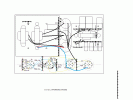
One other thing I do, which helps me make sensible layouts, is to draw out the entire circuit layout, including drawing all components (sockets, resistors, caps, etc), to scale, where they go from terminal to terminal. Here's one example of such a layout- I drew this in Microsoft Paint:

3-17-20_6l6gc_parallel_se_power_amp_layout_left.gif

This is not difficult- the important part, is to draw all the parts to scale. I usually select a number of pixels per inch- like 50 per inch, or 100 per inch, depending on the size and complexity of the diagram. I then draw things like terminal strips to scale (you can see one of my left-over terminal strip drawings that I cut-and-pasted from, at the right bottom of the image above), tube sockets to scale, draw in ghosted outlines of transformers and such, and then start laying out where the components all go. By being careful of the indicated distance between terminals (you can get the exact distance over even diagonal distances, by using the Pythagorean Theorum- X^2 + Y^2 = L^2, where X and Y are the horizontal and vertical pixel counts, and L is the actual distance), you can make sure that resistor and cap leads are long enough to reach between the desired two terminals.

You can also reduce- oftentimes virtually eliminate- components having to "jump over" each other this way, too. I will work with terminal arrangements, to where I achieve a good balance between short lead lengths, as few "jump over" points as possible, and putting noisy junctions as far away as possible, from sensitive signal points. It's also possible to minimize the number of wire jumpers needed, if you're patient and careful with this process.

Note also how I color coded the wiring. Those are EIA/RETMA codes (red= B+, orange = screens, yellow = cathodes, etc). You can find those here:

eia_retma_wiring_color_codes.jpg

Note while violet/purple is listed as "not used"- I frequently use that for bias supplies or other similar control circuits.

Following this does take a little more time up front- but boy, does it make assembly easier. And after-the-fact servicing IMMENSELY easier.

Regards,
Gordon.
 
One other thing I do, which helps me make sensible layouts, is to draw out the entire circuit layout, including drawing all components (sockets, resistors, caps, etc), to scale, where they go from terminal to terminal. Here's one example of such a layout- I drew this in Microsoft Paint:

Following this does take a little more time up front- but boy, does it make assembly easier. And after-the-fact servicing IMMENSELY easier.

Regards,
Gordon.
For sure! :thumbsup:

I have yet to have a DIY go 100% on the first attempt. The layout best suited for measuring voltages and tweaking is the way to go.
 
Back
Top Bottom
