• The move to the new server is done. There are some software and database maintenance updates in process. This has us passing the hat around to help out. We appreciate any donations. Seriously, even a dollar helps. The payment page may be found here - https://www.audiokarma.org/support.html

Rohde & Schwarz UPL Audio Analyzer & FM Performance Tests with SML Signal Generator

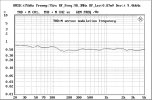
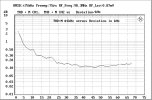
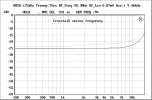
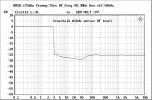
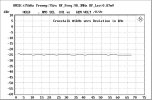
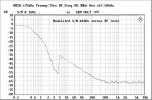
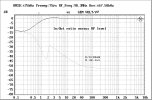
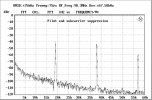
Here are some results from the UPL / SML-01/B5 FM Tuner Performance tests. This was on my McIntosh MR74. It works well although I haven't serviced it myself yet. There was a sticker inside indicating it was last serviced by Richard Modafferi at Audio Classics in June 2003. Very interesting - looks like it has an issue with frequency response. I tested a modern digital tuner (Carver CT-3) and it's frequency response checked out, so I know it's not an issue with the analyzer setup.

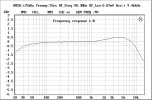
IMG_0133.jpeg

1-freqresp.jpg2-thdnvsfreq.jpg3-thdnvsdev.jpg4-crosstalkvsfreq.jpg5-crosstalkvsrflevel.jpg6-crosstalkvsdev.jpg7-snrvsrflevel.jpg8-inoutvslevel.jpg9-pilotsup.jpg
 
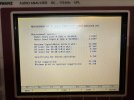
Ran out of attachments on the last post. Here's the summary screen it pops up after running all tests.
IMG_0137.jpeg

There are a few things I want to change in the script, if I can figure out how. First of all, it presets my SML RF generator to defaults every time you run it, which includes changing the option for the oscillator back to internal vs using my external Rubidium/GPSDO. Second, it would be nice to have color in the PCX image files it exports. That's an option in the menu of the system, but the script seems to hardcode the commands to grab the files in B&W. (edit, finished that, was pretty easy)

There is a newer version of this FM tuner performance software for these devices that runs on Windows and controls the instruments over GPIB instead. I'm going to try that next.
 
Last edited:
Does anyone know the loss of a 75-300 ohm balun at 100MHz?

I can’t find any datasheets, etc for them with a specification. Also, most tuners have a 300-75 ohm balun inside them to convert back to 75 ohm into the tuner front end, inducing more loss? So, I’ve been trying to measure tuners using the 75 ohm connection if it has both. This works fine on tuners that have an F connector like the Mr74.

I was getting horrendous results when testing tuners that have screw terminal 75 ohm connections. For example 5% thd across the band instead of 0.3%.

It turns out you have to be extremely careful with cabling when using the screw terminal connections.

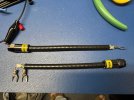
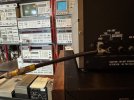
After much trial and error I came up with these two adapters to fit my various 75 ohm connectors. Now I’m getting the performance I expected from the 75 ohm inputs. I think the root cause was the Pomona bnc to bare wire adapter, the wires were too long. I didn't cut them short because that adapter was expensive. Bob@FM suggested using a bulkhead connector with short wires on it, I did that as well and it performs well. Not sure why I didn't think of that!


IMG_0205.jpegIMG_0206.jpeg
 
Last edited:
I have a late model UPV and want to replace the internal 2.5" SATA disk with newer SSD. I just want to have an exact copy/clone of the current drive.
Currently it has a 160gb drive with windows XP. Can I just use a one button desktop disk cloner unit and just clone the disk and put the newer SSD in?
The new SSD is 250gb Samsung EVO 860.

Not that much of an IT guy. :)
 
Last edited:
I have a late model UPV and want to replace the internal 2.5" SATA disk with newer SSD. I just want to have an exact copy/clone of the current drive.
Currently it has a 160gb drive with windows XP. Can I just use a one button desktop disk cloner unit and just clone the disk and put the newer SSD in?
The new SSD is 250gb Samsung EVO 860.

Not that much of an IT guy. :)
I have never used a UPV, but if the old drive and new drive are SATA, as long as the new one is equal to or larger than the size of the old one you should be able to without any issues*

unless there are weird BIOS restrictions or something, which I doubt. Just don't mess up and wipe the original drive on accident. I also would probably tell the cloning utility to leave the partition the same size as the old drive, and not expand to fill the free space just to play it safe.

I wonder if the restore media exists on the Internet for the UPV like it does for the UPL.
 
I'm going to first try to get an Image file of the drive then I will try the One button sector by sector feature on my Cloning/Docking station.
Although the unit works great the drive is getting old and I don't want to loose all the data since it is setup perfectly.
So I figure now is a good time to move to SSD and put the Old drive in safe storage.
 
Update:
I removed the original 16gb 2.5" SATA drive from the UPV and connected to my PC VIA a USB to SATA adapter and made a backup image of the drive using EaseUS Data Recovery software.
Then I cloned the drive to a new Samsung EVO 860 250gb SSD useing a standalone drive cloner like this one Dual Bay Hard Drive Duplicator and Eraser, Standalone SATA HDD/SSD Cloner/Copier, USB 3.0 to SATA Do
After the drive was cloned I installed the new SSD in the UPV and it powered on and detected the drive and booted right into windows XP and yes boot time was a bit faster.
It takes about 1 hour to clone and the new 250gb SSD is only shows up as a 160gb because it is a sector by sector copy so partition size stays the same on the new SSD drive.
I might be able to extend one unused partitions in windows drive manager to get more of the unused space back?

I'm just happy to be able to keep such a fine instrument going and an SSD is a nice upgrade as well.
I still have the same software that came with the unit back in 2013/2014. Now that I know I have a working back up I would like to update to the latest firmware/software and see what new features and benefits their are but I cannot seem to get access to the download section of the R&S site?
 
Got mine cheap on eBay, non-working. It had a blown fuse for one of the power supply rails, which in turn was caused by a shorted cap on the audio monitor board.

Those fuses are plastic solder-in units that are a PITA. Suggest you buy a few spares while you can find 'em.

I like mine, nicer and easier than my Tektronix. It has the digital option, but not the very low distortion oscillator. Still, the HP 8903B is my go-to analyzer when troubleshooting - ie I just need a low distortion source and an accurate audio voltmeter.
The R&S without the low distortion oscillator still does circles around the venerable HP.
 
I have a late model UPV and want to replace the internal 2.5" SATA disk with newer SSD. I just want to have an exact copy/clone of the current drive.
Currently it has a 160gb drive with windows XP. Can I just use a one button desktop disk cloner unit and just clone the disk and put the newer SSD in?
The new SSD is 250gb Samsung EVO 860.

Not that much of an IT guy. :)
I am sure it can be done.
Never bothered with neither of my units because the system is never a bottleneck.


And what do you mean later model UPV?
Latest models came with win 7 but that is not the only thing that dictates the latest models came.
What is your FMR mobo version?
 
Last edited:
When you update the firmware/software did you just install over the prior version or did you uninstall the old version first or some other method?
I still have version 3.3.1 and hope to update to 4.0.5 but just want to make sure I'm not missing something important.
Is there a special installation procedure to update the UPV?

I believe mine is FMR9. It has the updated DVI-D video out and Core Duo CPU @ 2.20Ghz. I think R&S sold UPV units until 2019?
 
It’s all good. I’m paying attention since I hope to get a UPV some day ;)
Generally speaking if your UPL is working well and doing what you need I would just stay with it. It's a Monster!
Just get some spare parts and keep her going forever!
Your UPL has the nice digital I/O on the front mine does not, also I don't have the B1 option however for vintage audio the stock UPL & UPV are more than you need but great to have.
R&S is in my opinion some of the finest test equipment on the planet!
 
I have some interesting things in my archive:

UPL: Dos 6.22 + HS Software UPL + Ersatzsicherungen für UPL, nos + ovp (Dos+Software+ spare fuses, NOS, originally packed)
UPL/UPL16/UPL66: Betriebshandbuch 1078.2089.11-06 (printed manual)
UPL/UPL16/UPL66: Betriebshandbuch 1078.2089.11-08 (printed manual)
UPL/UPL16/UPL66: Betriebshandbuch 1078.2089.11-11 (printed manual)

double numbers means double manuals.
 
Back
Top Bottom