• The move to the new server is done. There are some software and database maintenance updates in process. This has us passing the hat around to help out. We appreciate any donations. Seriously, even a dollar helps. The payment page may be found here - https://www.audiokarma.org/support.html

Rohde & Schwarz UPL Audio Analyzer & FM Performance Tests with SML Signal Generator

pac1085

AK Subscriber
Subscriber
I've been eyeing these for a while, but couldn't justify the prices they were going for.

1733403254841.png
1733403271258.png
Review from Ken Rockwell's website: https://www.kenrockwell.com/audio/rohde-schwarz/upl.htm

Link to datasheet:

I have a Levear VP-7725D which is a great audio analyzer, probably one of the best ones you can get for bench repair use due to the awesome user interface. But it does come short with automated testing, sweep testing, etc. Meaning there's nothing built into it, you have to write your own software to interface with it over GPIB. As you guys have seen from my other thread I've tried that, but it's not getting me where I want to be, and isn't very consistent. I'm sure someone with a lot of experience writing software to interface with GPIB instruments could do a good job at it, but that's not me.

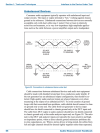
Another reason I wanted the UPL: R&S you can pair it up with a R&S SML (with option B5) RF generator and get an all-in-one FM receiver testing solution. I'm really looking forward to this, as I already have a SML-01 w/ B5. You basically just press a button and it totally characterizes the performance of your FM receiver. This will be great for alignments, showing improvements before and after tuner repair / alignments. Which will be nice to prove that I didn't make anything worse during the process. The cool stuff starts on Page 13 of the document.

Measurements on RF radio tuners with Audio Analyzer R&S UPL and Signal Generator R&S SML with option -B5 | 1GA43
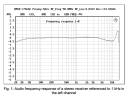
Screenshot 2024-12-05 at 7.52.02 AM.png

There's apparently a later version of the FM software too, which runs from a PC and connects over GPIB: https://scdn.rohde-schwarz.com/ur/pws/dl_downloads/dl_application/00aps_undefined/RAC-0502-0012.pdf


Anyways, I didn't realize this but they sold a model called "UPL66" which is the same thing but doesn't have the built in display or front panel controls. Meaning you have to either use it in an automated testing solution OR connect a keyboard and mouse to it and use it that way. With the keyboard and mouse you get the same functionality as the full blown UPL which goes for 3-5x the cost.

So, I found a UPL66 and it's on the way from Belgium, I can't wait! It does not have the ultra low distortion B1 option, but if I need to spot check something with ultra low distortion I can use the VP-7725D or my Victor 1khz oscillator.

I'll be sure to post a follow up after I get it, very excited.
 
Last edited:
Register to hide this ad
Yeah, I bought a QA403 last year and returned it. I think it's a great analyzer for $600 and would recommend it to most people, but I didn't like the user interface and lack of ability to customize the charts it made. So, I would have had to do a lot of it manually using their rest API, python, etc like the route I was going with my VP-7725.

Also, the FM integration with the SML RF generator and the custom R&S software for characterizing FM receivers is worth its weight in gold and only easily possible with the combo of a UPL/UPV with the SML.
 
I would loooove a UPV some day (provided it has option B1), but this thing was about 1/6th the price or what the low end of functional UPV's go for... it'll do for now.

I read somewhere that the actual technical specs of the UPL and UPV are the same, but the UPV is obviously a much more modern instrument. I'll swap the HDD on this over to a CF card and hopefully it'll last me a long time.
 
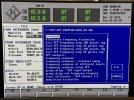
It showed up today and seems to work fine, though I’ve only used it in loopback mode so far. Definitely a steeper learning curve than the VP-7725D I currently use, mostly due to the old DOS interface that requires memorizing all sorts of different keyboard combos (Ctrl-this, alt-that). Certainly the regular model with the front panel controls would have helped that a little bit.

Here are some of the built in configurations you can choose from if you wish:
IMG_8660.jpeg
IMG_8661.jpeg
 
Some notes on buying one of these from Europe:

1. Make sure to change the voltage selector to 120v, and swap in the appropriate fuses (it calls for 2.5a on 240v and 4a on 120v. I left the 2.5a in since I didn't have the small size 4a's they use and it hasn't blown them so it's probably ok)


EDIT: for the next steps I found they have a program called "bootset" you can run from the DOS command line to select the correct keyboard instead of doing it manually as I described below.


2. the keyboard layout might be set for a different region which confused the heck out of me at first. it turns out this one was set to azerty, Belgian layout.
In this case, hit ctrl-f9 to break out to dos, then type "keyb us" - you might have to hunt around for the right key combo :)
you'll also want to edit the file c:\upl\uplcfg.bat to change the language... you can get a description of the options by looking at c:\autoexec.bat. I changed it from "E" (UK) to "U" (USA)
 
The UPL Died already, ugh!!

It was working fine for the first two days. I came home after a long day at work looking forward to playing around with it, hit the power button, it turns on but no floppy drive seek, no POST, etc.

I'm pretty sure the PC motherboard in it died. The capacitors aren't bulging or leaking. It didn't have a PC Speaker hooked up to the motherboard so I attached one. You just get a beeeeep --- beeeeep --- beeeeep. I tried moving the RAM around (It uses 72 pin Simms, and has an AMD K5 PR133 processor with a Shuttle hot-555a socket 7 motherboard). I took the motherboard out and tried hooking it up on the bench with a different video card (the UPL's video card is attached to a special daughter board)

same thing... ugh..

I found someone selling the same board so I ordered it, a different CPU (pentium 166 mmx) and some EDO SIMMS (this thing only had 8mb ram in it)

I sure hope that fixes it, because otherwise I have no hope. Since the motherboard doesn't work outside of the UPL as a regular computer, I suspect it will....
 
I got it working again. Man what a relief.

I ended up having to replace the PC motherboard and the ram. I don’t get it, but I’ll take it. I have some additional new ram and another cpu coming in later this week, I’ll play around with the old motherboard. I ended up having to use Dimm instead of a simm (it’s an early board that supports both). I don’t see how 2 sticks of ram and the mobo could both go bad.

The new motherboard has some leaky caps but it has nice shiny solder joints so I should be able to replace them. The old board has the horrific early lead free solder joints that won’t flow no matter what you try.
 
Got mine cheap on eBay, non-working. It had a blown fuse for one of the power supply rails, which in turn was caused by a shorted cap on the audio monitor board.

Those fuses are plastic solder-in units that are a PITA. Suggest you buy a few spares while you can find 'em.

I like mine, nicer and easier than my Tektronix. It has the digital option, but not the very low distortion oscillator. Still, the HP 8903B is my go-to analyzer when troubleshooting - ie I just need a low distortion source and an accurate audio voltmeter.
 
I hope I can find a parts unit one day. It would be nice to add the digital option, audio monitor option, standard LCD front panel, etc. Doubt I'll ever find one with B1, but who knows.

I do agree though, I couldn't replace the VP-7725D with this, the 7725D is a MUCH better general purpose bench tool.
 
The rest of the parts came in and I got it all fixed up. I pulled that stick of SDRAM out (as it didn't fit perfectly - was hitting something below) and installed 4 8Mb 60ns EDO SIMMS (32mb total)

I installed a 2GB CF card to replace the spinning hard drive. It looked like someone replaced the hard drive in the past, it had a 30GB with a 2005 date code on it, but there was only a 2GB partition on it.

I spent way too much time figuring out the best way to do that. Various cloning tools like Clonezilla, GParted to resize the partition etc (It was actually just over 2GB so it didn't fit the 2GB CF Card after formatting). Nothing worked right (even after attempting to fix the mbr with fdisk /mbr) so I came up with this method which works great.

Anyways, if anyone needs this in the future here's the easiest way to do it.

1. Remove HDD from UPL and set aside.
2. Install CF Card in holder and install in UPL.(I used this one which bolted into the original HDD position: https://www.amazon.com/dp/B0036DDXUM?ref=ppx_yo2ov_dt_b_fed_asin_title&th=1
*note you have to cut one of the pins, check the pics in reviews.
3. Install MS Dos 6.22 onto the new SD card while in the UPL - this will format the CF card, setup the correct MBR etc. You'll need it on floppies. You can get the image files online but you'll need a USB floppy drive and 3 blank floppies to burn them to.
4. Shutdown UPL and remove CF card after DOS is installed. Insert CF card into your modern PC with a CF to USB adapter.
5. Attach original HDD to your modern PC with a Mini-IDE to USB adapter (like this: https://www.amazon.com/dp/B0758RP5V8?ref_=ppx_hzsearch_conn_dt_b_fed_asin_title_1&th=1)
6. Make sure windows explorer is set to show hidden files and protected operating system files.
7. Delete all of the files off the CF card. (make absolutely sure you're deleting the files from the CF card and not the original HDD!)
8. Copy all of the files from the original R&S HDD to the CF card
9. Reinstall CF card into UPL and you're good to go.

I bought a spare motherboard as well - Shuttle HOT-569a - it's a little newer than the HOT-555a but it should work just fine incase this one dies in the future. For now I will build a DOS gaming PC with it.
 
So essentially the MSDOS install only is needed to format and install the MBR, correct?

Thanks for laying this out. Hopefully mine will never need it....
 
So essentially the MSDOS install only is needed to format and install the MBR, correct?

Thanks for laying this out. Hopefully mine will never need it....
Yup, exactly. No matter which cloning utility I tried it never resulted in a bootable drive, even if I booted from a dos 6.22 disk and ran fdisk to make the partition active, fix the mbr, run sys c:, etc.
 
made up some specially wired test leads per the guidance of the audio precision book “audio measurements handbook” page 66
Screenshot 2024-12-19 at 8.33.50 PM.png

Screenshot 2024-12-19 at 8.35.49 PM.png
The RCA's are Canare F-09 Narrow Profile plugs. They aren't quite as narrow(needed for connecting to vintage gear like Scott 299, Pioneer SX9000 etc) as the Rean Silver connectors I have for the other analyzer but the strain reliefs are nice for constant movement. Half of this set is used to go back to the Analyzer from RCA jacks on preamps, so I still need to make another pair of cables for connecting to power amps. I used to connect to my dummy load with BNC's but after that stuff Ray Gianelli found about connecting the analyzer leads directly at the DUT output I'm going to go that route.
IMG_8823.jpeg
 
Last edited:
Well, I bought another one on that auction site today. As much as I like the UPL66, it would be nice to have a regular UPL16 with a built in LCD, and control panel. There was one listed that was in mint condition, but failed to boot - hard drive error. The seller included a video and you can hear the hard drive trying to start. I'm betting that the hard drive failed and the rest of the unit is fine once I swap a CF card in place of the old IDE drive, fingers crossed. Still a bit risky in that the analog section could be blown up, etc. Worst case I use the parts to convert mine into a UPL06. Best case it has the UPL-B1 low distortion generator hiding out inside - that would be awesome! Can't wait to get it.
 
Last edited:
Well, the new UPL06 showed up today. It looked like it had a bad hard drive per the eBay listing and wouldn't boot, but as soon as I plugged it in and turned it on it booted right up! Maybe a combo of the cold/vibration from the trip coaxed it back to life. I don't expect the old drive to last and will still replace it with a CF card, but I'm really happy. Although they shouldn't be needed I grabbed the calibration files and backed them up to a floppy disk.

The LCD is a little dim but still totally usable, and I'll probably continue to use an external monitor with it.

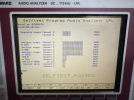
I ran the self test and it passed with flying colors:
1741199795304.png

Here's the best part! It has option UPL-B1, the low distortion generator! This seems to be extremely rare and expensive, I've had a saved search on eBay for upl b1 for over a year, only saw one and it went for the price of a small car. Couldn't be happier!
 
Last edited:
Back
Top Bottom