• The move to the new server is done. There are some software and database maintenance updates in process. This has us passing the hat around to help out. We appreciate any donations. Seriously, even a dollar helps. The payment page may be found here - https://www.audiokarma.org/support.html

2275: Loud crackly burst sound on left channel after approx 10 seconds after turning on!

I x
It may be bad contacts on the speaker protect relay (L801) on the P800 board. It looks like you put in a new one, so check the board for cold solder joints.
Or, it could be dirty Main and Remote speaker switches. Make sure you clean them with Deoxit or contact cleaner if you haven't already done so.

View attachment 3825716
I'm hearing the noise through headphone jack also, so I'm assuming that the speaker switches aren't affecting that. I have a kit to replace all of the transistors and diodes on the power supply board, so I'll do that and report back.
 
It may be bad contacts on the speaker protect relay (L801) on the P800 board. It looks like you put in a new one, so check the board for cold solder joints.
Or, it could be dirty Main and Remote speaker switches. Make sure you clean them with Deoxit or contact cleaner if you haven't already done so.

View attachment 3825716
I've rebuilt the power supply board with all new transistors, diodes, caps. It's 35V rock solid. I even tried another new relay, just in case while being careful about solder joints. I've swapped amp boards left and right, tried every combination of preamp-out/main-in. I've gone directly main-in with my phone via RCAs. I've used patch cables to connect preamp out to main in. The loud static pops remain on left channel output. These bursts occur shortly after turning on, and may happen suddenly out of the blue also after warm up. DC spikes on left channel via left channel output. What's left to try? Bridge Rectifier? I even tried swapping out main filter caps from another amp. I get the pops and static through headphone left channel also. Thanks for any further suggestions
 
When you swapped amp boards L and R, did the noise change sides or stay on the same speaker (L or R).
Sounds like maybe a bad transistor on the Main Amp board?
The noise stays on the same speaker (left) even when physically swap right and left amp boards. It stays on same headphone channel also.
 
I may have asked this before, but I forget... if you use an RCA patch cable to connect PreOut L to Main In R and PreOut R to Main In L does the noise stay on the same L speaker or does it swap sides?
 
Do you have the original left amplifier shield in place?
 

Attachments

  • 20220318_075244.jpg
    20220318_075244.jpg
    132.1 KB · Views: 9
I may have asked this before, but I forget... if you use an RCA patch cable to connect PreOut L to Main In R and PreOut R to Main In L does the noise stay on the same L speaker or does it swap sides?
No worries! Yeah i tried that and it still remains on the left channel.
 
In post #24, you swapped Main Amp boards and the noise is on the L speaker.
In post #27, you swapped L/R PreOut to Main In jumpers and the noise is still on the L speaker.
In post #21, you said the noise is also on the headphone jack so it's not the Main or Remote speaker switches.
In post #1, you said that you installed a new relay so it's not bad relay contacts.
The problem is NOT in the PreAmp and is NOT in the Main Amp.

Check the voltage across the relay coil and see if you get a constant 24VDC. Maybe you are getting some voltage drop-outs.
Also, maybe you are getting an intermittent larger DC offset on the speaker outputs that is causing the circuit to cut out the speaker protect relay momentarily.
 
In post #24, you swapped Main Amp boards and the noise is on the L speaker.
In post #27, you swapped L/R PreOut to Main In jumpers and the noise is still on the L speaker.
In post #21, you said the noise is also on the headphone jack so it's not the Main or Remote speaker switches.
In post #1, you said that you installed a new relay so it's not bad relay contacts.
The problem is NOT in the PreAmp and is NOT in the Main Amp.

Check the voltage across the relay coil and see if you get a constant 24VDC. Maybe you are getting some voltage drop-outs.
Also, maybe you are getting an intermittent larger DC offset on the speaker outputs that is causing the circuit to cut out the speaker protect relay momentarily.
Where do I put the probes to measure this? Thanks
 
Where do I put the probes to measure this? Thanks
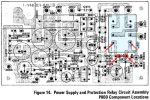
To measure the relay coil voltage, set your DMM to measure VDC.
Find the P800 Power Supply board.
Find diode D812 and attach one DMM probe on each side of the diode. (red arrows)
Or, if it is easier to get to the bottom side of the board, you can attach the probes to the two PCB relay coil pins. (also red arrows)
Check voltage to see if it drops when you hear the problem.

1788667746937.png
 
To measure the relay coil voltage, set your DMM to measure VDC.
Find the P800 Power Supply board.
Find diode D812 and attach one DMM probe on each side of the diode. (red arrows)
Or, if it is easier to get to the bottom side of the board, you can attach the probes to the two PCB relay coil pins. (also red arrows)
Check voltage to see if it drops when you hear the problem.

View attachment 3831239
I checked the relay voltage as suggested, and it was fine and didn't waver when the distortion started. Even after trying all the cable swaps etc, it ended up being the damned BA312s in the preamp! I thought they were the culprit early on, but the preamp-out main-in threw me off! I even did the resistor mod to help with that, which wasn't effective apparently. I had a Sparkos BA312 upgrade sitting in its box uninstalled forever, and I was holding off on that till I fixed the issue. I want ahead and put that in. It turns out, the Sparkos kit fixed it! Getting rid of the BA312s. I bought this with a Sansui 890DB years ago as a package deal. It turns out that Sansui had the same BA312 problem but just one channel. Anyways, thanks for all of the help! At least I have lots of new parts installed now, and the Sparkos upgrade sounds awesome.
 
Back
Top Bottom