
• The move to the new server is done. There are some software and database maintenance updates in process. This has us passing the hat around to help out. We appreciate any donations. Seriously, even a dollar helps. The payment page may be found here - https://www.audiokarma.org/support.html

9090DB Right Channel only works in Mono

HarryGillung

New Member
Hi

I'm new here.

Seems like the Search function is not working so it makes it very difficult to search the 23.600 + threads looking for a resolution relevant to my problem.

I have a 9090DB I bought in 1978. I've had it repaired twice now, pre-YouTube and forums like this. So, I have no idea what was done to it.

As mentioned the Stereo function is not working on the right channel. Works fine in Mono but not Stereo.

Any insights or links to other posts would be greatly appreciated. Here is a list of what has been done so far.
  • Replaced all resistors on the 2624 Driver Board.
  • Replaced (6) capacitors on 2624, did not replace the (2) 330uf (the big ones).
  • Replaced the ribbon cables on the 2655 Dolby Board.
  • Replaced all capacitors on the 2655 Dolby Board.
  • Replaced the MJ21194G transistors.
  • Deoxit 2624, 2655, and switches.
  • Replaced all resistors on the Power Board.
All of this was done one board at a time and then tested. The issue remained the same throughout this entire process. Kinda frustrating.

I did come across a thread for the 9090 where the Right Channel seemed to be doing the exact same thing as mine but not sure how much of that translates to my issue.

Thank everyone in advance for your help.

Harry
 
Last edited:
Register to hide this ad
Harry,

You can still search in google or your browser of choice using audiokarma in your search string.

- Jeff
 
Have the solder connections on the feedthrough rivets on the Dolby board been resoldered? That is a VERY common issue with the x0x0DB receivers.
 
You can't just solder the feed thrus. You have to remove the board, remove the wafer switch and stick a wire through every feed thru, bend the wire over on both sides of the board, then solder on both sides. This is the way. There are 60 feed thrus, and every one must be done.
 
You can't just solder the feed thrus. You have to remove the board, remove the wafer switch and stick a wire through every feed thru, bend the wire over on both sides of the board, then solder on both sides. This is the way. There are 60 feed thrus, and every one must be done.

Thank you for the reply. Yes, that is how I did it.

Cleaned all the upfront switches and still no improvement.

I reversed the 2624 driver board and the issue switched channels. From what I am reading this means the issue is in the 2624 driver board. I already replaced almost everything on that board already.
 
Thank you for the reply. Yes, that is how I did it.

Cleaned all the upfront switches and still no improvement.

I reversed the 2624 driver board and the issue switched channels. From what I am reading this means the issue is in the 2624 driver board. I already replaced almost everything on that board already.
Yes, if you reversed the driver boards and the problem switched channels then the problem is on the driver board. Initially you said that when you put it in mono it worked on both channels. That would not have worked if the driver board was the problem.
I think you have proved it's the driver board. Replace all the electrolytic caps on the board.
 
Yes, I believe I read that. I will repeat. Certainly worth a try. Thanks!
What did you use to clean the switches? - I hope it was a purpose designed product like DeOxit, CorrosionX, or Kontakt 60, or something very similar.

Update:
I have just noticed in post #1 DeOxit. :thumbsup: - and I'll repeat the suggestion to do it more than once - and leave it overnight.
 
Last edited:
What did you use to clean the switches? - I hope it was a purpose designed product like DeOxit, CorrosionX, or Kontakt 60, or something very similar.

Update:
I have just noticed in post #1 DeOxit. :thumbsup: - and I'll repeat the suggestion to do it more than once - and leave it overnight.

If your getting both channels in mono you need to isolate the issue. Try observing the signal coming from the preamp to the output amplifiers. See if they are equal in amplitude. You also mentioned that you deoxit the switches. Check them on continuity and see if both channels are routing through the switch. Most wafer switches can't be deoxit too well because they are sandwiched together. You will need to see if you can disassemble the wafer switch and clean all the contacts and then check them with a DVM on continuity. I had a Marantz that had this problem and after cleaning the wafer switch the problem was corrected. If you signal trace the audio paths you will find out where the channel is dropping off at. Some technicians use a square wave to analyze switching operations as they are easy to see and show bad contacts and bouncing on a scope.
 
If your getting both channels in mono you need to isolate the issue. Try observing the signal coming from the preamp to the output amplifiers. See if they are equal in amplitude. You also mentioned that you deoxit the switches. Check them on continuity and see if both channels are routing through the switch. Most wafer switches can't be deoxit too well because they are sandwiched together. You will need to see if you can disassemble the wafer switch and clean all the contacts and then check them with a DVM on continuity. I had a Marantz that had this problem and after cleaning the wafer switch the problem was corrected. If you signal trace the audio paths you will find out where the channel is dropping off at. Some technicians use a square wave to analyze switching operations as they are easy to see and show bad contacts and bouncing on a scope.

Hi Schoenradt,

Thank you for the reply.

I don't have an oscilloscope. I only know enough to make me dangerous.

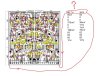
Please see the attached jpg. The red x's represent components replaced so far.

Using a volt meter my stepson measured the readings on all of the pins on the powerboard and got one pair that is suspicious. There is a big variance in the reading for the first pin on powerboard #20 One pin reads 60.7v and the other reads 3mv.

All values for the pin pairs are listed.

Not sure where to look to figure out what is feeding pin #20 that reads 3mv.

Hope that makes sense.

Thanks!
 

Attachments

  • 2656.jpg
    2656.jpg
    111.7 KB · Views: 19
Hi Schoenradt,

Thank you for the reply.

I don't have an oscilloscope. I only know enough to make me dangerous.

Please see the attached jpg. The red x's represent components replaced so far.

Using a volt meter my stepson measured the readings on all of the pins on the powerboard and got one pair that is suspicious. There is a big variance in the reading for the first pin on powerboard #20 One pin reads 60.7v and the other reads 3mv.

All values for the pin pairs are listed.

Not sure where to look to figure out what is feeding pin #20 that reads 3mv.

Hope that makes sense.

Thanks!
You really don't need an oscilloscope, just a good DVM that has AC MV readings. You will see the signal coming in on the inputs to the pre amp. I'll download a schematic and see if I can find some test points and references you should check. You'll find it I'm sure. I'm working on a Sansui 8900ZDB and had to redesign the output stage because the output transistors are obsolete. This thing is nasty it consumes over 6 amps at 125 WPC.
 
You really don't need an oscilloscope, just a good DVM that has AC MV readings. You will see the signal coming in on the inputs to the pre amp. I'll download a schematic and see if I can find some test points and references you should check. You'll find it I'm sure. I'm working on a Sansui 8900ZDB and had to redesign the output stage because the output transistors are obsolete. This thing is nasty it consumes over 6 amps at 125 WPC.

I will look forward to seeing the schematic.

Thank you!
 
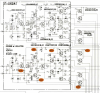
Here you go here is a small sample of your audio output stages. Start by checking your supply rails to the output transistors they should be equal in voltage.
upload_2023-4-12_18-21-50.png
 
Hi
I am admitting defeat. I have tried all that I am comfortable doing and still the same problem persists.
I am located in the Myrtle Beach Area and am looking for a qualified technician who could possibly help. Does anyone have any suggestions?
Obviously, if I want to avoid shipping and would prefer to drop it off somewhere between Charlotte, Raleigh, Charleston, or within 2-3 hours of North Myrtle Beach, SC
Any suggestions are greatly appreciated.
Thanks!
Harry Gillung
858-945-0232
 
Back
Top Bottom