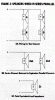
Help! How do I Wire a second pair of Maestros?
I have exausted my research skills. How do I add/wire a second pair of Advent Maestro speakers in my living room for a total of six speakers (3pair)? I have one pair of Advents in the living room on channel A and a pair of Bose in the kitchen on channel B. No problems. I want to add the second pair of Advent Maestros in the living room and be able to use all six. Do I wire the four Advents in parellel, series or a combo of both. Do I need another amp or preamp?
Thank you.
H
Here is what I have:
1) Optimus STAV-3000 AM/FM Stereo Receiver: 100 watts per channel, minimum RMS into 8 Ohms from 20-20,000 Hz, with no
more than 0.05% total harmonic distortion. Total Harmonic Distortion (80 Watts)
2) Advent Maestro (two sets) in my living room.
Drivers: 10" woofer, 4.75" dome midrange, 1 1/2" dome tweet. Power Handling : 750 watts Peak (max), 150watts RMS
Frequency Response: 42-23,000Khz +/- 3 DB, 6ohms impedance
3) Bose® 301® Series IV Direct/Reflecting® Speakers two (one pair) in the kitchen. Compatible with amplifiers and receivers rated from 10 to 150 watts per channel.
Rated 8 ohms
4) From the amp manual:
"Connect no more than two pairs of speakers to your receiver.
If you connect only one pair of speakers to the receiver or use only one
pair of speakers at a time, you can use speakers with an impedance of 4
Ohms or more.
If you use two pairs of speakers at the same time, all speakers must have
an impedance of at least 8 Ohms. If any of the four speakers you use has
an impedance of less than 8 Ohms, the speakers might overload the ampli-
fier and activate the protection (shut-off) circuits.
The speaker buttons - SPEAKERS [A], , AND [SURROUND] - let you select
various speaker combinations.
If you have connected speakers only to the A terminals, press in [A] to
turn on those speakers for a two-speaker stereo effect.
If you have connected speakers to the A and B SPEAKERS terminals:
Press in [A] or to turn on either pair of speakers for a two-speaker
stereo effect.
Press in [A] and to turn on both pairs of speakers for a four-speaker
stereo effect.
Press in [A] and [SURROUND] for an enhanced four-speaker stereo effect.
Press [A] to out and leave [SURROUND] in to monitor the B speakers in the
surround-sound mode.
Press [A], and [SURROUND] a second time (out) to silence all speakers
and listen privately with optional headphones.
I have exausted my research skills. How do I add/wire a second pair of Advent Maestro speakers in my living room for a total of six speakers (3pair)? I have one pair of Advents in the living room on channel A and a pair of Bose in the kitchen on channel B. No problems. I want to add the second pair of Advent Maestros in the living room and be able to use all six. Do I wire the four Advents in parellel, series or a combo of both. Do I need another amp or preamp?
Thank you.
H
Here is what I have:
1) Optimus STAV-3000 AM/FM Stereo Receiver: 100 watts per channel, minimum RMS into 8 Ohms from 20-20,000 Hz, with no
more than 0.05% total harmonic distortion. Total Harmonic Distortion (80 Watts)
2) Advent Maestro (two sets) in my living room.
Drivers: 10" woofer, 4.75" dome midrange, 1 1/2" dome tweet. Power Handling : 750 watts Peak (max), 150watts RMS
Frequency Response: 42-23,000Khz +/- 3 DB, 6ohms impedance
3) Bose® 301® Series IV Direct/Reflecting® Speakers two (one pair) in the kitchen. Compatible with amplifiers and receivers rated from 10 to 150 watts per channel.
Rated 8 ohms
4) From the amp manual:
"Connect no more than two pairs of speakers to your receiver.
If you connect only one pair of speakers to the receiver or use only one
pair of speakers at a time, you can use speakers with an impedance of 4
Ohms or more.
If you use two pairs of speakers at the same time, all speakers must have
an impedance of at least 8 Ohms. If any of the four speakers you use has
an impedance of less than 8 Ohms, the speakers might overload the ampli-
fier and activate the protection (shut-off) circuits.
The speaker buttons - SPEAKERS [A], , AND [SURROUND] - let you select
various speaker combinations.
If you have connected speakers only to the A terminals, press in [A] to
turn on those speakers for a two-speaker stereo effect.
If you have connected speakers to the A and B SPEAKERS terminals:
Press in [A] or to turn on either pair of speakers for a two-speaker
stereo effect.
Press in [A] and to turn on both pairs of speakers for a four-speaker
stereo effect.
Press in [A] and [SURROUND] for an enhanced four-speaker stereo effect.
Press [A] to out and leave [SURROUND] in to monitor the B speakers in the
surround-sound mode.
Press [A], and [SURROUND] a second time (out) to silence all speakers
and listen privately with optional headphones.
Last edited: