• The move to the new server is done. There are some software and database maintenance updates in process. This has us passing the hat around to help out. We appreciate any donations. Seriously, even a dollar helps. The payment page may be found here - https://www.audiokarma.org/support.html

Adding HiRes streamer to Mac/Airport Airplay system (latest - WiiM Pro )

Of course, I am always interested in the Black Ice FX Tube DAC DSD WIFI -
I've been a big fan of Jolida gear over the years and - and, if I found a super-deal, I would probably go that way. (normally priced around $800)

But I just ordered this inexpensive DAC and will give it a chance over the weekend.
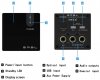
Its got Coaxial, Optical and USB inputs, a display to show data rate, and under $100

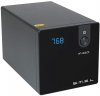
SMSL M100 USB DAC AK4452 DSD512 32Bit/768kHz Coaxial Optical OTG Input AUX Power Hifi Audio Decoder (Black)

https://smile.amazon.com/gp/product/B07KLRDVGX/

SMSL-M1000.jpg SMSL-M1000-f-BbkL._AC_SL1003_.jpg
 
Last edited:
SMSL M100 DAC arrived earlier this morning. pointed to Qobuz with Qobuz app. Picked Diana Krall Hi-Res/album 96kHz album.
Hooked the two up with Optical out of the KEiiD streamer - Set to Input 2 (optical) shows 44 as bit rate!
Removed the optical cable.
Hooked the two up with coaxial out of the KEiiD- Set to Input 3 (Coaxial) also shows 44 as bit rate.
Hmmm.

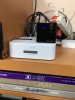
KEiiD-DAC-stack_2957.jpg
 
What is the reading using the USB input? The optical input is limited to 44.1/16. I am not sure about the coaxial input.
 
What is the reading using the USB input? The optical input is limited to 44.1/16. I am not sure about the coaxial input.

USB? I'm not using a laptop. That's weird - why wouldn't all inputs be Hi-Res?
If its limited to 44.1 on most inputs it's useless to me! sigh...
If so, its just another unit to pack up and ship back to Amazon!

I have the native Qobuz app,and 2 others I can run.
Qobuz has a wifi res setting and a mobile Network setting.
I have Wifi set to 24 bit Hi-Res/up to 192 kHz
I have Mobile at 24 bit Hi-Res/up to 96kHz.

Front and rear views of the KEiiD streamer. There is no USB out.

KEiiD-Vert-ScreenCap.png
 
Last edited:
USB is inherently a noisier signal path than coaxial or optical
Updated - thanks for the better information.
 
Last edited:
Don't send it back.

According to What Hi-fi, coax digital is good for 24 bit/192 khz hi res files. Optical is good to 24 bit/ 96 khz. That's assuming your sorce provides it.

My Denon 1920 SACD/DVD player outputs 192 khz through it digital outputs, at least the coax as it has no USB connection.
 
USB is inherently a noisier signal path than coaxial or optical

Depends on the type and source of noise.

Optical SPDIF obviously doesn't propagate electrical noise, but it is subject to jitter due to electrical noise at both transmit and receive ends (not helped by the low speed of the optical components). It also requires clock recovery (or data resampling with an ASRC filter), since it is a source clocked protocol. Both of these can result in clock jitter.

Coax SPDIF has the same jitter issues, plus the potential to propagate electrical noise.

USB allows the use of a destination clocked protocol, using a FIFO and flow control, allowing the clean DAC clock to be used, with potentially lower jitter. It does have the potential to propagate electrical noise.

All interfaces depend on the quality and care in implementation. Electrical noise in these interfaces can be addressed by good engineering, or not... As can timing noise. That's why I'm always uncomfortable seeing statements about inherent superiority of one type of interface over another.
 
OK, according to Head-Fi https://www.head-fi.org/showcase/smsl-m100.23776/reviews
This M100 CAN do Hi-RES on the Coax/Optical ports -
But I must be limiting it somewhere!

Bit Depth – USB (1 to 32 Bit), Coaxial and Optical (24 Bit),
Sampling Rate – USB (44.1- 768 KHz, DSD 64 - 512), Coaxial and Optical (32 – 192 KHz),

But I can't get the M100 to see anything other than 44k- and the manual is terse, at the least!

Don't send it back.

According to What Hi-fi, coax digital is good for 24 bit/192 khz hi res files. Optical is good to 24 bit/ 96 khz. That's assuming your sorce provides it.

My Denon 1920 SACD/DVD player outputs 192 khz through it digital outputs, at least the coax as it has no USB connection.
 
Last edited:
But I must be limiting it somewhere!

It's more than 3 months since my Qobuz trial ended, but IIRC, there's a setting to control your output device resolution. AmazonHD also limits output to match the destination, so, even though 'UltraHD' sources were available, when I actually played them, they indicated HD in the Amazon GUI, as i had set 16/44k1 as output resolution.
 
I think the problem lies with the Keiid player's optical output. See post #14 in this thread. It seems to me that the problem is with the Keiid player and not the DAC.
 
I think the problem lies with the Keiid player's optical output. See post #14 in this thread. It seems to me that the problem is with the Keiid player and not the DAC.
I saw that quote - where/who is it from?

Perhaps, but it doesn't seem to matter if its Optical or Coaxial -
Like I said, I have the default rates set with my Qobuz account

Qobuz has a wifi res setting and a mobile Network setting.
I have Wifi set to 24 bit Hi-Res/up to 192 kHz
I have Mobile at 24 bit Hi-Res/up to 96kHz.
 
I wrote to support@keiid.com, sent my picture (from post #23), and asked them how to get Hi-Res signals (96k or 192k)
from either the Coaxial or Optical port to my external DAC.
 
It was a question on Amazon's website whether it can play 192/24 The answer was from Keiid.
Hopefully you will get an answer to your email soon...

It's frustrating when they say it will play 96/192k signals,
but the Q and A on their Amazon page says the device won't output them!

https://www.amazon.com/ask/questions/asin/B07WWNQJQK/6/ref=ask_ql_psf_ql_hza?isAnswered=true
KEiiD Audio Seller on Amazon has a list of 50+ Q and As on AMAZon - and says-

Will this pass 24/192 over coax s/pdif? i need something like this for amazon ultra hd music.
Answer: Hi, It supports 24/44 over coax S/PDIF, when you stream 24/192 files, if its format can be supported, 24/192 will be output as 24/44, so the sound will be different from original 24/192 files. If you want to know more details or info, please contact us via email: service@keiid.com, we will response it within 12 hours.


KEiiD AUdio basically says the same thing about their optical output -

How does this unit handle higher res files, like 192KHz files? Will it play them at a lower rate or not play them at all?

Answer: Hi, Usually, our optical port can only support 44 KHz 16 bit files, if you want to stream 192 KHz files, it will play them at a lower rate and the sound will be different from the original files. If you want to know details or info, please contact us via email: service@keiid.com, we will response it within 12 hours.

KEiiD audio pretty much says it degrades them to CD-quality through S/PDIF or Optical out.
So, near as I can see, the KEiiD won't output Hi-Res through the coaxial or optical ports -
so its basically useless to feed a better quality DAC with ...

Well, I have Amazon permission to return the KEiiD gadget ... it's packed and ready to ship, probably Friday).

I'll keep the cute SMSL DAC - I swear, it's heavy, feels well made, and looks like a jewel.
I hooked it up with optical out from my Airport Express. That also reads 44k - but it sounds nice, and I can stream Qobuz or from my iTunes collection to it just fine!
 
Last edited:
The SMSL DAC definitely will output 192/24 when connected to a Raspberry Pi via USB. Here is a screenshot of what a hires file looks like while playing using Logitech Media Server:

Screenshot from 2020-11-25 15-35-02.png

For further proof, you can query the DAC (my DAC doesn't have any file resolution indicators) with this command to see what it's output is:
Code:
pi@raspberrypi:~ $ cat /proc/asound/S3/pcm0p/sub0/hw_params
access: MMAP_INTERLEAVED
format: S32_LE
subformat: STD
channels: 2
rate: 192000 (192000/1)
period_size: 7680
buffer_size: 30720

Another cheap alternative is the Chromecast Audio. It will output 96/24 from it's optical out which is located in its 3.5mm analog out jack.
 
Answer: Hi, Usually, our optical port can only support 44 KHz 16 bit files, if you want to stream 192 KHz files, it will play them at a lower rate and the sound will be different from the original files.

That's disappointing, and strange. It takes more effort to down sample a data stream than it does to just bung it out of a data port. I can only think that they are trying to keep it within the bandwidth of a really cheap optical SPDIF transmitter.

Really disappointing, considering how versatile the Keiid seems otherwise.
 
The KEiiD Seller guy at Amazon wrote back:

support@keiid.com
Thu, Nov 26, 10:32 AM;
cleardot.gif
to service, me

Hi. I think our optical is only with CD quality connection.
Allen.
Please check with engineers and reply with details.

========================================
I replied back to him to be honest -

HJames
Nov 26, 2020, 12:09 PM; to support@keiid.com, service
cleardot.gif


Okay, so I'll send it back tomorrow for a full refund. If it won't output HiRes, its pretty useless/worthless to me. I'll copy/paste this to the Audio forum I've been working
with to spare anyone else the grief of the vague specs of this gear.

Thank you for your honesty.
========================================
And he replied -
support@keiid.com
Nov 27, 2020, 9:32 PM; to service, me

Sorry again for this.
We will keep you updated once we got this solved.
cleardot.gif

=========================================


After all this crazy bad spec gear, I decided I might as well follow the DIY path, give it a go.
So I just ordered the Raspberry Pi 4, case and power supply.
A friend has been on using it with the Ropieeexl distribution as a streamer, recommends it highly, so I'll try that out early next week.
The KEiiD is packed for return.
I'll keep the SMSL M100 for further testing with the Pi 4

https://ropieee.org/xl/
 
Found 2 older 16GB MicroSD cards and Samsung MicroSD adapters from when I played with Raspberry Pi3 last year.
Also have a card adapter, so I downloaded the BalenaEtcher installer tool, ropieeeXL as well as the regular ropieee compressed binaries, and loaded one to each of my cards.
 
Last edited:
Back
Top Bottom