• The move to the new server is done. There are some software and database maintenance updates in process. This has us passing the hat around to help out. We appreciate any donations. Seriously, even a dollar helps. The payment page may be found here - https://www.audiokarma.org/support.html

AT91/AT3600cf

sbroni09

New Member
Hey everyone, just trying to find out more information on this cartridge I've recently installed on my turntable. My parents gave me their old JCPenny MCS 6502 belt drive tt. I'm trying to revamp it and make it work good as new again. I installed a AT91/AT3600 as per Turntableneedles helped me find. I have a few questions about this cartridge, but also about my stylus pressure on the record.

First off, I installed the AT91/AT3600 carbon fiber cartridge last night. It sounds great. The specs they gave me are as follows:
Stylus: .6mil Conical Bonded Diamond tip
Cantilever: Alloy round tube
Tracking Force: 1.5 - 2.5 grams
Output Level: 4.2mV @ 5cm/sec. @ 1Khz
Frequency Range: 20 - 20Khz
Load Impedance: 47K ohm
Channel Balance: 1.5 dB
Channel Seperation: 20dB @ 1Khz & 15dB @ 10Khz
http://www.turntableneedles.com/Cartridge-AT3600CF_p_690.html

My turntables specifies on that user manual that the balance weight for the tonearm is between 1.50g and 2.0g (literally 3 settings). The recommended pressure is 1.75g per the manual. With the new cartridge I have tried to get the stylus to raise up off the record at 2.0g on the balance weight and 0g on the bias knob, but has not worked. As you can see the tracking force for the stylus is between 1.5g and 2.5g. I basically want to make sure I'm not scratching my records or doing anything to harm that player/records. So I have set my bias to 1.75g and my balance weight to 1.75g, but wondering how to tell if it's actually working properly and on the right settings. Any tips or recommendations for what I can do? Thanks in advance!
 
Register to hide this ad
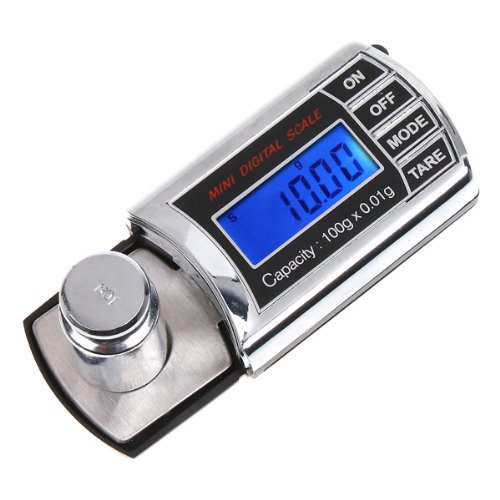
With a small and inexpensive digital scale, a jewelers scale for example, you can measure the actual force your stylus is applying and adjust the tone arm counterweight accordingly until you get 2.0 grams. Do that with the bias dial set to "0". After you achieve 2.0 grams on the stylus adjust the bias dial to 2.0 grams also. I am not familiar with your turntable specifically but it may be possible to adjust just the dial on your tone arm counterweight to read "2.0" after you verify that your settings are correct. If not, dont worry. Just trust the digital scale and enjoy listening to your records.
 
Inexpensive digital scale - example:
https://www.amazon.com/0-01g-100g-D...7690623&sr=8-39&keywords=digital+pocket+scale
51jCuVRbP7L.jpg
:music:
 
I don't have access to the JCPenny MCS-6502 turntable manual, but I believe it's the same or similar to Technics SL-23.
I'm confused by a few things you posted:
Your user manual specifies that the balance weight for the tonearm is between 1.50g and 2.0g (3 settings)? Recommended pressure is 1.75g? Bias knob?

Anyhow, to set up the tonearm for any cartridge here's what I think most people do.
1. Attach your cartridge and headshell to the tonearm.
2. Make sure the stylus guard is removed, so you need to be careful that your stylus doesn't hit anything while doing this.
3. Set the anti-skate knob to zero (is that what you refer to as the bias knob?)
4. Release the tone arm lock and lower the cue lever. Again make sure your stylus does not hit anything.
5. Rotate the counter weight at the back of the tone arm out to get the tone arm to just lift off the tone arm rest, just slightly, so that the tone arm is balanced horizontally level.
If the cartridge end of the tone arm jumps up in the air beyond level after releasing the tone arm lock, rotate the counter weight in so that the tone arm balances horizontally level. This is your 'zero' setting.
6. Place the tone arm back on the arm rest and lock the tone arm.
7. The part of the counter weight with the numbers on it will rotate separately from the weight. Hold the back of the weight in place with one hand and turn the wheel that has the numbers on it so zero (0) lines up with the line on the tone arm. Just make sure the counter weight doesn't rotate with the wheel that has the numbers on it.
8. Refer to your cartridge recommended stylus tracking force - in this case you say the AT91/AT3600 is 1.5-2.5 grams. Set your tracking force somewhere within that 1.5-2.5 gram range. (This is where I hear some debate - where to set the tracking force? Low end of the range? Middle? High end? I go mid to high end, but that's me) Try some different settings and see what sounds best to you. I think the most critical part of a vinyl record is the last track (the one closest to the center) This is where you can get what is called IGD - inner groove distortion. I set my tracking force and anti-skate based on how the last track (inner grooves) sound, but again, that's just me.
9. Set the anti-skate knob to about the same number as you set your tracking force.

Hope I have that right, I'm sure others will jump in if I've got it wrong or left something out.
**********************************************************************************************************************
Now if you really want to drive yourself crazy, you might want to try this before setting the tracking force:

Are you familiar with vinylengine.com? If not it's a good source of information. There is a "Tools" page that has links to what's called alignment protractors. http://www.vinylengine.com/tools.shtml

These will assist you in setting where the cartridge mounts on your headshell. Notice that the headshell has slotted holes for the cartridge mounting screws that allows you to move the cartridge in or out. Like I said, if you want to really drive yourself crazy print out some alignment protractor and try to fine tune the location of the cartridge on the headshell. But, if you are going to this extent, I think you would do this before setting tracking force as moving the cartridge up or back will change where the zero balance point is on the tone arm.
************************************************************************************************************************************
Here is a petty good youtube video that shows and tells the whole procedure including setting tracking force and anti-skate:

Good luck, good listening.
 
Last edited:
Back
Top Bottom