• The move to the new server is done. There are some software and database maintenance updates in process. This has us passing the hat around to help out. We appreciate any donations. Seriously, even a dollar helps. The payment page may be found here - https://www.audiokarma.org/support.html

Audio from One Speaker Only - Beginner's Question

Shadow_Boxer

New Member
Hello all,

I'm reaching out as a desperate beginner having problems with my very first set up. First, I'll list out the equipment, which may or may not suck depending on all of your standards, but is my equipment nonetheless:

- Receiver - Onkyo TX-8255 with phono input
- TT - Pro-Ject Debut Carbon DC
- Speakers - Wharfedale Diamond 220's

My problem is that I am only getting audio out of the right speaker when using the phono input on the receiver, and getting a steady hum from the left speaker. When using an AUX or other input, audio is coming from both speakers, so I have eliminated those from being the issue and am down to the TT, receiver, or the RCA cords (that came standard with the TT) only.

After doing a ton of solo trial and error and searching on this forum for a bit, I feel like i've exhausted my limited capabilities in solving this and am stumped as to whether or not I need to return the TT, buy a new receiver, buy a new cord, etc. In one thread I found on this forum, a user instructed someone with a similar issue to change the White and Red RCA inputs on the receiver first to see if the problem switched speakers (the audio did switch for me). Next, the user instructed to then switch the inputs on the TT to see if the problem switched back another time (once again, it did switch back for me - so back to the original issue of left speaker not working). The user said that this would indicate the RCA cord was the issue.

After thinking the RCA would be the issue, I borrowed a friend's RCA he uses on his Carbon and the problem still existed, thus seemingly eliminating the RCA from being the problem.

Has anyone had a similar issue or thinks they know what the problem may be? Should i return the TT for a new one?

Thank you all in advance!
 
Register to hide this ad
try swapping the R/L cables between the turntable and the receiver to see if it's a problem with the table or the phono input.

I've done this a few times - and I apologize for the dumb question but - how would this help me isolate one or the other? When I switch the R/L cables between the turntable and the receiver, the same issue remains...does that indicate it's one in particular?
 
Since this appears to be a brand new turntable, the wires connecting the tone arm to the cartridge probably came loose during shipping. The left wires are white and blue.get a pair of needle-nose pliers and reseat them
 
If the issue does not change sides when you swap cables L/R at one end, then that pretty much locates the issue to the receiver. It would be entirely possible for e.g. a broken tonearm wire to cause the same symptoms you describe, and this step rules out that possibility (as if it were the issue, then you'd see the hum/no music on the RIGHT speaker with the RCA cable reversed.)

I would start with Deoxiting the selector switch, and if that doesn't sort it, there's probably an issue in the phono preamp section.

Do you have a receiver or preamp with a known good phono input to try your TT on? That would 100% confirm the above.
 
well, if you switch the cable so that the right signal from the table goes into the left input on the receiver, and the problem stays on the left side, you know the problem is with the receiver. if the problem moves to the other speaker, you know that it's the TT causing the problem.
 
If the issue does not change sides when you swap cables L/R at one end, then that pretty much locates the issue to the receiver. It would be entirely possible for e.g. a broken tonearm wire to cause the same symptoms you describe, and this step rules out that possibility (as if it were the issue, then you'd see the hum/no music on the RIGHT speaker with the RCA cable reversed.)

I would start with Deoxiting the selector switch, and if that doesn't sort it, there's probably an issue in the phono preamp section.

Do you have a receiver or preamp with a known good phono input to try your TT on? That would 100% confirm the above.

Well i can most likely rule out the receiver as being the problem, as switching the cables on one-end changes the issue to the other speaker. I should have added this set of facts in but...I just moved out of an apartment where my roommate had the exact same TT using my receiver and speakers with no issue. Unless I damaged something on the receiver in the move, I am starting to think its either the cord or something to do with the newly shipped TT.
 
Since this appears to be a brand new turntable, the wires connecting the tone arm to the cartridge probably came loose during shipping. The left wires are white and blue.get a pair of needle-nose pliers and reseat them

This seems like a legitimate possibility. Any chance you know of a tutorial on how to do this?
 
Well i can most likely rule out the receiver as being the problem, as switching the cables on one-end changes the issue to the other speaker. I should have added this set of facts in but...I just moved out of an apartment where my roommate had the exact same TT using my receiver and speakers with no issue. Unless I damaged something on the receiver in the move, I am starting to think its either the cord or something to do with the newly shipped TT.

Ah, so it changes sides - then I'm going to vote check the connections at the cartridge as well. Specifically the white and blue wires.

Alternately, does the table have RCA jacks? What happens if you swap the *other* end of the RCAs?
 
Since this appears to be a brand new turntable, the wires connecting the tone arm to the cartridge probably came loose during shipping. The left wires are white and blue.get a pair of needle-nose pliers and reseat them

I suspect this could be the cause. Look closely at the wires connecting to the cartridge and see if one is loose.

Edited: n8gel posted the same...but quicker.
 
Something to always keep in mind is to make sure your equipment is unplugged before working on it. Even plugging in RCA cables to a live receiver can cause damage.
 
I suspect this could be the cause. Look closely at the wires connecting to the cartridge and see if one is loose.

Edited: n8gel posted the same...but quicker.

Thanks all - I can look into doing this but not sure i have the confidence to do so! Does anyone know of a helpful tutorial to do this without damaging the cartridge?

Any basic advice is appreciated.
 
well i have to say that we're outside my realm of comfort here - having never connected a cartridge other than a p-mount, which was pretty easy. maybe post a picture of the wires connecting to the headshell?
 
well i have to say that we're outside my realm of comfort here - having never connected a cartridge other than a p-mount, which was pretty easy. maybe post a picture of the wires connecting to the headshell?

Will do - when I get home a little later I'll add a photo to see if anyone can offer some advice. Thanks for the suggestion.
 
Thanks all - I can look into doing this but not sure i have the confidence to do so! Does anyone know of a helpful tutorial to do this without damaging the cartridge?

Any basic advice is appreciated.

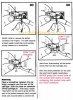
Try this:

DO-shellwires.jpg

Or about 3 and a half minutes in to this video:


Don't squeeze too hard on the tweezers or needle nose pliers and the loose wire should slide right on to the pin.
 
Back
Top Bottom