

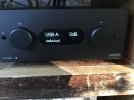
Hi you all. I am posting for the first time on this forum (living in The Netherlands). The musical quality of this DAC is great … IF AND WHEN IT WORKS! The issue is: it hardly locks on the source. Be it over OPT1, OPT2, USB-A for Apple product et all. Furthermore, it does not hold the default settings for the preferred source and the fixed or adjustable volume level when restarted after standby. I had to replace the first one under warranty for the same issues. Now the second MDAC + has exactly the same issues. Factory resets, disconnecting, changing filter settings, changing the source, no joy, no result. And then sometimes it does work. But, at next startup the same annoying issue shows up again. It runs on software version 1.026. I sent a customer support inquiry to Audiolab, but no reply yet. And for the sceptical ones: search the www. and you will learn this problem is not just with my device. However, on Internet forums I have not found a solution so far. Getting fed up with the Audiolab brand momentarily, as I also had issues with theit MDAC Nano ( only the third one worked, also a wider problem with multiple customers complaining about volume adjustment issues).
My question here is: does someone recognize the Audiolab MDAC+ locking issues (remaining unlocked on all sources)? Is there a solution I should try? Thank you for replying. I hope this can be solved, since I still believe the musical quality of it is great in my mostly analogue vintage audio system.
kind regards, Ron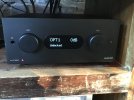
My question here is: does someone recognize the Audiolab MDAC+ locking issues (remaining unlocked on all sources)? Is there a solution I should try? Thank you for replying. I hope this can be solved, since I still believe the musical quality of it is great in my mostly analogue vintage audio system.
kind regards, Ron