

I purchased a Banana Pi BPi-R4 Pro WiFi 7 AP-Router recently. At the time the intention was to use it as a combination WiFi 7 (802.11be) AP/router but I ended up pulling the WiFi card out and will use it solely as a layer 2/3 switch. The WiFi card has been relegated to the parts bin.
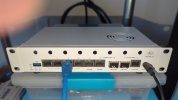
It came with a half-baked version of OpenWRT 24.12 installed. I never bothered testing the WiFi and didn't like what was done on the OS side of it, plus the OpenWRT image installed was not a OpenWRT release. That's a problem as there are very few other options when you're dealing with newly released hardware. This architecture is 64 bit ARM, not x86-64, so you're not dealing with readily available images for installation.
I found someone that had set up a toolchain to build a Linux kernel and a Debian image for this device. At the time I decided to try it, I was still thinking I could use the WiFi card, but after compiling a kernel and building the image I found that the image was configured for a different WiFi card than the one I had, and spent a little time trying to find the right firmware blobs to get it to work, but decided that wasn't going to happen. I could probably have continued and figured something out, but I came to the realization that combining your core router and AP is not a very good idea. Sure consumer gear has been like that for years, but we that a have a background in networking/infosec know combining them is not a good practice.
I configured it as a layer 2/3 switch, meaning effectively it's a switch with routing layered on top of it. This will be the core networking device in my network. This device is an odd one in several ways. It has four different storage options for the OS. MicroSD card (which I would never use beyond an install), NAND, eMMC and there are two NVMe slots on the bottom of the board. Initially I installed the OS image I built on the onboard eMMC.
The kernel is a very recent release.
I've been on a crusade to use RAID1 arrays for system installs recently, and decided I wanted to use two spare Micron 500GB 2280 NVMe drive pulls from other hardware (laptops). The drives are on the bottom of the board. I was concerned about heat dissipation but after monitoring found that they seem to idle at 38-40C which is fine. The load on the router is unlikely to change that.


I tried to set up the RAID1 array, but realized I didn't include RAID functionality in the kernel when I compiled it, so setting up an array wasn't an option, and I'm lazy enough I don't feel like compiling another kernel. So I set up a manual process for syncing the drive being used to the other one. I'll probably set up a cron job to sync the drives on a schedule. I have a script for the sync process.
This is how they're set up now.
If the primary drive fails I can pull it and boot from the other. It's a quasi RAID1 setup.
I am waiting on a longer fiber optic patch cord which should be here within a day or two in order to connect it to my rack with a 10G downlink. I'll be using fiber optic rather than copper DAC cables or even ethernet cables to reduce the heat involved. 10G fiber optic connections are considerably cooler.
The other 10G SFP+ cage will be used for another server that will act as a backup for some services in case there are issues within the rack. Or that's the plan at this point, anyhow.
The network is involved, but not too terribly complex.
The network ports:
(2) 10G
(1) 1G
(4) 2.5G
Overall setting this router up has been fun. I really enjoy projects like this. I'll admit this was not a straighforward build, and took considerable effort to get it working properly. It's running Debian which I run on most of my various components here at home. This should provide service for quite a few years.
It came with a half-baked version of OpenWRT 24.12 installed. I never bothered testing the WiFi and didn't like what was done on the OS side of it, plus the OpenWRT image installed was not a OpenWRT release. That's a problem as there are very few other options when you're dealing with newly released hardware. This architecture is 64 bit ARM, not x86-64, so you're not dealing with readily available images for installation.
I found someone that had set up a toolchain to build a Linux kernel and a Debian image for this device. At the time I decided to try it, I was still thinking I could use the WiFi card, but after compiling a kernel and building the image I found that the image was configured for a different WiFi card than the one I had, and spent a little time trying to find the right firmware blobs to get it to work, but decided that wasn't going to happen. I could probably have continued and figured something out, but I came to the realization that combining your core router and AP is not a very good idea. Sure consumer gear has been like that for years, but we that a have a background in networking/infosec know combining them is not a good practice.
I configured it as a layer 2/3 switch, meaning effectively it's a switch with routing layered on top of it. This will be the core networking device in my network. This device is an odd one in several ways. It has four different storage options for the OS. MicroSD card (which I would never use beyond an install), NAND, eMMC and there are two NVMe slots on the bottom of the board. Initially I installed the OS image I built on the onboard eMMC.
Code:
jcwx@sabrina:~$ ssh root@192.168.11.90
root@192.168.11.90's password:
Linux anand 6.18.41-bpi-r4-main #1 SMP Sun Aug  2 15:55:02 UTC 2026 aarch64

The programs included with the Debian GNU/Linux system are free software;
the exact distribution terms for each program are described in the
individual files in /usr/share/doc/*/copyright.

Debian GNU/Linux comes with ABSOLUTELY NO WARRANTY, to the extent
permitted by applicable law.
Last login: Fri Sep 11. 12:41:57 2026 from 192.168.11.17
The kernel is a very recent release.
I've been on a crusade to use RAID1 arrays for system installs recently, and decided I wanted to use two spare Micron 500GB 2280 NVMe drive pulls from other hardware (laptops). The drives are on the bottom of the board. I was concerned about heat dissipation but after monitoring found that they seem to idle at 38-40C which is fine. The load on the router is unlikely to change that.
I tried to set up the RAID1 array, but realized I didn't include RAID functionality in the kernel when I compiled it, so setting up an array wasn't an option, and I'm lazy enough I don't feel like compiling another kernel. So I set up a manual process for syncing the drive being used to the other one. I'll probably set up a cron job to sync the drives on a schedule. I have a script for the sync process.
This is how they're set up now.
Code:
root@anand:~# lsblk -o NAME,MODEL,SIZE,FSTYPE,LABEL,MOUNTPOINTS /dev/nvme*
NAME        MODEL                        SIZE FSTYPE LABEL          MOUNTPOINTS
nvme0n1     Micron_3400_MTFDKBA512TFH  476.9G
|-nvme0n1p1                                1G vfat
`-nvme0n1p2                               64G ext4   ROUTER_STANDBY /
nvme0n1p1                                  1G vfat
nvme0n1p2                                 64G ext4   ROUTER_STANDBY /
nvme1n1     Micron_2400E_MTFDKBA512QFM 476.9G
|-nvme1n1p1                                1G vfat
`-nvme1n1p2                               64G ext4   ROUTER_ROOT
nvme1n1p1                                  1G vfat
nvme1n1p2                                 64G ext4   ROUTER_ROOT
If the primary drive fails I can pull it and boot from the other. It's a quasi RAID1 setup.
I am waiting on a longer fiber optic patch cord which should be here within a day or two in order to connect it to my rack with a 10G downlink. I'll be using fiber optic rather than copper DAC cables or even ethernet cables to reduce the heat involved. 10G fiber optic connections are considerably cooler.
The other 10G SFP+ cage will be used for another server that will act as a backup for some services in case there are issues within the rack. Or that's the plan at this point, anyhow.
The network is involved, but not too terribly complex.
The network ports:
(2) 10G
(1) 1G
(4) 2.5G
Code:
root@anand:~# ip a s
1: lo: <LOOPBACK,UP,LOWER_UP> mtu 65536 qdisc noqueue state UNKNOWN group default qlen 1000
    link/loopback 00:00:00:00:00:00 brd 00:00:00:00:00:00
    inet 127.0.0.1/8 scope host lo
       valid_lft forever preferred_lft forever
    inet6 ::1/128 scope host noprefixroute
       valid_lft forever preferred_lft forever
2: sit0@NONE: <NOARP> mtu 1480 qdisc noop state DOWN group default qlen 1000
    link/sit 0.0.0.0 brd 0.0.0.0
3: eth0: <BROADCAST,MULTICAST,UP,LOWER_UP> mtu 1504 qdisc mq state UP group default qlen 1000
    link/ether 56:57:39:8c:5e:29 brd ff:ff:ff:ff:ff:ff
    inet6 fe80::5457:39ff:fe8c:5e29/64 scope link proto kernel_ll
       valid_lft forever preferred_lft forever
4: eth1: <BROADCAST,MULTICAST> mtu 1500 qdisc noop state DOWN group default qlen 1000
    link/ether 76:cb:be:5e:b4:95 brd ff:ff:ff:ff:ff:ff
5: eth2: <BROADCAST,MULTICAST,UP,LOWER_UP> mtu 1504 qdisc mq state UP group default qlen 1000
    link/ether d2:a7:74:e6:77:a6 brd ff:ff:ff:ff:ff:ff
    inet6 fe80::d0a7:74ff:fee6:77a6/64 scope link proto kernel_ll
       valid_lft forever preferred_lft forever
6: mgmt@eth0: <NO-CARRIER,BROADCAST,MULTICAST,UP> mtu 1500 qdisc noqueue master br0 state LOWERLAYERDOWN group default qlen 1000
    link/ether 56:57:39:8c:5e:29 brd ff:ff:ff:ff:ff:ff
7: lan0@eth2: <NO-CARRIER,BROADCAST,MULTICAST,UP> mtu 1500 qdisc noqueue master br0 state LOWERLAYERDOWN group default qlen 1000
    link/ether d2:a7:74:e6:77:a6 brd ff:ff:ff:ff:ff:ff
8: lan1@eth2: <NO-CARRIER,BROADCAST,MULTICAST,UP> mtu 1500 qdisc noqueue master br0 state LOWERLAYERDOWN group default qlen 1000
    link/ether d2:a7:74:e6:77:a6 brd ff:ff:ff:ff:ff:ff
9: lan2@eth2: <BROADCAST,MULTICAST,UP,LOWER_UP> mtu 1500 qdisc noqueue master br0 state UP group default qlen 1000
    link/ether d2:a7:74:e6:77:a6 brd ff:ff:ff:ff:ff:ff
10: lan3@eth2: <NO-CARRIER,BROADCAST,MULTICAST,UP> mtu 1500 qdisc noqueue master br0 state LOWERLAYERDOWN group default qlen 1000
    link/ether d2:a7:74:e6:77:a6 brd ff:ff:ff:ff:ff:ff
11: lan4@eth2: <NO-CARRIER,BROADCAST,MULTICAST,UP> mtu 1500 qdisc noqueue master br0 state DOWN group default qlen 1000
    link/ether d2:a7:74:e6:77:a6 brd ff:ff:ff:ff:ff:ff
12: br0: <BROADCAST,MULTICAST,UP,LOWER_UP> mtu 1500 qdisc noqueue state UP group default qlen 1000
    link/ether 06:e5:54:ed:63:6b brd ff:ff:ff:ff:ff:ff
    inet6 fe80::4e5:54ff:feed:636b/64 scope link proto kernel_ll
       valid_lft forever preferred_lft forever
13: vlan20@br0: <BROADCAST,MULTICAST,UP,LOWER_UP> mtu 1500 qdisc noqueue state UP group default qlen 1000
    link/ether 06:e5:54:ed:63:6b brd ff:ff:ff:ff:ff:ff
    inet 172.17.23.1/24 brd 172.17.23.255 scope global vlan20
       valid_lft forever preferred_lft forever
    inet6 fe80::4e5:54ff:feed:636b/64 scope link proto kernel_ll
       valid_lft forever preferred_lft forever
14: vlan10@br0: <BROADCAST,MULTICAST,UP,LOWER_UP> mtu 1500 qdisc noqueue state UP group default qlen 1000
    link/ether 06:e5:54:ed:63:6b brd ff:ff:ff:ff:ff:ff
    inet 192.168.11.90/24 brd 192.168.11.255 scope global vlan10
       valid_lft forever preferred_lft forever
    inet6 fe80::4e5:54ff:feed:636b/64 scope link proto kernel_ll
       valid_lft forever preferred_lft forever
15: vlan1@br0: <BROADCAST,MULTICAST,UP,LOWER_UP> mtu 1500 qdisc noqueue state UP group default qlen 1000
    link/ether 06:e5:54:ed:63:6b brd ff:ff:ff:ff:ff:ff
    inet 10.73.58.1/24 brd 10.73.58.255 scope global vlan1
       valid_lft forever preferred_lft forever
    inet6 fe80::4e5:54ff:feed:636b/64 scope link proto kernel_ll
       valid_lft forever preferred_lft forever
Overall setting this router up has been fun. I really enjoy projects like this. I'll admit this was not a straighforward build, and took considerable effort to get it working properly. It's running Debian which I run on most of my various components here at home. This should provide service for quite a few years.