• The move to the new server is done. There are some software and database maintenance updates in process. This has us passing the hat around to help out. We appreciate any donations. Seriously, even a dollar helps. The payment page may be found here - https://www.audiokarma.org/support.html

Best free program for chassis drawings?

AlexHempel

AK Subscriber
Subscriber
I want to produce some technical drawings so that I can have two custom monoblock tube chassis professionally fabricated. I just need basic functionality (location and size of the holes). What sort of free cad/drawing software is best for this sort of thing? I have virtually no CAD experience.
 
Register to hide this ad
"FreeCad" is very popular and well supported. QCad seems simpler. But if you don't need a CAD software and you only need to draw 2D vectors, perhaps something like " Libre Office Draw " or "inkscape" can do it.

If you are sending to a metal shop, you could ask what file format they need, or better, draw a sketch by hand and let them to do the CAD drawing following their standards.

I've worked for many years as a prepress technician at packaging and publishing industries, and many times the "hobbyst" drawings or designs needed to be completely re done professionally from scratch.
 
Last edited:
G'day;
If you know the model type you'd like to copy.. there may be a free online chassis schematic already out there.
 
It's the amp in my profile picture; a custom design by Emory Cook. Apparently there was a hole drilling template made, but it was never publicized as far as I know. In any case, I'm going to be mounting some custom iron and modern chassis-mount film caps, so I'll need a fresh layout.

I've downloaded LibreCAD and it seems perfect for what I'm doing. Simple interface for layout of 2D shapes.
 
I'll try and post the final drawings. One issue I'm encountering now is that my parts have a mix of metric and imperial units. For instance, the Langevin output transformers use imperial thread sizes but for some odd reason the spacing between bolts is metric. And of course some of the connectors I want to use (Neutrik etc.) have specifications in metric units whereas tube sockets want imperial cutouts. My interim solution is to use a very small grid increment (.0025 inches) and round. When I produce a final drawing, I might go in and manually add the correct dimensions in mm.
 
I'm pretty sure most shops would probably won't tie up a cad-cam machine for a couple of panels and tol of +/-0.01 in. or equiv. metric will suffice. might ask the shop of intent what they want.
 
So, after realizing this is probably a bit too complex to just draw up and hand to a shop, I decided to browse some of the specialty chassis fabrication sites. I had previously checked Front Panel Express, but their chassis options aren't really fitting for a big tube amplifier (in my opinion). I don't want to make some sort of aluminum rack-mountable thing.

I ended up settling on Protocase. Their free 3D CAD software is amazingly intuitive. I created my chassis and started to make cutouts within minutes of downloading the application. Of course, the big caveat -- I haven't gotten them to quote my project yet. Since it's a huge stainless steel chassis with tons of cutouts, I don't expect it to be cheap by any means. But this is going to be a months-long project and I want everything done perfectly.

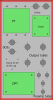
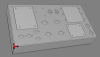
Here is the layout I plan on using. The first image is a 2D representation of the top of the chassis, and the 3d one is below. The lighter grey squares represent the physical footprint of the iron. I would love any feedback. I tried to maximize the distance between the output tubes, something the original chassis layout did not do. Connectors and the power switch will go on the front face of the chassis.

ChassisLayoutV1Annotated.png

ChassisLayoutV13D.png
 
Just added the transformer and film cap cutouts and the front panel cutouts. The quote right now is $450, which is about what I expected for a large custom-dimension stainless steel chassis with a lot of cutouts and free powder coating. Obviously much more expensive than buying a blank and punching it yourself, but I don't really have the equipment or time to do that properly.
 
Sounds like you found a good solution for the task.

But, for the record, Siemens Solid Edge 2D is free for home use. Fairly steep learning curve though. I use it now and then but barely scratch the surface of its potential.
 
Back
Top Bottom