• Please note that Audiokarma will be offline briefly for updates early on Monday morning, September 28th.

Bias on MC 2205

aedaza

Active Member
Hi guys
So I found an MC 2205 here in the wild in Colombia, not very common!
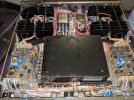
Did the dim bulb test and everything seems ok! Well except for a left channel with a weaker output (less volume and bass), so tried to check bias (saw some posts with instructions on checking mv across pin 13 and 15 on both channels) but I am confused;
- both channels seem to be wired differently on pin 13 and 15
- checked really different measurements
- now I'm doubting I got the proper test pin 13 and 15 points
Can anyone help me confirming pin 13 and 15?
Thanks!
Alejandro
 

Attachments

  • PXL_20230627_034245009.jpg
    PXL_20230627_034245009.jpg
    182.7 KB · Views: 60
Register to hide this ad
In your photo, on the driver board rear connectors, pin 11 is on the left. They don't spec bias this way for the MC2205, the pots should be turned full CCW, then each channel turned CW until the input current runs up 50mA/5W from the baseline.

For a low channel / flatness problem I would suspect you need to look at dirty controls/connectors/switches/relay contacts or capacitors in the signal path. I don't think bias is your issue.
 
If you're running the amp on 220V, then the idle current should be 1/2 - or 25 mA. You need an AC current meter to monitor the input current draw of the amp from the 220V (or 120V) supply. There is no other way to set the bias properly.

As Bob said it's highly unlikely that the problem is bias. Clean the three switches in the back - one is for .75V/2.5V input, one is powerguard on/off, the last is mono/stereo. I've gone through three of these amps recently and all three had dirty switches. Best way to do this is to unplug it, turn the amp upside down, remove the bottom cover, and shoot a little Deoxit or other contact cleaner into the open portion of the switches, then exercise them well.
 
Thanks @w3jn ! and @Bob the Tech ! The amp is running at 120v.
I will clean all the switches including the powerguard, input and mono/stereo.
On the pin measurement methodology, just want to clear out the source; https://www.audioaficionado.org/showthread.php?t=3648
Do you guys have tried that method?
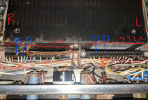
If do you think that method is OK, im having difficulties finding those pins. Is this image right? Trying to grasp it.
Many thanks for your help and knowledge
 

Attachments

  • Pins.png
    Pins.png
    903.4 KB · Views: 34
Your picture is not the driver board. You have a picture of the bottom of the connectors that hold the power supply/PG driver board and the meter driver board. The driver/output boards are right out in the open, if the amp is turned upside down. The bias adjust is the blue pot on each board. I presume that where the poster in that thread monitors the voltage is on the driver board.

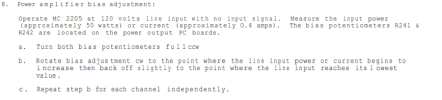
All that said, unless you have proof that the bias is wrong DO NOT MESS WITH IT. There's another thread here where someone did exactly that with a MAC 4300V and his meter leads slipped as he did so, and it fried the driver and outputs. If you insist on doing so, follow the directions in the service manual:

1687893219481.png

If the heatsinks on one channel are heating up more than the other channel, with the amp at idle (no signal for ~15-30 minutes) then perhaps a look at the bias is in order. In my experience adjusting the bias does not make a huge difference in distortion - going from perhaps .015% down to .008% throughout the adjustment range of the pot at about 100W output where I tested this.
 
Hello

I am always amazed by the non tech guy trying to repair their unit thinking that touching is critical adjustment will be the trick

All messages I can read on many problems in units everybody talk about bias , bias ....

The problem is never coming from bias and many of you don't have the minimum accurate tools necessary to do the job and the knowledge of the method

If you don't have the knowledge to adjust bias don't touch it this is not the cause of your problem .

You better consider the capacitors that we can all see on your driver boards , they are very old and probably 40 years old . The can cause a lot of different problems in your amp

We see that you don't know what a MC2205 is and you are touching boards who are not driver boards with a risk to destroy something in this wonderfull amplifier. w3jn explain it very well ! you are not in the right area !

Did you double check the speaker relay ? No
Did you make serious investigations from where your problem is coming ?
Did you make any comparaison between the both channel ?

We wait for your answers to be able to help you .
 
Hi @clinic-audio
I received the MC 2205 last week and I'm starting to learn about it. Is not easy for me just to send it over to a tech here in Colombia.
My questions have the objective to learn from you guys who have the knowledge.
The back switches and the speaker relay are in my to do list, as well as a proper recap. The channel imbalance and weaker sound is heard easily but I have not traced it.
Best
Alejandro
 
Hello Alejandro

I will be happy to help you
Do you have oscilloscope ? You have to follow the tracks untill they stop to be indentical starting from input sockets untill the relays contacts (see the big white wires at the input of speaker relay ) with gain control at maximum position
 
Hi @clinic-audio !
So I cleaned the stereo/mono, 2.5input and power guard switches. No difference. I will go after for the relay cleaning.
On the oscilloscope, I don't have one but I can source it.
Also, interestingly the imbalance is present too in the headphone jack but with an additional component; the headphone is in mono... Odd?
Thank you all
 
Relays are typically intermittent when old, so each time it’s energized it might have better or worse contact. If it’s consistent each time I’d keep looking. Typically.

Also, cleaning relays is a fool’s errand. Relay contacts are a base-metal with a cladding. Once the cladding is worn/pitted/etc. it will not come back, sanding and filing away this cladding does not make it better although you might get it to work temporarily. Replacement is the best solution and considering the cost-to-hassle ratio of the R&R & “cleaning” vs replacement? If they’re available just buy one for when you’re in there.
 
True, but Alejandro being in Columbia may not have ready access to a replacement relay. In any event nobody should be sanding or filing any relay contact for the reasons you stated. I've had success with a piece of paper, wetted with Deoxit, and dragged between the contacts while holding tension on the armature. The paper will burnish the contacts somewhat but not wear off the coating.

I also have an old Western Electric relay cleaning tool intended for cleaning Teletype machine contacts, which is essentially a thin strip of metal in a handle. I've not used it much since its configuration is usually a bit inconvenient but it does seem to work well also.
 
Hi all!
Thank you a lot for your suggestions and wise advices.
Ordered yesterdey all the replacement caps, a replacement relay and some diodes.

Excited about giving this amp a proper new life! Just to give you guys some history, these equipments were stored for 40 years in a place with bad humidity conditions near the ocean (sad yes...), but they are a really nice find,, one of those one in a lifetime... MC 2205, MR80 Tuner, C32 preamp, C29 preamp in almost NOS condition (with mcintosh unnopened bag but with corrotion and cracked faceplate), and some other equipments (Revox B77 reel to reel, Beogram 4004 tunrtable in almost NOS, Kenwood Kt 917 tuner, and a Nakamichi 1000 zxl in bad shape but lets see what we can do...)

On the caps, I bought generally Panasonic, Nichicon and Wurth Electronic when the prior were not available.

Found some post recommending on the diodes the general 1n4004 and some other suggesting that 1n5395 are better. Bought both as they are cheap. Any recommendation?
Mfr. #:Desc.:Order Qty.Price (USD)
ECE-A1HN100UBAluminum Electrolytic Capacitors - Radial Leaded Aluminum Electrolytic Capacitors - Radial Leaded 50VDC 10uF SU BI-POL2
0,56​
ECA-1HM100BAluminum Electrolytic Capacitors - Radial Leaded Aluminum Electrolytic Capacitors - Radial Leaded Al Lytic Cap 85C Radial M Series4
0,21​
ECA-1HM220BAluminum Electrolytic Capacitors - Radial Leaded Aluminum Electrolytic Capacitors - Radial Leaded Al Lytic Cap 85C Radial M Series1
0,26​
ECA-1CM470BAluminum Electrolytic Capacitors - Radial Leaded Aluminum Electrolytic Capacitors - Radial Leaded Al Lytic Cap 85C Radial M Series1
0,22​
860010772005Aluminum Electrolytic Capacitors - Radial Leaded Aluminum Electrolytic Capacitors - Radial Leaded WCAP-ATG8 1uF 63V 20% Radial2
0,12​
860010672004Aluminum Electrolytic Capacitors - Radial Leaded Aluminum Electrolytic Capacitors - Radial Leaded WCAP-ATG8 0.47uF 50V 20% Radial4
0,11​
UDB1H100MHM1TOAluminum Electrolytic Capacitors - Radial Leaded Aluminum Electrolytic Capacitors - Radial Leaded 10uF 50 Volts 20%4
1,17​
UKZ1E221MHMAluminum Electrolytic Capacitors - Radial Leaded Aluminum Electrolytic Capacitors - Radial Leaded 25volts 220uF 12.5x202
0,99​
UFG1H3R3MDMAluminum Electrolytic Capacitors - Radial Leaded Aluminum Electrolytic Capacitors - Radial Leaded 50volts 3.3uF 85c 5x11 2LS4
0,39​
EEU-FR1H100BAluminum Electrolytic Capacitors - Radial Leaded Aluminum Electrolytic Capacitors - Radial Leaded 50VDC 10uF 20% L/S=5mm1
0,35​
UKZ1E101MPMAluminum Electrolytic Capacitors - Radial Leaded Aluminum Electrolytic Capacitors - Radial Leaded 25volts 100uF 10x162
0,71​
MAL213816222E3Aluminum Electrolytic Capacitors - Axial Leaded Aluminum Electrolytic Capacitors - Axial Leaded 2200uF 25V 20% Axial2
5,01​
1N4004RLGRectifiers Rectifiers 400V 1A Standard2
0,26​
1N5395Rectifiers Rectifiers Diode, DO-15, 400V, 1.5A2
0,58​
KUP-14D15-48General Purpose Relays General Purpose Relays 3PDT PLAIN 48VDC1
23,67​
 
Wow, thats quite a score! Expect to have a few small issues with them, I got a similar pile of McIntosh stuff (a bit corroded and broken) but it didn't take a lot to get all of them going.

I'd recommend not replacing the diodes unless proven bad. Those on the output heatsink may be selected for temperature characteristics. I am NOT sure about that, but the McIntosh parts manual specifies a 1N4820 RED which implies they are selected for characteristics. D302 and D303 on the power supply board comprise a voltage doubler for the PG lamps. THey aren't stressed and probably OK.
 
@w3jn is correct in cautioning you, McIntosh did screen some diodes and transistors for specific characteristics and matching, it took some work to find duplicates for the diodes on my 2105 driver board. If they’re good, it might be best to leave them alone or wait for advice from Patrice.
 
Those should be no problem to replace, they're the voltage doublers for the PG lights. They're nothing special. 1N4004s will work fine there.

I will caution you that the more you replace unnecessarily, the more the chance that you'll mess something up. The forums here are full of guys asking for help after they put something in backwards and the entire amp fried, or ruined a circuit board, etc.
 
Hi guys!
Awaiting for parts to arrive... Next week they should be here.
One question; the speaker on/off pot seems bad.. I can turn it freely without hearing any click sound, but I get sound from the speakers as described before. Any source for the speaker potentiometer?
 
It’s a switch, not a pot. You can remove it from the amp and take it apart, there will be a plastic cam that has broken in half. There anew instructions here on AK somewhere for repairing those Alps switches. Not hard, and not sure if replacements are available. All it does is switch the speaker relay so any SPST switch will work if it comes down to replacing it.
 
When I checked a couple of years ago, McIntosh Parts still stocked the speaker switch for the MC2255. I would call them.
 
This is what's inside the switch, and how to repair it. Did exactly this on a 2205 recently. Not sure how long it will last, but if you can;t get a new replacement this will get you going.

 
Back
Top Bottom