

Hey, here to share my experience of writing PC streamer software from scratch.
It all started with getting into streamers by buying myself a CambridgeAudio MXN10. Nice little box, but the software on it made me sell it a few months later. So, I started to look around for more flexible options.
As I already had a pro-level sound card on hand, I thought I'd go with a PC + sound card + a media server. I got myself an old Mac Mini for less than 100€ and started hacking. Since I wanted Tidal streaming, open-source and freeware options quickly grew very limited. I settled on Mopidy, eventually. It's a great piece of software once you get it running. It plays Tidal streams with no problem and has plugins for a few other things. But I missed having control over Bluetooth and hardware volume in my sound card. It also lacked a good mobile interface, and a few more nags came up over time.
So the next logical step, of course, was DIY!
It has taken a fair bit of time to get things where they are, but I'm quite happy with the outcome. So far, the little project (codenamed Miliza) features:
Most of all, I achieved what I was looking for. Pulling up the interface on any device takes me right to where I left off. It's like walking up to a record player. Besides, anybody can access it. There is no need to install software or connect to anything else except the local WiFi.
I'll add some shots...
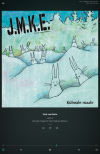
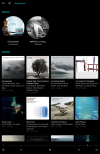

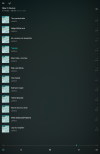
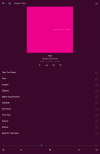


It all started with getting into streamers by buying myself a CambridgeAudio MXN10. Nice little box, but the software on it made me sell it a few months later. So, I started to look around for more flexible options.
As I already had a pro-level sound card on hand, I thought I'd go with a PC + sound card + a media server. I got myself an old Mac Mini for less than 100€ and started hacking. Since I wanted Tidal streaming, open-source and freeware options quickly grew very limited. I settled on Mopidy, eventually. It's a great piece of software once you get it running. It plays Tidal streams with no problem and has plugins for a few other things. But I missed having control over Bluetooth and hardware volume in my sound card. It also lacked a good mobile interface, and a few more nags came up over time.
So the next logical step, of course, was DIY!
It has taken a fair bit of time to get things where they are, but I'm quite happy with the outcome. So far, the little project (codenamed Miliza) features:
- A progressive web app (PWA) interface that runs like a native app on phones and works perfectly in browsers, too.
- High-res Tidal streaming with search, search history, favourite albums and artists, playlists, suggestions, sharing, gapless playback, etc.
- Basic queue handling.
- Radio streaming from direct links and the api.radio-browser.info database, plus quick links in the main menu.
- Soundcard/DAC hardware volume control for selected channels.
- Bluetooth power control, pairing, and audio control, multiple connected devices, which ever device is put to play pauses others.
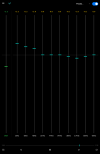
- Basic DSP, gain, and EQ with some popular loudness curves as presets.
- A display showing incoming and outgoing audio data information, file formats, sample rates, Bluetooth codec, etc.
- User state memory, so if the system reboots, it continues right where it was interrupted.
Most of all, I achieved what I was looking for. Pulling up the interface on any device takes me right to where I left off. It's like walking up to a record player. Besides, anybody can access it. There is no need to install software or connect to anything else except the local WiFi.
I'll add some shots...
Last edited:
