Drayman
New Member
Hi, newbie here- Thanks in advance for your help.
I have an early C31V with the volume buttons (Serial ER1041). It's been poorly stored in a box in a shed, but otherwise undisturbed for years.
PROBLEM: Plug it in, press red Power button, it wont turn on. Totally dead. No clicking, no lights, nothing. I don't have the remote so can't say if that would work.
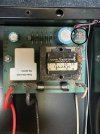
At first I assumed it was the power relay. They are still made and can be easily acquired. (Potter & Brumfeld T90 Series - Now TE T9A series.) But it has no markings- is it 12V, 5V, or 5-12V?
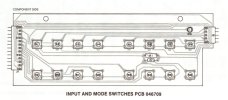
Then I read these threads about button panel issues:
https://audiokarma.org/forums/index.php?threads/new-to-me-c31v-issues.626867/
https://audiokarma.org/forums/index.php?threads/mcintosh-c31v-issue.241770/
Is it possible the unit doesn't fire up because the Power button isn't working?
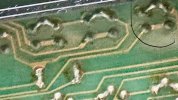
Would cleaning the panel be in any way bad?
Alcohol, acetone, DeOxit 5?
I don't see any burned traces, and the last time plugged in it worked, although it was looooong ago,
Any and all help appreciated!
I have an early C31V with the volume buttons (Serial ER1041). It's been poorly stored in a box in a shed, but otherwise undisturbed for years.
PROBLEM: Plug it in, press red Power button, it wont turn on. Totally dead. No clicking, no lights, nothing. I don't have the remote so can't say if that would work.
At first I assumed it was the power relay. They are still made and can be easily acquired. (Potter & Brumfeld T90 Series - Now TE T9A series.) But it has no markings- is it 12V, 5V, or 5-12V?
Then I read these threads about button panel issues:
Problems with my C31V preamp
My C31V is having problems with the channel selectors. Some of the buttons on the front panel work (Speaker 1, Speaker 2, Mono, Phono, VCR Copy 1->2, VCR Copy 2->1) while the rest do not. Very similar issues described in these threads...
audiokarma.org
https://audiokarma.org/forums/index.php?threads/mcintosh-c31v-issue.241770/
Is it possible the unit doesn't fire up because the Power button isn't working?
Would cleaning the panel be in any way bad?
Alcohol, acetone, DeOxit 5?
I don't see any burned traces, and the last time plugged in it worked, although it was looooong ago,
Any and all help appreciated!