
• The move to the new server is done. There are some software and database maintenance updates in process. This has us passing the hat around to help out. We appreciate any donations. Seriously, even a dollar helps. The payment page may be found here - https://www.audiokarma.org/support.html

Connect SG-9500 EQ, RG-2 DP & SA-8500II AMP

bcharlesd

New Member
I apologize for posting this, but I have spent four hours reading about two-dozen different takes on this quandary...how to hook up both an EQ and a dynamic processor to affect the sound of all components hooked to a integrated amp. I am more confused at this point than when I started reading.

For reference purposes, I have:

Pioneer SA-9500 Integrated Amp
Pioneer SG-9500 Equalizer
Pioneer RG-2 Dynamic Processor
Pioneer TX-8500II Tuner
Pioneer CT-F900 Tape Deck
Pioneer CT-300 Tape Deck
Pioneer PL-400 Turntable
Pioneer DT-510 Digital Timer (moot point in this discussion)

The SA-9500 has the following connections:

Left Panel:

Power In
Pre Out

Right Panel:

Phono 1 +/-
Phono 2 +/-
Tuner +/-
AUX 1 +/-
AUX 2 +/-
Tape 1 REC/PB
Tape 2 REC/PB

Currently, I have two tape decks, and I use both Tape 1&2 connections. Many of the threads I read say to use Tape 1 or 2 to connect the DP and Power In/Pre Out to connect the EQ. Is it even possible to use 2 tape decks, a DP and an EQ and be able to mix all sources through the DP and the EQ? What does that connection look like (if I may ask)? Am I a moron in the first place for even wanting to use an EQ and DP in tandem?

Admittedly, I just got into this hobby when I was given my old man's SX-780 and PL-400. I then dove off the deep end purchasing the rest of "the stack" without giving much thought to how it all hooks together. I just learned last week that you can't hook an SX-780 to an SA-9500.

To-date, I have just been running the CT-F900 through the EQ directly. After reading tonight, I finally realized I could run everything through the EQ via the Power In/Pre Out connections, however there are various threads that say to not do this. I am just thoroughly confused at this point. And if you do that, how does the DP fit into the picture? I really just want it all components hooked up and running so that I can DP/EQ the tuner, deck 1, deck 2 or the turntable without committing some cardinal sin of audiophile-dom that will make me appear even more of a moron that I already do.

Any assistance, advice or thoughts would be greatly appreciated. I am trying to learn...but there is a ton of information out there and a lot of it is contradictory. It ain't easy being a noob--.

Thanks!
 
Register to hide this ad
Many of the threads I read say to use Tape 1 or 2 to connect the DP and Power In/Pre Out to connect the EQ.
…I finally realized I could run everything through the EQ via the Power In/Pre Out connections
It's not a normal way to connect external processors, EQs and 3-head decks.
however there are various threads that say to not do this.
They are right.
...how to hook up both an EQ and a dynamic processor to affect the sound of all components hooked to a integrated amp.
For reference purposes, I have:
Pioneer SA-9500 Integrated Amp
Pioneer SG-9500 Equalizer
Pioneer RG-2 Dynamic Processor
Pioneer TX-8500II Tuner
Pioneer CT-F900 Tape Deck
Pioneer CT-300 Tape Deck
Pioneer PL-400 Turntable
Please see the diagram for your purpose (preserving monitoring possibility for your 3-head CT-F900 Tape Deck):
 
Portkula - many thanks, the diagram is most helpful and most excellent! So with this particular configuration, do you know off-hand what series of switches would I have on to affect the turntable play with the DP and the EQ?

(pardon my stupidity)

I assume the main SA-9500 function knob would be switched to Phono 1 (to get the turntable sound to come out of the speakers). It is the Tape Duplicate/Monitor where I get confused.

So for the 2 Tape switches:

Duplicate > [blank/off] / On
Monitor > 1 / Source / 2

What would be the switch combination to get the turntable (with Function knob: Phono1) to play via the speakers with the DP and the EQ affecting the raw sound coming out of the turntable?

Again, many thanks for your assistance and knowledge!
 
…do you know off-hand what series of switches would I have on to affect the turntable play with the DP and the EQ?
I assume the main SA-9500 function knob would be switched to Phono 1 (to get the turntable sound to come out of the speakers).
Yes. As for your “sources” connected to “Phono 2”, “Tuner”, “Aux 1” and “Aux 2”, the main SA-9500 function knob should be switched to their respective position. “Tape duplicate” in position “Off”. “Tape monitor” in position “2”. On the “RG-2” → “Processor” and “Tape monitor” “On”. On the “SG-9500”→ Equalizer “On”; “Tape monitor” “Off”.

To play “Tape 1” with the DP and the EQ: “Tape Duplicate” in position “On”. “Tape monitor” in position “2”. On the “RG-2” → “Processor” and “Tape monitor” “On”. On the “SG-9500”→ Equalizer “On”; “Tape monitor” “Off”.

To play “Tape 2” with the DP and the EQ: “Tape Duplicate” in position “Off”. “Tape monitor” in position “2”. On the “RG-2” → “Processor” and “Tape monitor” “On”. On the “SG-9500”→ Equalizer “On”; “Tape monitor” “On”.

To record equalized sound onto “Tape 2”: on the “RG-2” → “Processor” “Off” and “Tape monitor” “On”. On the “SG-9500”→ “Tape monitor” “On”; Equalizer “On/Recording” (then the monitored “Tape 2” sound returns to the amplifier NOT EQUALIZED after recording).

If I understood correctly the “SA-9500”, “RG-2” and “SG-9500” “Operating instructions” descriptions, it should be so.

Equalizing and monitoring diagrams as I described, work in my system for many years (except a hardware processor similar to yours).

Anyway, you can try all this and report the results.
 
Last edited:
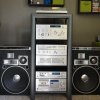
Well, that worked perfectly! I can't thank you enough for the knowledge! I have included a photos of the set up. The RG-2 is on its way, but the setup already works as you outlined, so I am just going to add the RG-2 into the stack and call it complete!
 

Attachments

  • stereo.jpg
    stereo.jpg
    63.6 KB · Views: 150
"And what is the distance between the speakers line and your usual listening place?"

A: About 10 feet, this system is currently in my temporary housing arrangement in a rather small office--far from ideal. I'll be moving soon and will have more room to set everything up.

I did have one other question. On this bit of instruction:

To record equalized sound onto “Tape 2”: on the “RG-2” → “Processor” “Off” and “Tape monitor” “On”. On the “SG-9500”→ “Tape monitor” “On”; Equalizer “On/Recording” (then the monitored “Tape 2” sound returns to the amplifier NOT EQUALIZED after recording).

Do you know what the "Monitor" switch on the SA-9500 should be? "Source" or "2"
Do you know what the "Monitor" switch on the CT-900 should be? "Source" or "Tape"

I have played around with a bunch of combinations, but I am getting no sound when I record. Many thanks...again...
 
Might I be so bold to ask a question here, regarding a Pioneer SG9500 EQ.
Is there a way to hook up a Turntable to an amp, then out to the EQ and back into the amp, so when I listen to my Vinyl, I can EQ it to my taste?

Roger
(Newbie).


It's not a normal way to connect external processors, EQs and 3-head decks.

They are right.

Please see the diagram for your purpose (preserving monitoring possibility for your 3-head CT-F900 Tape Deck):
 
As long as the EQ is connected to the tape loop and it's switched to "Monitor" anything selected with the input selector will be EQ'd.
 
Thank You very much!
Is there a section here to buy Stereo gear?
I'm still in need of an Amp, Turntable, EQ.
Oh and some type of rack too.

Roger
As long as the EQ is connected to the tape loop and it's switched to "Monitor" anything selected with the input selector will be EQ'd.
 
I apologize for posting this, but I have spent four hours reading about two-dozen different takes on this quandary...how to hook up both an EQ and a dynamic processor to affect the sound of all components hooked to a integrated amp. I am more confused at this point than when I started reading.

For reference purposes, I have:

Pioneer SA-9500 Integrated Amp
Pioneer SG-9500 Equalizer
Pioneer RG-2 Dynamic Processor
Pioneer TX-8500II Tuner
Pioneer CT-F900 Tape Deck
Pioneer CT-300 Tape Deck
Pioneer PL-400 Turntable
Pioneer DT-510 Digital Timer (moot point in this discussion)

The SA-9500 has the following connections:

Left Panel:

Power In
Pre Out

Right Panel:

Phono 1 +/-
Phono 2 +/-
Tuner +/-
AUX 1 +/-
AUX 2 +/-
Tape 1 REC/PB
Tape 2 REC/PB

Currently, I have two tape decks, and I use both Tape 1&2 connections. Many of the threads I read say to use Tape 1 or 2 to connect the DP and Power In/Pre Out to connect the EQ. Is it even possible to use 2 tape decks, a DP and an EQ and be able to mix all sources through the DP and the EQ? What does that connection look like (if I may ask)? Am I a moron in the first place for even wanting to use an EQ and DP in tandem?

Admittedly, I just got into this hobby when I was given my old man's SX-780 and PL-400. I then dove off the deep end purchasing the rest of "the stack" without giving much thought to how it all hooks together. I just learned last week that you can't hook an SX-780 to an SA-9500.

To-date, I have just been running the CT-F900 through the EQ directly. After reading tonight, I finally realized I could run everything through the EQ via the Power In/Pre Out connections, however there are various threads that say to not do this. I am just thoroughly confused at this point. And if you do that, how does the DP fit into the picture? I really just want it all components hooked up and running so that I can DP/EQ the tuner, deck 1, deck 2 or the turntable without committing some cardinal sin of audiophile-dom that will make me appear even more of a moron that I already do.

Any assistance, advice or thoughts would be greatly appreciated. I am trying to learn...but there is a ton of information out there and a lot of it is contradictory. It ain't easy being a noob--.

Thanks!

Not withstanding most here will say not to do it but I have always used an EQ in Mains in and Pre outs on all my previous systems and currently am with my Marantz 2385.My DP (RG-2) and my Reverb (SR-303) all come out of my Pioneer SG-9800 EQ in that loop and are On or Off as needed for everything else in the System whenever I choose to utilize them:):thmbsp:

Sounds AWESOME no matter what anyone else will tell you!
 
Thank You very much!
Is there a section here to buy Stereo gear?
I'm still in need of an Amp, Turntable, EQ.
Oh and some type of rack too.

Roger

For $25 bucks you can SUBSCRIBE to AK and get access to the Barter Town forums where folks give stuff away, trade their junk for someone else's junk and buy and sell gear, parts and most other things that are legal. Even folks posting wanted to buy threads that get answers.

Probably worth it because these guys can get the gear to you in one piece, provide properly described equipment (broken, working, recapped, or whatever it is honest) and pricing is cheap, reasonable, fair of a bit high depending on your view. Much easier to use than other places that have gear available.
 
Hi,

I own a SA-8500 II amp , together with

Pioneer SG-8500 Equalizer
Pioneer RG-2 Dynamic Processor
Pioneer TX-8500II Tuner
Pioneer CT-F900 Tape Deck
Pioneer CT-300 Tape Deck

I haven't used the setup in years and recently bought a Rega RP-1 record player

I tried to connect the stereo yesterday , but was not able to get a single sound out of it ;-(

I used the diagram shown up on this page.

had the Rega connected to Phono 1 , and even tried a dvd player (RCA stereo OUT , to AUX IN of the amp)

Q: Should the I hear sound , when I skip the diagram and solely use the amp ? (rega to Phono 1 , dvd or cd player to AUX IN , speakers in group A)

I even checked the buttons on the amp (User Manual as a reference) and tried ALL possible setting for Source / Monitor

not single beep ;-(

Q2: is there a way to test to see if the Amp is still alive ?

Any help is much appreciated, as I really want enjoy my Pioneer again ...

Speakers are Teufel Ultima 40 Mk2 (8 Ohms)

I've tested the record player , speakers and dvdplayer on a different stereo set , they all work

Thanks in advance ...

Grtz Sven


***UPDATE*** Got it ...had to connect pre / power amp ;-)
 
Last edited:
Hi,

I own a SA-8500 II amp , together with

Pioneer SG-8500 Equalizer
Pioneer RG-2 Dynamic Processor
Pioneer TX-8500II Tuner
Pioneer CT-F900 Tape Deck
Pioneer CT-300 Tape Deck

I haven't used the setup in years and recently bought a Rega RP-1 record player

I tried to connect the stereo yesterday , but was not able to get a single sound out of it ;-(


I used the diagram shown up on this page.

had the Rega connected to Phono 1 , and even tried a dvd player (RCA stereo OUT , to AUX IN of the amp)

Q: Should the I hear sound , when I skip the diagram and solely use the amp ? (rega to Phono 1 , dvd or cd player to AUX IN , speakers in group A)

I even checked the buttons on the amp (User Manual as a reference) and tried ALL possible setting for Source / Monitor

not single beep ;-(

Q2: is there a way to test to see if the Amp is still alive ?

Any help is much appreciated, as I really want enjoy my Pioneer again ...

Speakers are Teufel Ultima 40 Mk2 (8 Ohms)

I've tested the record player , speakers and dvdplayer on a different stereo set , they all work

Thanks in advance ...

Grtz Sven

Svengun,
I have a set-up similar to yours (see my sig below).
My issue was with my Pioneer amp.
Both "Output Circuits" were shot and I had to have them replaced.

That being said, a fellow AK Member, helped me hook up MY equipment.
Below is the way he recommended that I do it.

DISCLAIMER: Due to my TT being repaired, I have NOT tried this set-up yet.
Yea I know, I've had this set-up for 10 months and have not played 1 note on my set-up yet, due to having equipment repaired.


This may help you, and if anyone wants to chime in/correct my instructions, please feel free. ;)

Roger
WWOTR
*******************************************************

SET-UP:

1) Keep in mind when you do start. Just take your time and start off with the Pioneer 6500II Amplifier ( I believe it is actually a Pre-Amplifier?) as the center of your whole system,

2) then connect the TUNER to the rear of the amplifiers that says 'TUNER input'.

3) Then connect the EQUALIZER 'output' to the rear of the amplifier that says 'tape input'

4) then connect the from the rear of the amplifier 'tape output' to the EQUALIZER 'input'.

5) Next connect the EQUALIZER 'tape output' to the RT-701 'tape input'

6) then connect the 'tape output from the RT-701 to the EQUALIZER's 'tape input'.

7) Then connect the 'Turntable' to the AMPLIFIER's rear that says 'PHONO INPUT'.

8) Then connect Amp Tape 2 Rec to Cassette Input (Rec)
8a) Then connect Amp Tape 2 Play to Cassette Output (Play)

9) Lastly just connect each speaker to the Left (L) and Right (R) to the rear of the amplifier.

10) After all that you should be pretty much setup and complete.

11) The next step would be (first make sure that the volume is turned all the way down!) to plug everything in (you should be able to plug the 'tuner, equalizer and phone to the rear of the AMPLIFIER and plug in the reel to reel to the rear of the EQUALIZER) and slowly turn everything on, one by one.

12) Start off first with the AMPLIFIER
then the EQUALIZER,
then the TUNER,
PHONE
and last the REEL TO REEL.

Okay, first plug in the Tuner" and the "Equalizer" into the back/rear of the ''SA-6500" Intergrated Pre-Amp / Amplifier's two plug-in's that say "SWITCHED" above them.

Second, plug in the "RT-701" and the "Cassette deck" to the back/rear of the other two plug-in's that say "UNSWITCHED" above them ( they are right next to the 'SWITCHED' plug-ins).

Third, plug in the 'SA-6500' Intergrated Pre-Amp / Amplifier into the 'Power Strip Spike Protector' that you purchased.

Fourth, plug in the 'Power Strip Spike Protector' to the wall plug-in.

"MAKE SURE THAT EVERYTHING IS SWITCHED OFF" before you plug in the power strip spike protector into the wall plug-in!


Connect the cassette player to those connections
on the rear of your amp. as you have described.

1.) Cassette "OUTPUT" to Tape 2 "INPUT"

2.) Tape 2 "OUTPUT" to Cassette "INPUT"


"REMEMBER" don't turn on anything until everything is plugged in first!

1.) Once everything is plugged in,
finally plug in the 'Power Strip Spike Protector' into the wall socket.

2.) Turn on the "Power Switch" to the Tuner and leave it turned on.

3.) Press the "Power Switch" to the Equalizer and leave it turned on.

4.) Turn on the "Power Switch" to the Amplifier.

Noticed that the Tuner and Equalizer both turn on as well?
This is because the Tuner and Equalizer
are plugged into the Amplifiers rear "SWITCHED" plug in's.
This means that whenever you turn on, only the Amplifier, both the Tuner and Equalizer will both turn on as well. This is a nice feature to have so that you will not have turn on each one every time, only the Amplifier will need to be switched on or off. This controls power to both the Tuner and Equalizer.

5.) Now press the power switch to the RT-701. It should power on.
This is plugged into the rear of the Amplifiers "UNSWITCHED" plug in. The "UNSWITCHED plug in is used only when you decide to use the RT-701. You can turn it off or on and this will not affect the Amplifiers power switch.

6.) The same for the other "UNSWITCHED" plug in next to it (on the rear of the Amplifier) anything plugged into this plug in will operate the same (turn on or off) as described in step #5 above.
 
Back
Top Bottom