
• The move to the new server is done. There are some software and database maintenance updates in process. This has us passing the hat around to help out. We appreciate any donations. Seriously, even a dollar helps. The payment page may be found here - https://www.audiokarma.org/support.html

DAC popping sound

Ted_E_Boy

Active Member
I run USB sound out from my NVIDIA Shield TV Pro box to the USB audio in on my SMSL DO100.

I then run RCA out to a vintage integrated amplifier and run the XLR out to another vintage integrated amplifier via XLR/RCA adapter cables.

I'm getting intermittent popping sounds.
The pops don't occur when using only the RCA outs.

I'm going to not use the XLR adapter cables and I've ordered pro audio XLR adapters instead to see if that stops it.

Any advice would be appreciated.

p.s... When I use optical from the television to the DAC there's no popping from the XLR outputs but the sound briefly drops out now and then entirely over both the RCA and the XLR outputs. Just a very brief pause and then it resumes but it's annoying. I want to use the USB connection anyway.
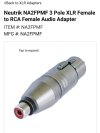
Screenshot_20230617_191814_Chrome.jpg


Last edited:
Register to hide this ad
Does the popping only occur with one of the amplifiers? Have you run the RCA outs to both amps?
 
I run USB sound out from my NVIDIA Shield TV Pro box to the USB audio in on my SMSL DO100.

I then run RCA out to a vintage integrated amplifier and run the XLR out to another vintage integrated amplifier via XLR/RCA adapter cables.

I'm getting intermittent popping sounds.
The pops don't occur when using only the RCA outs.

I'm going to not use the XLR adapter cables and I've ordered pro audio XLR adapters instead to see if that stops it.

Any advice would be appreciated.

p.s... When I use optical from the television to the DAC there's no popping from the XLR outputs but the sound briefly drops out now and then entirely over both the RCA and the XLR outputs. Just a very brief pause and then it resumes but it's annoying. I want to use the USB connection anyway.

View attachment 2912477


I run optical from my TV to the DAC then RCA to the preamp. Randomly when turning the TV on there will be silence with intermittent pops, the only way I've been able to stop it is to reboot the DAC, this involves unplugging it then plugging it back in.
 
Does the popping only occur with one of the amplifiers? Have you run the RCA outs to both amps?
I did swap.
It's the XLR output.

The main issue seems to be when the USB input is used my XLR outputs don't like it.
 
Last edited:
I have receiver and 2 integrated amps connected this way (the ones in my signature) so I know this works.

Connect receiver 1 to receiver 2 TapeRec(output) to AUX (input). Connect DAC to receiver1.

I'm thinking your receivers(amps) are sitting next to each other so you can connect DAC to both. So it should be easy to connect as I have explained.

Try this instead of trying to make XLR work. I would think there is no benefit to XLR if amp doesn't support it.
 
I have receiver and 2 integrated amps connected this way (the ones in my signature) so I know this works.

Connect receiver 1 to receiver 2 TapeRec(output) to AUX (input). Connect DAC to receiver1.

I'm thinking your receivers(amps) are sitting next to each other so you can connect DAC to both. So it should be easy to connect as I have explained.

Try this instead of trying to make XLR work. I would think there is no benefit to XLR if amp doesn't support it.
Now I remember.
Thank you.
I'll try this today.
 
I have receiver and 2 integrated amps connected this way (the ones in my signature) so I know this works.

Connect receiver 1 to receiver 2 TapeRec(output) to AUX (input). Connect DAC to receiver1.

I'm thinking your receivers(amps) are sitting next to each other so you can connect DAC to both. So it should be easy to connect as I have explained.

Try this instead of trying to make XLR work. I would think there is no benefit to XLR if amp doesn't support it.
That cured it.
Thank you.

Now I can enjoy USB out from the NVIDIA and no pooping!
 
Back
Top Bottom