• The move to the new server is done. There are some software and database maintenance updates in process. This has us passing the hat around to help out. We appreciate any donations. Seriously, even a dollar helps. The payment page may be found here - https://www.audiokarma.org/support.html

dbx 3BX-DS will not power on?

Usedtoyman

New Member
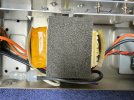
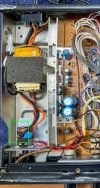
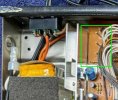
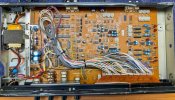
I have a cosmetically new looking dbx 3BX-DS both in and out, I'm new to electronics repair so I know very little, that won't power on. Can someone walk me through determining why it won't power on? Where do I put my meter's probes to determine if power is coming in or not? Like I said, know very little. I can resolder a cap here and there but I'd like to learn more. Here's some pics of the internals. Does the power unit look bad? Is it bulged or is that normal?
 

Attachments

  • dbx 3BX-DS internal pics-1.jpg
    dbx 3BX-DS internal pics-1.jpg
    173.1 KB · Views: 16
  • dbx 3BX-DS internal pics-2.jpg
    dbx 3BX-DS internal pics-2.jpg
    162.7 KB · Views: 17
Register to hide this ad
I went and found the manual for it. To answer my own question it does not have a fuse inside or outside. My guess is the transformer has an internal standard fuse or an internal thermal fuse. Unplug it turn on the power switch and set your meter up for Ohms and measure across the prongs of the power cord. It should have some lowish resistance if
ff the switch and transformer are good.
 
Thanks, I too pulled out the manual and the only mention of a fuse is in the British version. I did the ohm test you mention and it stayed at 1 so that means it's bad, right? So I probably need to replace the transformer?
 

Attachments

  • dbx 3BX-DS internal pics-3.jpg
    dbx 3BX-DS internal pics-3.jpg
    209.7 KB · Views: 1
Probably, but not quite there yet. A couple of more things to try. Long shot but toggle the voltage selector switch a few times and try the ohm check on the plug again.
If that fails then ohm check the power switch at the terminals in the green box.

dbx 3BX-DS internal pics-1.jpg
 
I had already checked the power switch but did it again and off it ohmed at 1 and on it was .5. I am not familar with what or where the voltage selector switch is?
 
It is behind a cover on the back panel. You can see it right behind the transformer.
 
Btw, I had previously just used continuity to test the switch and it beeped when on and did not when off. Make sense?
 
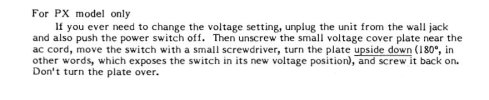
I think, correct me if I'm wrong, when briefly reading through the manual that back wiring has a voltage block that you turn over and rewire to change the voltage for the unit, I don't think it's a switch. Do you agree or am I just missing the switch?
 
Btw, I had previously just used continuity to test the switch and it beeped when on and did not when off. Make sense?
Yep continuity is what we are looking for in a switch. Sometimes a transformer can have enough resistance that the continuity beeper is not triggered even if the transformer is good.
 
I think, correct me if I'm wrong, when briefly reading through the manual that back wiring has a voltage block that you turn over and rewire to change the voltage for the unit, I don't think it's a switch. Do you agree or am I just missing the switch?
dbx.jpg
It looks like there is actually a switch behind the plate on the PX model only. It is a real longshot that is the problem.

The DBX manual does not give the original specs for the current rating of the transformer. This one is 1.5 amps per secondary winding, there is also a 2 amp per secondary version for more $. See if the dimensions of the old one allow for the replacement below to even fit.

Here is a likely candidate for a replacement. You would need to compare the dimensions.
 
Thank you so much! Now to find the proper transformer, order it, and get started on my next project! Thank you.
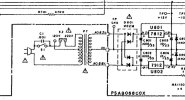
You are welcome. The schematic appears to have a 17vac center tapped transformer. No current rating given but the regulators are rated at 1.5 amps so the transformer I linked should be fine if it will fit. Since we don't see an external fuse it would be a good practice to install one when you replace the transformer.
 
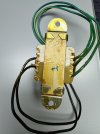
Hello again, I bought the transformer you suggested as I thought that I could get it to fit in the unit if I installed it on its side. Maybe a bad idea but it was only like $20 so I decided to take a chance; however, while I think I can make it fit it came with two wires coming out of one side and three wires out of the other. The existing transformer I have has three wires out of each side. Any ideas?
 

Attachments

  • IMG_3460.JPG
    IMG_3460.JPG
    157.4 KB · Views: 5
  • IMG_3461.JPG
    IMG_3461.JPG
    113.6 KB · Views: 5
The old transformer has an extra primary wire because it is 110/220 volts. The new one is 110 volt only. If it were mine i would just bypass the voltage selector switch. If you really want to you can use it and just cut off or desolder the 220 volt output wire at the switch.

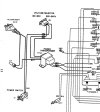
You can see here how the transformer is wired from the factory.

dbxps1.jpg
A schematic view of the same thing.
dbx1.jpg

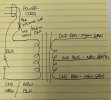
And finally my crude drawing of the way to hookup the new one. This hookup does not use the 120/220 switch, I can redraw if you wan to use it.

Primary 110 volt connections.
One lead of the power cord goes to that splice cap and connects to a white transformer lead. Resplice it to one of the black primary wires on the new transformer.
The other black primary wire from the new transformer goes to the power switch where the orange wire currently is. Disconnect the orange wire and tape it off or remove it.
The wires coming from the 110/220 switch to the old transformer are not needed. Again tape them off or remove.

PXL_20241114_135309300.jpg

Secondary connections old transformer red to new transformer green X2. Old transformer black to new green with yellow stripe.
 
Thank you so much! I very much look forward to getting this done! Your instructions are clear and so helpful! I appreciate your time and if you get tired or frustrated with me just let me know.
 
There are three test points in the back corner of the circuit board for the regulated PS voltages. They appear to be labeled GND +12 and -12.

Be sure to check that they are correct when you are done. I am going to assume that the new transformer will work, I would turn the box on and monitor the transformer temperature.

We don't know the current rating of the old one and I took an educated guess for the new one.

If this works out I would recommend you come back and put a fuse in. Something like this. https://www.mouser.com/ProductDetail/Eaton-Electronics/BK-S-8002-1X-R?qs=9GX7soZQXxEr/cHMlBteKw==
 

Attachments

  • dbxtp1.jpg
    dbxtp1.jpg
    31.4 KB · Views: 2
Thanks again for your help! I wish I understood this stuff better myself. I may put that fuse in later but for now it's working perfectly. The new transformer was a very tight fit but looks like it will work out. Now on to my next project, a Crown IC150 preamp/control center.
 
:thumbsup: :rockon: You are welcome. A 1 to 1 1/2 amp fast blow fuse would be appropriate if you get around to it.
 
Back
Top Bottom