• The move to the new server is done. There are some software and database maintenance updates in process. This has us passing the hat around to help out. We appreciate any donations. Seriously, even a dollar helps. The payment page may be found here - https://www.audiokarma.org/support.html

Dead Vintage CD player, laser gain adjustment, I finally did it…

442_Tom

Well-Known Member
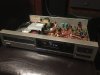
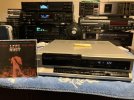
For the past 10 years I’ve been fiddling with 80s cd players, and certainly have my favorites (currently in use), but recently pulled out a few lonely ones. For instance, this (silver face) realistic CD1400, made in Japan, July ‘86, and a sentimental favorite from my younger days perusing the local mall rat shack. Acquired very inexpensively due to the dreaded drawer won’t open syndrome. Previous owner took a screwdriver to the front panel instead of using it to pop the top open, only needed a new drawer belt, which was one of the more accessible replacements I’ve run across. Easy fix.

0B53A5B8-E1DC-4CD1-AE4B-4279348EBDB6.jpeg6F6BB9FE-C6BA-4234-9DAC-B540AF653B17.jpeg05990730-9EA5-4537-BABB-ECA39F6D3106.jpeg

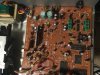
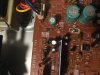
Now to the topic at hand, drawer works, so the $64,000 question, will it spin. Laser tries to focus but no spin. Nada. And no red dot or light or anything from lens. Our friend at Laserology teaches that’s probably a dead laser - so nothing to lose right? Typically it’s ‘adjust laser gain at your own peril’ but why not. No service manual - but who needs one, maybe board is labeled well, hmmm - how about “la gain adj”.

Ok let’s do it. A quarter turn got the disc spinning. Another quarter turn gets TOC read. Another 1/8th and I’m in business. Currently enjoying my third CD of the evening, yes this could be a short-lived resurrection - but with nothing to lose it was definitely worth it. On my higher end units I’ve been afraid to delve into laser adjustments - but this gives me some confidence, and perhaps you as well.

Prior to any CD troubleshooting I highly recommend http://lampizator.eu/LAMPIZATOR/TRANSPORT/laser/Laserology.html
 
Last edited:
Register to hide this ad
For the past 10 years I’ve been fiddling with 80s cd players, and certainly have my favorites (currently in use), but recently pulled out a few lonely ones. For instance, this (silver face) realistic CD1400, made in Japan, July ‘86, and a sentimental favorite from my younger days perusing the local mall rat shack. Acquired very inexpensively due to the dreaded drawer won’t open syndrome. Previous owner took a screwdriver to the front panel instead of using it to pop the top open, only needed a new drawer belt, which was one of the more accessible replacements I’ve run across. Easy fix.

View attachment 2743153View attachment 2743154View attachment 2743155

Now to the topic at hand, drawer works, so the $64,000 question, will it spin. Laser tries to focus but no spin. Nada. And no red dot or light or anything from lens. Our friend at Laserology teaches that’s probably a dead laser - so nothing to lose right? Typically it’s ‘adjust laser gain at your own peril’ but why not. No service manual - but who needs one, maybe board is labeled well, hmmm - how about “la gain adj”.

Ok let’s do it. A quarter turn got the disc spinning. Another quarter turn gets TOC read. Another 1/8th and I’m in business. Currently enjoying my third CD of the evening, yes this could be a short-lived resurrection - but with nothing to lose it was definitely worth it. On my higher end units I’ve been afraid to delve into laser adjustments - but this gives me some confidence, and perhaps you as well.

Prior to any CD troubleshooting I highly recommend http://lampizator.eu/LAMPIZATOR/TRANSPORT/laser/Laserology.html

I have done this with my original xbox and sega dreamcast to get them to read games better. From all I've read it is a temporary thing and eventually the laser will burn out. Could be a year or could be 20 years but for now they work great.
 
For the past 10 years I’ve been fiddling with 80s cd players, and certainly have my favorites (currently in use), but recently pulled out a few lonely ones. For instance, this (silver face) realistic CD1400, made in Japan, July ‘86, and a sentimental favorite from my younger days perusing the local mall rat shack. Acquired very inexpensively due to the dreaded drawer won’t open syndrome. Previous owner took a screwdriver to the front panel instead of using it to pop the top open, only needed a new drawer belt, which was one of the more accessible replacements I’ve run across. Easy fix.

View attachment 2743153View attachment 2743154View attachment 2743155

Now to the topic at hand, drawer works, so the $64,000 question, will it spin. Laser tries to focus but no spin. Nada. And no red dot or light or anything from lens. Our friend at Laserology teaches that’s probably a dead laser - so nothing to lose right? Typically it’s ‘adjust laser gain at your own peril’ but why not. No service manual - but who needs one, maybe board is labeled well, hmmm - how about “la gain adj”.

Ok let’s do it. A quarter turn got the disc spinning. Another quarter turn gets TOC read. Another 1/8th and I’m in business. Currently enjoying my third CD of the evening, yes this could be a short-lived resurrection - but with nothing to lose it was definitely worth it. On my higher end units I’ve been afraid to delve into laser adjustments - but this gives me some confidence, and perhaps you as well.

Prior to any CD troubleshooting I highly recommend http://lampizator.eu/LAMPIZATOR/TRANSPORT/laser/Laserology.html
Years ago couldn’t find s tech to clean my beloved sta2080 I bought out of high school ? I knew I was to emotionally invested to try cleaning cold turkey ,bought a non working sta2080 off of eBay tore it apart cleaned it ,not so bad I didn’t care it didn’t work anyway but after I cleaned it started working ! Then I did the other one still enjoying both receivers ! Had dr audio bring the flea bay one up to spec use it daily ! He does really good work ! He solved a tunner issue and updated the protection relays .
 
Thanks CPT, dr*audio’s post is so good, had to repost. Thanks doc!


1. CD won't play:
Observe the mechanism with no disc loaded and the cover off (don't look directly at the lens!) When the player starts, the first thing the micro does is make sure the drawer is loaded and the mechanism has risen up to the play position. Then it will reverse the sled motor until the home position switch closes, then it moves the pickup forward a bit until the switch opens. (If the pickup doesn't move at all, the CD mechanism may not be in the fully loaded position, or there may be a problem with the sled drive or motor. Check the loading belts.) There is a switch that tells the micro that the pickup is in the home position so it can stop the motor and keep the pickup from jamming. If the switch gets dirty the micro keeps the motor on in reverse and the pickup won't move. With no CD in the player, turn the player on and watch the laser pickup (don't look directly at the lens!) If the pickup moves toward the disc motor then moves back, the switch is ok. If the pickup moves toward the disc motor and doesn't move back, the switch is dirty and doesn't close. On Sony based players, the home switch is a leaf switch located on the board that the disc motor is on. There is a plastic cover on the end of the leaf switch. Note what position it is installed in, and gently pull the cover off. Then clean the contacts by drawing 600 grit sandpaper through them just a couple of times. Then flush the debris out with contact cleaner or alcohol and gently replace the plastic cover. Depending on the construction of the mechanism, you may have to remove the disc motor board in order to get to the switch.
After the player correctly senses the home postion, the focus search starts and the laser pickup lens moves up and down. If the lens doesn't move after the pickup finds home, either the pickup is bad or the cable for the pickup is broken, or the drive IC is bad, or there is a power supply problem. Some players have IC protectors that look like transistors with only 2 leads. They go open.
If focus search starts, load a CD. If the disc spins, focus search was successful and the player achieved focus lock. The pickup may be good. If the table of contents is displayed but the player doesn't play, the pickup is either bad or the internal adjustments must be performed. A scope is necessary for this. If you have a scope and can see the RF waveform, it should be 1.2V - 1.5V peak to peak, on a player with a Sony chipset and many others as well. Use a commercially recorded CD, preferably an older issue, because newer issues can have lower reflectivity. If the RF waveform is lower than 1V peak to peak, the pickup is probably bad. Do the adjustments and if the waveform doesn't improve, the pickup is bad. Panasonic / Technics players have lower amplitude on the RF waveform, I think it's 1V peak to peak. Not sure about Philips players, I think they are 1.2 - 1.5V.
If the CD doesn't spin, the pickup could be bad or the disk motor, or disc motor drive could be bad. If the player does focus search and the disc doesn't spin and you hear a sizzling sound, the disk motor is bad. Try giving it a turn with your finger, it may start turning. If you replace the disc motor, the disk table height is critical. Measure the height before you replace the motor. You can use a ruler or calipers or feeler gauges. A good trick is to find something, a piece of wood cut to the same dimension, a nut, several feeler gauges; that fits under the disk table and you can use that as a gig to remount the disk table on the new motor, shoving the table down until it hits your gauge. The disk table must be glued to the motor shaft with a drop of superglue.

2. Skipping CDs:
There are several causes of skipping CDs. The most common is the top bearing of the disk motor is dried up and a couple of drops of light weight machine oil will cure it.
The second most common cause of skipping is the suspension of the CD mechanism is sagging and the CD chuck that holds the CD in place is rubbing on the arm that supports the chuck. This is cured by stretching the springs on the mechanism by the length of one turn. You must be sure to return each spring to the same position on the mechanism, because they are different tensions to account for the weight of the motors. If the player uses rubber bumpers instead of springs you can either replace them, replace them with springs if you can find some, or install washers under the bumpers to bolster them up.
On Sony 5 disc players that are sensitive to vibrations, open the top and insert a CD. Observe the chucking arm and magnetic chuck. On some Sony players the plastic chassis warps over time and the magnet is no longer centered in the chucking arm and rubs against the inside edge of the hole it rides in. If it appears not to be centered, push on the arm, from the front, sides and back to determine which edge the chuck is scraping on. You will be able to hear it scrape. If it does, remove the chucking arm. There is a screw in the back of the arm that adjusts the height of the arm and secures it, along with a spring. Remove the chuck from the arm by twisting the 2 halves until the plastic tabs line up with the openings. Now that the chuck is free, file or cut the hole in the arm on the side that it rubs, to enlarge the hole by about 1/8". Don't overdo it or the chuck will fall through.
Remove all burrs and plastic shavings and re-assemble the chuck and install the arm in the player. Adjust the height of the arm so that the chuck floats in the arm with equal parts above and below the arm. The improper height of the arm is another cause of skipping.
If the chuck is not off center, is it riding too low in the arm and scraping on the arm? If so, adjust the height of the arm if it is adjustable on this model.
Sometimes the machined posts that the laser slides on need to be cleaned and re-lubricated, especially if the owner had pets. Clean them thoroughly with alcohol and then apply 2 drops of light weight machine oil to each post on either side of the laser.
Clean the lens. Use a Q tip moistened with ethanol (NOT Isopropyl alcohol, it can cloud plastic!), distilled water or Kodak Lens Cleaner.

3. Drawer won't open / stay closed:
Replace the loading belts.

This covers most of the problems found in CD players.

 
I'm just here to look at the equipment, love the Technics! That display is fun to mess with, a few of the other brands did something similar, I've also got the Kenwood Version. I'm also a fan of those JVC Tape Decks, pretty much bullet-proof and they look outstanding.

I've been known to pick up stray mid-80's CD players as well, it was such cool technology and it exploded overnight. Here's a book on archive.org that might also be of use, you can also download the PDF version.
https://archive.org/details/understandingandservicingcdplayers
 
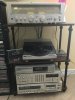
Thanks Bone. That Technics SH-8030 “Space Dimension Controller” is an interesting 1981 attempt (at surround sound maybe), combining ambience, eq, echo, fader, mic mixing, et al, with a cool graphical display. Love the look and the name, and sometimes even the sound. My $8.99 puny Realistic CD player may not have the same prestige or build quality as the Sansui G-3500, or SL-7 turntable and JVC KD-A7 cassette deck, but together they represent a wonderful sweet spot for me, and a bygone time for vintage audio. I’m stuck in the late 70s and early 80s, and perhaps others are too.
 
Last edited:
I have done this with my original xbox and sega dreamcast to get them to read games better. From all I've read it is a temporary thing and eventually the laser will burn out. Could be a year or could be 20 years but for now they work great.
With electronics, if you respect your device with good, CLEAN power, the device (and its constituent components) will respect you back with reliability and longevity.
Use an audio grade power conditioner strip. You can also cascade several to improve the AC.
Use ferrite rings on the on power cables.
For vintage or thrift shop pickups, check all electro caps for ESR and leakage. Replacing diodes with higher-quality ones also improves pwr regulation.
Power up from cold is stressful. Always on may be an option.
 
1985 lives, Technics SL- PJ1. Wasn’t fully closing drawer, so no spin or read - replaced drawer motor belt and tiny laser slider belt, still no TOC. So why not tweek the focus and tracking servos, what’s to lose right? After about 30 minutes of dialing it in, got TOC read and test CD play, listening to (and recording) third main disc on it, wow it’s (small) rear panel heat sink gets HOT. Utilizing a $25 Belgian made Philips CD recorder that needs “audio/ music” blanks, and occasionally recognizes and records on them. Whereas the Tascam 750 to the right of it fortunately will record on anything. Don’t get me started on that BS scam (Serial Copy Management System).

Perhaps you’re not a digital fan Neil, but you sure sound pretty darn good on it.

IMG_3962.jpeg
 
Hi everyone.. I need help with Technics SL-PG 570 ... clasic NO DISC .. I replace laser unit to VAM1202 equivalent .But problem is still .. I check all microswitch for Home position everything its Ok Focus coil and radial coil its working , Sledge motor working .. But laser diode not come on "checking with iphone camera" 2 or 3 sec lens try focus . I check transistor Q751, OK .. 5V its OK But Spindle motor stay , no run .. and display sey me NO DISK
 
Check the capacitors on the servo board.
Search here for the SOAD 70 transport if that’s the one you have. I don’t know that deck.
 
Back
Top Bottom