• The move to the new server is done. There are some software and database maintenance updates in process. This has us passing the hat around to help out. We appreciate any donations. Seriously, even a dollar helps. The payment page may be found here - https://www.audiokarma.org/support.html

Denon AVR-X3400H powers down after 4 mins

oldNslo

Member
This gift to me from a neighbor, who owned since new, worked fine until it didn't, and is in outstanding external and inward visual condition. I'll be using my very newbie skills to learn more and attempt a repair.

What it does:
* Powers up
* Remote works
* Tunes in FM/AM
* Display works, all AVR functions scroll through and display properly

Upon early diagnosis
* Very early powering on, results resulted in an immediate power protection situation.
* It now stays powered on for 4 mins maximum before the white operation light flashes red and powers down.
* Restarting duplicates the above condition
* DBT results are: 1) flashes the 40w DBT and a resulting rhythmic "clicking" from internals and corresponding rhythmic dimming of the DB lamp. 2) a 60w bulb duplicates this, but with a dimmer bulb experience. This happens BEFORE I power the unit on (ie Standby), and when I initially power up my DBT.
* No burnt smell
* I have the owners manual, and service manual available
* Based on my lack of experience with this unit, is seems strange that the volume (when set at 40) is a soft conversational setting. At a setting of 70, it would seem to suit a small party environment, but not requiring yelling for conversation. Seems 40 is high number for such a low volume. The volume "scale" seems to be exponential, and not linear as well.

Q1 - I've read some of the other general posts on power protection for other (non Denon) units. Where is a good place to start (threads or links) with understanding power protection concepts and later I can start my diagnosis.
Q2- Any thoughts on the volume setting of 40, being low (comparatively) and needing to get to 60-70 to be loud? I would say 50-60 would be my upper limit for listening.

I trust this is the correct forum for this question, vs Home Theatre. Mods, please move if needed.

Thanks!

Screenshot 2026-09-15 080705.jpg
 
Last edited:
Register to hide this ad
This gift to me from a neighbor, who owned since new, worked fine until it didn't, and is in outstanding external and inward visual condition. I'll be using my very newbie skills to learn more and attempt a repair.

What it does:
* Powers up
* Remote works
* Tunes in FM/AM
* Display works, all AVR functions scroll through and display properly

Upon early diagnosis
* Very early powering on, results resulted in an immediate power protection situation.
* It now stays powered on for 4 mins maximum before the white operation light flashes red and powers down.
* Restarting duplicates the above condition
* DBT results are: 1) flashes the 40w DBT and a resulting rhythmic "clicking" from internals and corresponding rhythmic dimming of the DB lamp. 2) a 60w bulb duplicates this, but with a dimmer bulb experience. This happens BEFORE I power the unit on (ie Standby), and when I initially power up my DBT.
* No burnt smell
* I have the owners manual, and service manual available
* Based on my lack of experience with this unit, is seems strange that the volume (when set at 40) is a soft conversational setting. At a setting of 70, it would seem to suit a small party environment, but not requiring yelling for conversation. Seems 40 is high number for such a low volume. The volume "scale" seems to be exponential, and not linear as well.

Q1 - I've read some of the other general posts on power protection for other (non Denon) units. Where is a good place to start (threads or links) with understanding power protection concepts and later I can start my diagnosis.
Q2- Any thoughts on the volume setting of 40, being low (comparatively) and needing to get to 60-70 to be loud? I would say 50-60 would be my upper limit for listening.

Don't know about the technical problem other than asking what happens without DBT. Sometimes the current limiting of DBT can cause improper operation.

Far as the volume control operation, sounds 100% normal to me. AVR volume operation is not similar to vintage gear. AVR normally requires a lot more turning of the knob. Just the way it is; not a technical failure, nothing broken, not harmful to the unit. As a side note, I do prefer my volume to be set for the dB scale though rather than the straight numbers. Just more familar to me in terms of operating points.
 
  • Like
Reactions: mbz
An approximate conversion of the straight numeric volume scale to the dB scale would put that 50-60 range roughly -30dB to -20dB. We commonly play movies and such in the -25 to -20 range (if just me I may push it a bit more).

But, point is, yup, the volume operation and range look completely normal to me.
 
Thanks all. Adding to the observations above, once I determined the DBT didn't need to be in play, it was removed from the startup process.

I've noticed that when the unit is plugged in for the first time (not from standby), as into the wall, it goes right to the white "powered on" mode, and NOT into standby. I can cycle it from red ON, to standby, if I don't let it run for more than 10 seconds before it flashes red (power protection). This "direct to on" sure seems strange, almost like a power supply arced open/on.

The power cord is not polarized, thus the neutral leg is not wider. Just like audio of old. I've checked 4 other units in stores today and all were polarized. This cord is factory quick disconnect at the rear, thus the cord is completely removable. Sure seems strange to not be polarized.

Q3 - The audible click of the power protection seems to be coming from the middle bottom in the back. Completely obscured by a upper PCB that contains all the rear inputs on it. Can I remove this board and power up safely in order to locate the power protection click and then do further testing?
 
Hi!
Did you reset to factory?
I don't recommend to take apart the boards! Difficult to put them back!
From the service manual you can find what the error is! Ex thermal, aso or ...
All the above procedures are in the service manual!
From there you can focus in your search.
 
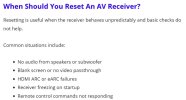
Thanks @dimanag. I have read up on what could be the reasons for needing a factory reset. While I am not opposed to trying this, my symptoms don't match any of the typical reasons for a reset (see pic), so I'll hold off for a while. Simply put, I am not having any screen, navigation or remote control issues currently.

I'll further add that in the short period I CAN get the amp running, the DC offset is 6 and 8mv for the front speakers. Again, the power gets shut down with no speakers or any input/output connected on the back. My powered on times are 30 seconds or less before protection kicks in (no output connected).

Hmmmm...


Reset guidance.jpg
 
Thanks @dimanag. I have read up on what could be the reasons for needing a factory reset. While I am not opposed to trying this, my symptoms don't match any of the typical reasons for a reset (see pic), so I'll hold off for a while. Simply put, I am not having any screen, navigation or remote control issues currently.

I'll further add that in the short period I CAN get the amp running, the DC offset is 6 and 8mv for the front speakers. Again, the power gets shut down with no speakers or any input/output connected on the back. My powered on times are 30 seconds or less before protection kicks in (no output connected).

Hmmmm...


View attachment 3838023
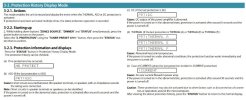
Addendum here, @dimanag, I've read and re-read your post to understand, and now see in the Service Manual, where your protection references are noted. I have the PRT: DC error. Since the AVR platform is 100% new to me, I had no idea about the built in error codes. :)
Armed with that knowledge, and knowing my DC offset is 6-8mv, where might I go looking further?

Protection status_pg 145.jpg
 
Last edited:
Is that error code specific only to the front channels?

Point being, you've mentioned DC measurement of front channels but maybe I missed measurement comments about all the other channels?
 
Ok, for your viewing pleasure, a few more data points. I had not reported on the other speakers other than the front ones, so missing are:

C = 2 to 5 mv
Surr L = 4-6mv
Surr R = 10mv
Back L = 4mv
Back R = 4mv

All as measured in the first 15 seconds of powering up, as it was protecting pretty quickly. Volume level 9db.

A later, but longer run of 28 mins of operation (gasp) produced:
LF = 9mv
RF = 4mv
C = 2-4mv
Surr L = 5-6mv
Surr R = 8mv
Back L = 3-5mv
Back R = 4mv

At the 30 min mark, I raised the volume (still no speakers attached) to 50db. I then plugged in headphones for the first time (no ill effect), and ran for a total of 70 mins before I purposefully added some Polk 8ohm bookshelf speakers. and ran for 10 more mins before I powered down in order to replicate another test. At this point I thought it had miraculously healed itself. Wrong. :mad:

Letting it rest unpowered for 60 secs, it only lasted 5 mins with L and R speakers connected before self protecting.

Letting it rest unpowered for 30 mins, then powered up with NO SPEAKERS (thinking I was onto a theory of speakers causing some level of issue), it lasted 40 mins then I powered down to replicate again.

The next 2 tests with NO SPEAKERS had the unit go into protection mode in under 2 mins. No consistency here.

Ugh!
 
From what you say, I think that one of the diferential pairs may go hi and the protection activates.
On the amp module (the big aluminum part) you have 2 or 3 power cable that supply the module. ( where all the channels are). These are powering the diferent chanells of amp. (Center, front, back). So unplaging them one by one you can narrow the problem on specific chanels. Then you can change the dif pair. ( very cheap).
 
@dimanag , thanks! Ever so helpful in moving me, forward including research I started while understanding the circuitry and layout. I have sent you a PM asking for clarification on your post.

For others participating in this, I have 5 ribbon cables going to this PCB, with wire counts ranging from 3 to 13. All black wires, with a single white in each ribbon grouping. While I can remove each of the 5 and evaluate cause and effect to the final outcome, I thought I would be prescriptive in knowing what I am removing to know WHICH speaker is the root cause. For example, with 14 speaker terminals (7 pairs), I'm doing the mental math of having 37 ribbon wires, thinking that the 3 wire cable (smallest count), might be the center speaker output. I'm then at a loss to tie the Surround, Rears and Front speakers to a specific cable count on the remaining 4 ribbons. Perhaps I am overthinking this?
 
@dimanag , thanks! Ever so helpful in moving me, forward including research I started while understanding the circuitry and layout. I have sent you a PM asking for clarification on your post.
It's certainly within your right to converse by PM. But, I suggest for your consideration that if some information is lost to the PM, it's potentially information that could help someone else if it was in the public view rather than in private.
 
  • Like
Reactions: mbz
Thanks, I appreciate the guidance. I believe I accomplished both (in my post #12), by PM and forum thread response. The reasoning for the PM was noted there as well.. I do have the appropriate service manual, and have been reviewing all 198 pages of it, including snippets taken from it in this forum post.

All good.
 
Last edited:
CASE CLOSED, problems solved. How? Its a mystery. Although I narrowed down the issue to the ribbon cable powering the 7 channels as being the protection cause, I tried further to even further diagnosis with jumpering each of the speaker cables individually, to identify WHICH channel was the root cause. Realizing that worked, but I got no sound (it was too far disassembled) and needed other boards installed, it was buttoned up ensure I could retry the jumpering, but with all the boards installed.

It's been playing for hours, no issues, several power on and off cycles.
 
Back
Top Bottom