• The move to the new server is done. There are some software and database maintenance updates in process. This has us passing the hat around to help out. We appreciate any donations. Seriously, even a dollar helps. The payment page may be found here - https://www.audiokarma.org/support.html

Desoldering problems

gonzo4886

New Member
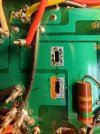
Hello, I'm trying to recap my Kenwood KA-9100. This is the first time I've ever desoldered on anything this old. The soldering field came delaminated from the board. I'm afraid I may have ruined it. I had the heat on the lowest setting on my desoldering iron. I'll attach some pictures. Am I able to save this?

Thanks
 

Attachments

  • IMG20230628193938.jpg
    IMG20230628193938.jpg
    121.5 KB · Views: 26
  • IMG20230628193950.jpg
    IMG20230628193950.jpg
    126.3 KB · Views: 26
  • IMG20230628193955.jpg
    IMG20230628193955.jpg
    130 KB · Views: 25
  • IMG20230628193959.jpg
    IMG20230628193959.jpg
    146 KB · Views: 26
Register to hide this ad
Simple to save.
All that light green around each solder pad is masked conductor. You can solder in the new parts and if they don't make a connection, clean some of the mask off and solder to that cleaned space using wire or whatever to connect the device.
 
What the guys said above, plus this: I've learned the hard way that sometimes having an iron that it too cool causes more damage like this than a hotter iron. Reason being, but the time the colder iron gets the solder hot enough to melt, the heat has had time to spread and loosen the adhesive that holds the foil to the substrate. A hotter iron heats the solder and melts it before the heat can saturate the area.
 
yeah, too cold is worse than too hot. The longer you are on the pad, the more chance it has of coming off. Ideally you want the solder to melt almost immediately so you can get in and out within a second or so.

and +1 on scrape and bridge the connection. I've made "lollipops" out of cut-off component lead for this sort of thing.
 
Back
Top Bottom