


Some of you may have also seen my post on amp pairings for these b&w matrix 803 speakers, but wanted to start a dedicated thread to a problem I discovered with them. The good news is they are gorgeous and seem to be in good cosmetic shape. The bad news is that the woofer in one of them is making a buzzing/rattling noise. I associate that with a blown speaker. I tried to get a video of it here.
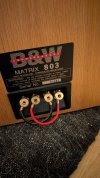
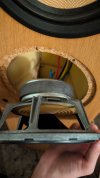
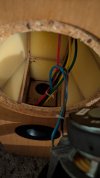
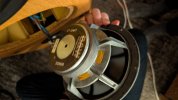
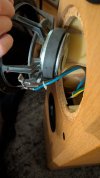
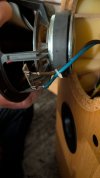
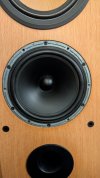
I've also attached photos of the speaker and the woofer pulled from the cabinet. I didn't want to do more than unscrew it and take some photos since I don't know what I'm doing. The rubber pad thing that covers the screws around the woofer was pulled up when I got it (see photo) so I screwed the woofer in a bit and pushed the rubber in before testing it.
If relevant, the receiver is underpowered for the speakers but has only been hooked up for this test play. The speaker wire is also too thick for the terminal in the receiver so it's kind of just jammed in there with a few loose/splayed strands. None touching other speaker wire though.
I tried swapping speaker wire from left to right speaker and it was still present in the same spraker, which I believe rules out a speaker wire or receiver issue. I also tried swapping the speaker wire input from the left two inputs to the right two, and it made no difference.
I also pressed the woofer from the outside and it felt normal, soft, and smooth. I confirmed the woofer is not loose in the cabinet.
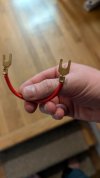
The red cable jumper wire fell out in transport and I had to put it back in. I believe I attached it correctly though I've never used one of those before.
Is there anything obvious I'm missing? Any easy next steps to try aside from take it to a repair shop?
I've also attached photos of the speaker and the woofer pulled from the cabinet. I didn't want to do more than unscrew it and take some photos since I don't know what I'm doing. The rubber pad thing that covers the screws around the woofer was pulled up when I got it (see photo) so I screwed the woofer in a bit and pushed the rubber in before testing it.
If relevant, the receiver is underpowered for the speakers but has only been hooked up for this test play. The speaker wire is also too thick for the terminal in the receiver so it's kind of just jammed in there with a few loose/splayed strands. None touching other speaker wire though.
I tried swapping speaker wire from left to right speaker and it was still present in the same spraker, which I believe rules out a speaker wire or receiver issue. I also tried swapping the speaker wire input from the left two inputs to the right two, and it made no difference.
I also pressed the woofer from the outside and it felt normal, soft, and smooth. I confirmed the woofer is not loose in the cabinet.
The red cable jumper wire fell out in transport and I had to put it back in. I believe I attached it correctly though I've never used one of those before.
Is there anything obvious I'm missing? Any easy next steps to try aside from take it to a repair shop?
Attachments
-
 PXL_20261003_204829792.jpg97.9 KB · Views: 12
 -
 PXL_20261003_204757689.jpg66.6 KB · Views: 9
 -
 PXL_20261004_024701566.jpg104.4 KB · Views: 8
 -
 PXL_20261003_204941587.jpg39.6 KB · Views: 9
 -
 PXL_20261004_035833672.jpg69.1 KB · Views: 8
 -
 PXL_20261004_035845884.jpg53.9 KB · Views: 8
 -
 PXL_20261004_035859685.jpg62.2 KB · Views: 8
 -
 PXL_20261004_035919847.jpg66.4 KB · Views: 7
 -
 PXL_20261004_035925374.jpg51.2 KB · Views: 8
 -
 PXL_20261004_040417942.jpg81.1 KB · Views: 11

