• The move to the new server is done. There are some software and database maintenance updates in process. This has us passing the hat around to help out. We appreciate any donations. Seriously, even a dollar helps. The payment page may be found here - https://www.audiokarma.org/support.html

Discussing Decibels

04blackmaxx

Well-Known Member
I just downloaded this free Android app for the fun of it and see that the meter oscillates between 80-90 at my average listening level with the volume a tad past 9 o'clock on the dial. This is from my couch about 12' away.

I pushed it to 95db and that's about where I draw the line for short periods for certain songs if im in the mood to crank it.

Then I found that when it got to the point where it sustained 95db clearly, was pretty much as far as it could be pushed without the sound falling apart. Never clipped though on this particular album. Weird how when it hit that 95dbfigure...it just held it there. Its WAY too loud but man it was still clear.

You guys ever fiddle with a db tool?
 
Last edited:
Register to hide this ad
I just downloaded this free Android app for the fun of it and see that the meter oscillates between 80-90 at my average listening level with the volume a tad past 9 o'clock on the dial. This is from my couch about 12' away.

I pushed it to 95db and that's about where I draw the line for short periods for certain songs if im in the mood to crank it.

Then I found that when it got to the point where it sustained 95db clearly, was pretty much as far as it could be pushed without the sound falling apart. Never clipped though on this particular album. Weird how when it hit that 95dbfigure...it just held it there. Its WAY too loud but man it was still clear.

You guys ever fiddle with a db tool?

What type of phone do you have? I have a Galaxy S3 with the Noise Meter app and it peaks at 90.3dB. So, I ordered a real sound level meter to play with.
 
What type of phone do you have? I have a Galaxy S3 with the Noise Meter app and it peaks at 90.3dB. So, I ordered a real sound level meter to play with.

Its an HTC One. Im sure its not a perfect reading but hey, its free. This app has a meter that goes to 130. I yelled at the phone at the top of my lungs and got 94. Yeah its been a boring day.
 
Some of them are fairly accurate. Not lab grade, but enough so for forum chatter.

However, even if the tool has the capability to register up to 130dB, that doesn't mean your phone's mic and circuits will facilitate that much. As someone mentioned previously, some phones will only register up to 90-95dB because it's the limitation of the hardware.
 
Sustained 85-90db is considered about average for casual listening. Good target level anyway.

PS ... not familiar with that specific app, but it'd be interesting to know exactly what it's reading and how. Typically, the number you're seeing would be SPLs - Sound Pressure Levels - and lot depends on how well the mike is calibrated and how the results are weighted. Unless it's a real smart app that senses the phone it's working with, I'd think it's more guessing than science.

Be interesting to do a head to head comparison between the app and a calibrated mike into something like REW software, or even a true analog SPL meter ...
 
I use SPLnFFT in my i5s. Works good. Here're couple screen shots.

attachment.php


attachment.php
 

Attachments

  • image1.jpg
    image1.jpg
    91.9 KB · Views: 83
  • image2.jpg
    image2.jpg
    91.6 KB · Views: 83
I don't use a smartphone, otherwise I would use this app. I've been hearing about it for some time, and it sounds incredibly-cool.

What I REALLY need is a pair of power meters that I can run between my Fisher and my W90's. My 800C has that dang volume knob/power switch that screws with the balance at lower settings, and having a pair of easily-readable LED power meters would make it a since to balance the channels manually. I'm pretty good at doing it by ear with the right recordings, but I'm gonna' wear out the damn balance knob twitching it back and forth. I need to be able to do it quick, and the external meters would allow this.
 
I've calibrated the SPL meter on the Galaxy S3 against a Technics frequency generator/meter I have. I've measured SPL peaking at around 95dB with comfortable levels (loud but tolerable). I was testing a pair of loudspeakers that can really play loud and when loud I thought they were distorting a lot. At around 105-110dB I could see the amp's VU meter lamps dimming in sync with the music. The amp was probably going into clipping. It was not a comfortable sound level. I think that peaks of 105dB is the max I would comfortably live with.

Listening to music in background (and concentrating to something else, like reading) is done at 80-85dB max. Anything more than that and the sound level just forces you to focus on the music.
 
Its an HTC One. Im sure its not a perfect reading but hey, its free. This app has a meter that goes to 130. I yelled at the phone at the top of my lungs and got 94. Yeah its been a boring day.

Got my car stereo to hit 109db with this app.. Not sure if it's due to the phone microphone quality or what, but the application definitely responds better to high frequencies.
 
Have to see if this app available for iPhone ... Have a RatShack analog SPL meter from back in the day we manually calibrated HT surround systems. Will be interesting to see how accurate and the limitations of the app/hardware.

And careful with those listening levels. Even 90-95 DB can effect permanent hearing loss (NIOSH sets permissible duration at 95db under one hour) and with the winning of the loudness war, even popular music is being recorded with greater dynamic range these days
 
Have to see if this app available for iPhone ... Have a RatShack analog SPL meter from back in the day we manually calibrated HT surround systems. Will be interesting to see how accurate and the limitations of the app/hardware.

I have the analog SPL meter from Radio Shack and had wondered how the phone apps would compare but have been too lazy to download and compare. It would be interesting for someone to post a comparison. Even if not really accurate, I would think an app would work well to balance a surround system.
 
Yeah, for a surround setup the relative level of each channel to the others is much more important than the exact value of the levels.
 
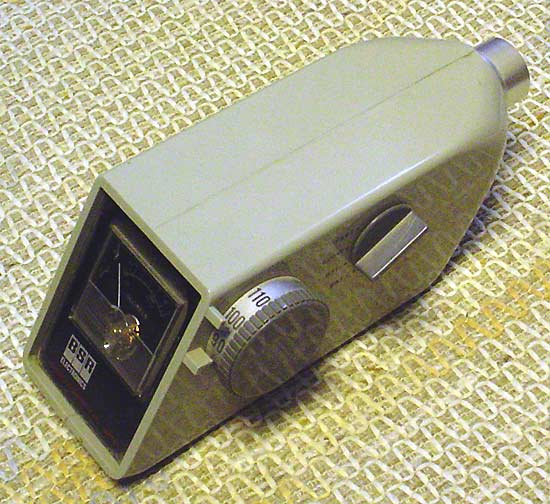
Old Faithful here ...

bsr-spl.jpg


I use that to calibrate this ...

rta-eq-setup.jpg


Tain't NO room irregularities that can hide from REW ...
 
Sustained 85-90db is considered about average for casual listening. Good target level anyway.

PS ... not familiar with that specific app, but it'd be interesting to know exactly what it's reading and how. Typically, the number you're seeing would be SPLs - Sound Pressure Levels - and lot depends on how well the mike is calibrated and how the results are weighted. Unless it's a real smart app that senses the phone it's working with, I'd think it's more guessing than science.

Be interesting to do a head to head comparison between the app and a calibrated mike into something like REW software, or even a true analog SPL meter ...

If I go to tools - calibrate - it shows sound pressure ratio and a number in the hundreds to thousands changes under the sound pressure ratio, then it says *calibrated = 59 (changes around) + 0) db and you can hit ok at any time.
 
Back
Top Bottom