• The move to the new server is done. There are some software and database maintenance updates in process. This has us passing the hat around to help out. We appreciate any donations. Seriously, even a dollar helps. The payment page may be found here - https://www.audiokarma.org/support.html

Faint C32 Background Static

Johnny_Law

o.O
Subscriber
My C32 works great, sounds great. BUT it has a very faint background static coming through the speakers that I'm trying to chase down.

The kind of background static that's only noticeable when there's nothing playing, e.g., between tracks. Even then it's quiet - but noticeable. I want to get rid of it.

Notes on the C32's condition: My C32 has all new ribbons internally, and all new electrolytic capacitors (except for the filter caps and C913/C914 in the amplifier because I ran out of 10uF / 50V caps). All the pots have been cleaned.

I notice the static when using my MC2105 amp, but if I turn on the amp without turning on the C32, no static at all. Once the C32 turns on, there's static. If I swap interconnects, the static remains.

The static grows louder with more volume.

The static remains unchanged regardless of:
-input source
-eq out on/off or any equalizer adjustments
-loudness
-balance (i.e., on the R speaker, static remains even with balance full L, and vice versa)

The static ONLY disappears with:
-Expander activated and fully clockwise

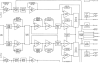
So ... looking at the block diagram, downstream of Balance is:
-Equalizer Op Amp
-FET filter Op amp
-Equalizer defeat switch (but Eq Out on/off doesn't affect the static)
-Expander & bypass (this DOES affect the static)
-Turn on delay & bypass

So ... my first guess is to focus on the Expander circuit / bypass (since there's static without expander engaged, but it goes away with expanded engaged and at max strength)?

Any suggestions for further tests?

Thanks in advance ...
upload_2023-6-5_21-44-59.png
 
Register to hide this ad
Hello,

if your static noise is constant, I would trace signal with scope from preamp outputs toward inputs to see which board 'generates' noise. Then you can narrow your problem. It might be that some power supply rail have problem if static is in both channels.
 
For optimum sound the volume controls on the 2105 should be set at the 12:00 position. I preferred around 11:00 position when using 2105s or 2505's pushing efficient speakers. That is why the next generation of amps had sensitivity switch where you could select 2.5 volts for optimum performance from MAC pre-amps. Some of the newer amps today are even less sensitive requiring more voltage from the preamps. With your volume controls wide open you are loosing close to 15 db of signal to noise ratio.
 
Update on this is that the Right channel started becoming intermittent. It seemed to come back if I toggled the EQ button on and off. But now it's totally gone.

If I put the Balance all the way to the Right channel, silence. (Regardless of source, iirc, but I'll be testing it on the bench.)

When I spin the volume knob higher, I can occasionally hear a crackle of music but that's it.

So I need to dig into it to figure out where the signal is dropping out. I'm wondering if it's related to the source of the static I had when I originally posted.
 
Update: I replaced the Eq OpAmps and the Right channel came back.

However it occasionally still drops out but comes back if I (a) turn up the volume and/or (b) toggle various switches. So I am pretty sure this just means something is still dirty.

Also the background hiss is still present in both channels. I will see if it remains after the next round of deoxit.
 
I think ... I have it isolated to the OpAmps and/or reed relays on the Expander board (from searching, it seems those reed relays have been known to go bad).

With the Expander OFF, both channels have faint static that is unaffected by:

Input
Eq
Volume
Balance
Loudness

When I turn the Expander ON, the static gets much stronger and I can also hear random pops and clicks. As I keep turning the Expander knob clockwise, the static gets quieter and eventually at full CW is about as strong as it is with the Expander OFF.

The way the Expander circuit works, when the Expander is OFF, the Reed Relay K801 closes switches K801-A and K801-B (to let the audio bypass the Expander OpAmps) while K802 opens switches K802-A and K802-B (opening the circuit from the OpAmps IC801/IC802 -> IC807/IC808 -> IC803/IC804 -> IC805/IC806).

So it's my first hunch that either K801 or K802 is bleeding into the signal path, since I'm getting the static on both channels, or maybe it's a combination of those OpAmps, or maybe it's both things?

I think my first step will be to remove K801 and K802 and jump the L(in) pin 24 to the L(out) pin 6 to physically bypass the entire Expander board, and see if the static disappears on the L channel.
 
With my C-34 when that happened Audio Classics had to rebuilt the EQ switch as they are no longer available. Its still working after 6 years.,
 
Good news is I made some diagnostic progress today. Bad news is it wasn't what I thought.

To diagnose, I've got an iPod -> RCA cable -> C32 AUX input -> RCA cable -> MC2105 -> speakers.

I removed K801 from the audio signal path, then I jumped one channel across the relay and left the other open. Hooked it back up ... same exact static as before on both channels. So that rules the Expander relays out. Then I put it back into the circuit and removed the jumper.

So on a whim I disconnected the C32 from the MC2105 and turned on the MC2105. Ears up to the speakers, SAME STATIC! The static is affected by the Gain knobs of the MC2105 though: it got louder at max gain, disappeared at min gain.

Back to the C32, I used headphones as well as speakers connected to the Monitor Amp outputs.

So, iPod -> RCA cable -> C32 AUX input -> Headphones & Monitor speakers

NO STATIC with Loudness turned all the way down. Turning Loudness up, static comes back in proportion to the Loudness knob.

So the diagnostics today are:

-It's the MC2105 with the constant background static
-The C32 has background static as well, but it's somehow related to Loudness or at least upstream of Loudness
-Confirmed that both C32 channels are working fine otherwise, and sound great at actual listening volume
 
Well, the loudness, when increased, raises treble and bass frequencies. So, this often results in more high end static, as the treble increases. My C34 does this same thing with the loudness control.
 
I de-oxited & faderlubed the Loudness pot in the C32, but no change. The static remains when the Loudness knob is turned up. But ... I will admit, it's hardly noticeable compared to the static coming out of the MC2105.

So, I put the MC2105 on the bench and (1) confirmed the static is present at the speakers with no input signal present, and (2) is affected by Gain - no static when Gain is all the way down, loudest static when Gain is all the way up.

Then I removed the driver boards (updated originals), static disappeared at max Gain.

Then I inserted a pair of brand new driver boards I have from McIntosh (destined for my MC2300) ... same static as before. So it's not the driver boards.

So it must be coming from something upstream of the driver boards.

I will start a new thread about it at some point - this thread about the C32 background static, is for the most part solved by figuring out the loudest static was actually coming from the MC2105...
 
No need to start a new thread. You can edit the title to reflect the issue.

When you say "static", what exactly are you hearing? A regular hiss? Irregular crackling? Snapping?

Makes a big difference in trying to figure out what, if anything, is wrong. Note that old(er) transistors are not as quiet as newer ones. There also could be an ultrasonic oscillation going on.
 
A quick note about my MC2105. The input switch has been re-wired to function as a stereo / mono switch - like the MC2100 - instead of a cap coupled / direct switch. See https://audiokarma.org/forums/index...ono-re-wire-also-terminal-block-notes.961548/ which is my thread about that.

The switch is clean as are the RCA inputs. In fact, the buzzing is loudest with no RCA inputs connected.

By "static" I mean like a buzzing sound (in my mind I'm thinking like radio or TV static). It's a constant soft buzzing with, if you listen very closely, occasional pops. I first noticed it with my L300s - instead of pitch black sound there was always a faint static buzz when nothing was playing that drove me crazy. Then the C32's left channel dropped out and I figured they were related, and started this thread thinking it was the C32's fault.

I'm mindful that the gain pots are immediately downstream of the inputs in this circuit. Therefore, if the buzz goes away when the gain controls are minimized, it may be that the buzz is being picked up by the RCA inputs / input switch. See this post by @TSmith8605 .

I tried to take some pics and videos to help explain what's happening.

I started with a shorted RCA plug in the left input, and nothing in the right input. I tried to show that the left speaker is outputting a soft buzz with the input shorted, but the cell phone microphone didn't pick it up. I also tried to show that the right speaker is outputting the buzz/clicking much more loudly with no input attached, which the cell phone did pick up.


Then as a sanity check I ran a 1kHz test tone into the MC2105 via my cell phone and a 3.5mm to RCA L/R cable. The amplitude is not important. I saw the same relatively clean 1kHz output from both channels (with this cool new single-channel handheld scope I picked up).

1701663434955.png

This led to a maybe major discovery regarding the speaker on/off switch. With the 1kHz test tone playing, the right channel all of a sudden went quiet regardless of Gain. I found that cycling the speaker on/off switch brought it back. When it came back, it was dead quiet. (So my next step may be to de-oxit / faderlube the speaker switch.)

Regardless I then, with the cell phone -> RCA cable still connected, but with no test tone, and observing the static/buzz/pops in the left channel, tried to capture it with the scope. Here's the best video I took of it. (For comparison, the same measurement on the now-quiet right channel shows a dead flat signal on the meter at the same settings.)


So ... from here, I'm going to de-oxit the speaker switch (as some, like this guy at ~3:19, have noted can introduce noise into the signal), and see if that quiets things down.

Open to any other suggestions, happy to take any other measurements. Thanks for following along.
 
After much head scratching in the garage, I have become convinced (for now) that the popping is coming from my cheap 3.5mm RCA cable I'm using to hook up my cell phone / iPod to the MC2105 for testing. I suspect it's picking up some kind of signal? The popping changes as I physically move the cable around.

So, I brought them back inside (where my awesome Yamaha A-1000 had been holding down home office music duties with the MC2105 & C32 in the garage). Took the A-1000 back out of the Barzilay, and in went the Mac gear (I'll replace the TX-500U with my MR71 as soon as I fish the MR71 out of storage):

1703466775991.png

Because I had noticed the static increases with the gain knobs turned up, I set it up this time by setting the C32 volume knob a little over halfway up, then increasing the MC2105 gain knobs gradually until I hit the max volume level I'd ever want. Now I have much finer control of the volume with the C32's volume knob, and the background static / hum through the speakers at normal listening levels is not noticeable. Previously, I had the MC2105 gain knobs all the way max, which meant I was only 3 or 4 clicks of the C32's volume knob away from really loud music. I've read different things about how you're *supposed* to set the gain knobs, but this new way seems to work much better in terms of eliminating background noise.

Both channels of the SL-1650 are sounding great now through my A100s!

1703467011464.png

Knock on wood it is good like this. I'll follow up if it starts going bad again!
 
The MC2105 owner's manual doesn't specify a setting for the left and right gain controls, but the photo of the front shows both in the 12 o'clock position.
 
LOL, that is exactly where my Gain knob’s are positioned on my fully rebuilt 2105 that is connected to one of my C33s. I just wanted to be on a different section if the level pot. No static noises, just a very slight power transformer hum.
 
Back
Top Bottom