
• The move to the new server is done. There are some software and database maintenance updates in process. This has us passing the hat around to help out. We appreciate any donations. Seriously, even a dollar helps. The payment page may be found here - https://www.audiokarma.org/support.html

Foam rot on KEF Reference 105.4 speakers

Joris Ceoen

New Member
I've been having my father's KEF Reference 105.4 speakers for a few years now and have been using them with utmost joy almost every day. They've never been revised and have the original components from 40 years ago, with the only exception being that the wooden cases have been revarnished.

It's being used for all sound (music/TV/console). I bought a Yamaha A-S1100 amplifier to somewhat match the requirements for the speakers.

However, in the last months I've been experiencing some weird crackling noises and feint audio loss of the left channel from time to time. I've then decided to re-wire everything, cable-manage and doublecheck every single thing that could have caused this. Eventually the balance seemed completely right again, but after listening/testing a while the bass seems to just have changed from what it used to be. All-in-all they still sound incredible, but on a higher volume you start to hear that the bass sounds slightly deformed or weaker (not easy to explain but it's different).

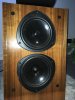
All was confusing, until I removed the covers for the first time in quite a while:
thumbnail_IMG_6086.jpg thumbnail_IMG_6085.jpg

Is this foam rot? I've tried Googling the symptoms and it's the only term that comes up. If so, are my speakers done for? I carry these speakers in my heart and soul and would be devastated if no repair of any kind is possible (I doubt original replacement kits exist anymore).
 
Register to hide this ad
It could be what's called *woofer sag*, where the voice coil starts to rub the magnet. From what I've read, it's fairly common with those particular KEF woofers. The fix is to rotate them. Remove the screws, rotate (one position) and replace the screws. A google search for KEF woofer sag will pull up several AK threads.

Another thought is to ask the mods to move your post to the KEF owners thread. https://audiokarma.org/forums/index.php?threads/kef-owners-thread.630884/ Lot's of KEF knowledge there. Simply hit the report button, at the bottom of your post, and ask that it be moved.

If that doesn't fix the issue, it's possible (but less likely) there's a weak cap in the crossover. Also fixable, but a little more involved.
 
It could be what's called *woofer sag*, where the voice coil starts to rub the magnet. From what I've read, it's fairly common with those particular KEF woofers. The fix is to rotate them. Remove the screws, rotate (one position) and replace the screws. A google search for KEF woofer sag will pull up several AK threads.

Another thought is to ask the mods to move your post to the KEF owners thread. https://audiokarma.org/forums/index.php?threads/kef-owners-thread.630884/ Lot's of KEF knowledge there. Simply hit the report button, at the bottom of your post, and ask that it be moved.

If that doesn't fix the issue, it's possible (but less likely) there's a weak cap in the crossover. Also fixable, but a little more involved.
Hey, thanks for the reply! So, the moistury texture appears simply because I haven't rotated it for a long time? I've never heard of having to do that, but I'll definitly look into it.
Is it just unscrewing those three screws, then rotate the bass woofers? Or is it more complicated (afraid to break something... never operated a speaker ever before. It has to be easy-peasy to do or else I will have someone else need to do it :bowdown:).

Alright, I'll do that and get the thread moved! Still pretty new here, not always sure where to post :)
 
Those B200 base drivers have rubber surrounds so there is no foam rot. Perhaps they need rotating as rickb119 suggested.
 
Is it just unscrewing those three screws, then rotate the bass woofers?
Yes.

I really can't see much from the pictures, but then I'm old, with not so good eyes. However, the texture issue is not related to the need to rotate. It's actually recommended that they be rotated, every so often (can't remember how often) to prevent sag. What caused the texture issue? I don't know, but hopefully, someone with more knowledge will chime in.
 
The texture on the b200 base drivers appears to be delamination of the plastiflex coating on the Bextrene cone. It has nothing to do with rotation of the drivers.
 
The texture on the b200 base drivers appears to be delamination of the plastiflex coating on the Bextrene cone. It has nothing to do with rotation of the drivers.
I see... learning a lot of stuff here :D after the whole rewiring and cable-management done, it does sound like there's no longer a real issue. I guess I could give it a very careful try to rotate them, since I'm sure they haven't been rotated in many many years.
About the delamination, is that a problem or sign of a larger problem at hand? If it's something of applying liquids I'm afraid my poor knowledge of handling fragile stuff like this will be of little use.
 
I don’t think it is a problem. The Plastiflex coating on the front of the driver was primarily used to adhere the dust cap in place and make it air tight. There is a plastiflex coating on the backside of the driver which is important because it was coated to achieve proper damping of the cone.

Don’t apply any liquids to these drivers. If you want to remove dust just use a soft cloth and gently wipe or use a soft camels hair brush.
 
Looking at your photos again, it appears that some solvent may have come in contact with the drivers to cause the mottle effect. You mentioned that the cabinets were varnished and you never removed the drivers. Perhaps some solvent came in contact with the drivers when the varnish was applied. If the varnish was not applied in a well ventilated space, it is possible that fumes from the varnish might attack the plastiflex coating. Just speculation.
 
Just as an FYI (which you probably already know), it's best to lay the speakers on their back before rotating the drivers.
 
Looking at your photos again, it appears that some solvent may have come in contact with the drivers to cause the mottle effect. You mentioned that the cabinets were varnished and you never removed the drivers. Perhaps some solvent came in contact with the drivers when the varnish was applied. If the varnish was not applied in a well ventilated space, it is possible that fumes from the varnish might attack the plastiflex coating. Just speculation.
I had the new varnish be applied by a professional audio repair shop, so I don't think that's going to be the issue. In the end, I can't recall whether this is a recent symptom or if it has been like this for a longer time unfortunately, so perhaps it's been like this for years.
Just as an FYI (which you probably already know), it's best to lay the speakers on their back before rotating the drivers.
Ok, thanks for the heads-up! ;)
 
Back
Top Bottom