• The move to the new server is done. There are some software and database maintenance updates in process. This has us passing the hat around to help out. We appreciate any donations. Seriously, even a dollar helps. The payment page may be found here - https://www.audiokarma.org/support.html

Frequency analysis apps

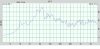
20B6C6F2-3B35-4CF0-BDCB-417582A68F8D.jpeg Have any of you downloaded any apps for analysis of your system? I picked up AudioTools and so far I really like it but I have no idea how accurate the information is. Included is a graph from the app on my main system. It’s the low end as that’s what I was looking at at the time. Seems to be reasonable but I’m getting something of a peak at about 16hz which I didn’t expect. My subwoofer is a RSL Speedwoofer 10s. Yes it’s only a 10” woofer but it makes a lot of bass but 16hz is a surprise. It’s advertised as having audible sound at 20hz which the graph seems to bear out. The music is Psychic TV the song Tribal using FFT graphing with peak hold using the AudioTools app. Thoughts?
 
Register to hide this ad
I just got very deep into this over the past month, using software called REW: https://www.roomeqwizard.com and the XREF20 calibration microphone from Sonarworks.

Based on my measurements and looking at graphs from other peoples' measurements, that doesn't look good at all. You have a more than 40dB difference between that peak and the lowest dip in your mids. My entire graph covering my speaker's 40Hz-20,000Hz doesn't deviate by more than 8 or 9 dB from the peaks to lows.

Another issue is that your measurement level looks too low. Your average is hovering around 40dB, which is the level of background noise in your house. A normal music listening level would be more like 75-85dB, so that could also explain why your results aren't accurate. I don't have a sound pressure level meter, so I used an app on my iPhone 12 called NIOSH SLM - not the best but good enough for calibrating the sound level.

What microphone are you using, where are you placing it and at what angle, and is it individually calibrated? I quickly learned that the only way to get accurate measurements is to use a microphone designed for this application, and it needs to come with its own, unique calibration file. I also calibrated REW to my soundcard to compensate for any coloration from that source.

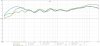
Here's my graph, where brown is the average of my L/R speakers measured from exactly 24 inches away, green is the R speaker from my listening position, and blue is the L speaker from my listening position. It's interesting to compare the close measurement with the listening position one, to get an idea of what effect the room is having.

This process is very scientific, so I would recommend searching for tutorials on youtube that walk you through it, preferably from recording engineers who do this stuff for a living. The results are worth it - my speakers and room sound incredible now.

2021-05-24_REW_LR_opera_speaker_center_edge_close_average_dayton_woofers.jpg
 
Last edited:
I just got very deep into this over the past month, using software called REW: https://www.roomeqwizard.com and the XREF20 calibration microphone from Sonarworks.

Based on my measurements and looking at graphs from other peoples' measurements, that doesn't look good at all. You have a more than 40dB difference between that peak and the lowest dip in your mids. My entire graph covering the 40Hz-20,000Hz doesn't deviate by more than 8dB from the peaks to lows. Another issue is that your measurement level looks too low. Your average is hovering around 40dB, which is the level of background noise in your house. A normal music listening level would be more like 75-85dB, so that could also explain why your results aren't accurate.

What microphone are you using, where are you placing it and at what angle, and is it individually calibrated? I quickly learned that the only way to get accurate measurements is to use a microphone designed for this application, and it needs to come with its own, unique calibration file. I also calibrated REW to my soundcard to compensate for any coloration from that source.

Here's my graph, where brown is the average of my L/R speakers measured from exactly 24 inches away, green is the R speaker from my listening position, and blue is the L speaker from my listening position. It's interesting to compare the close measurement with the listening position one, to get an idea of what effect the room is having.

This process is very scientific, so I would recommend searching for tutorials on youtube that walk you through the process, preferably from recording engineers who do this stuff for a living. The results are worth it - my speakers and room sound incredible now.

View attachment 2245068

Thank you for your input. I’m trying to learn and just using an app on my phone which may not be possible at all. I was taking measurements approximately 8 feet from the source. Like I said I’m just using an app that may not be accurate in anyway right now I have no way of verifying that
 
Many posters on AK use REW a PC and a calibrated mic to do frequency analysis. Many of us use the resulting figures to program a DSP. Usually, a flatter in room response is what's desired.

In my case, my reference SPL level for flat(ter) in room response is 85dB A-weighted measured where my head usually is.
 
Many posters on AK use REW a PC and a calibrated mic to do frequency analysis. Many of us use the resulting figures to program a DSP. Usually, a flatter in room response is what's desired.

In my case, my reference SPL level for flat(ter) in room response is 85dB A-weighted measured where my head usually is.[/QUOTE

284F4559-8C31-48E1-9ED2-EE85572ACEDB.jpegThank you so much! This is the graph I got using the app I got on my phone. This is no DSP, or at least as much as I can turn off on my Yamaha A/V receiver. I’m just now scratching the surface I’m going to have to invest in something a little better.
 
The website for the REW software which I linked in my post has tons of info explaining how it's done. There is no way you're going to be able to get useful measurements from an app on your phone, especially with the built in microphone, but even with an add-on microphone if it's not designed for this purpose and calibrated. You definitely want to do this with a good microphone and software on a laptop. Let us know how it turns out!
 
The website for the REW software which I linked in my post has tons of info explaining how it's done. There is no way you're going to be able to get useful measurements from an app on your phone, especially with the built in microphone, but even with an add-on microphone if it's not designed for this purpose and calibrated. You definitely want to do this with a good microphone and software on a laptop. Let us know how it turns out!
Thanks a ton! I’ll definitely update when I get something I can work with.
 
It doesn't get much better than REW (room equalization wizard) and it's a free download. Parts Express and Mini DSP have calibrated USB Mic's. They are less than $100. You will need a PC to complete the hardware requirements. I use a laptop that is also my music server.

The mics built into Android phones may be totally inaccurate. Every manufacturer has slightly different hardware. A single app can't be accurate for a bunch of different mics. Apple has a plus in this area. They monopolize their hardware so an app only has to work correctly with one mic.
 
It doesn't get much better than REW (room equalization wizard) and it's a free download. Parts Express and Mini DSP have calibrated USB Mic's. They are less than $100. You will need a PC to complete the hardware requirements. I use a laptop that is also my music server.

The mics built into Android phones may be totally inaccurate. Every manufacturer has slightly different hardware. A single app can't be accurate for a bunch of different mics. Apple has a plus in this area. They monopolize their hardware so an app only has to work correctly with one mic.
Thanks for the input. I’m definitely going that route. I’m using an Apple phone but I can see that it’s consistently missing pretty much everything over 15khz. I probably couldn’t hear it anyway but I can’t believe none of the speakers in the house are incapable of producing sound at those frequencies. The app seems to recognize the microphone but what that means for the end product is beyond me. I have a laptop available I just need a microphone and to download the software and I’ll be in business.
 
There's not really a lot of musical information above 15KHz. What's there is mostly overtones. Your iPhone probably produces better results than you think. It's that Apple monopoly at work.

Using measurements to adjust and set things or just to satisfy curiosity is very enlightening.
 
It is indeed! Curiosity led me in this direction to begin with and it has indeed been enlightening. I intend to get a different microphone and the room equalization wizard software and compare to see if the app and iPhone microphone will work for this application.
 
In theory, an app could know the characteristics of the mic built into the individual models of phone, and compensate to make them a bit more accurate. That theory is probably only practical for iPhones (where there are a limited number of models), and likely would not practical at all for Android (where there are a gazillion brands and models of Android phones). It would be interesting to know if any apps try to compensate for the mics in a given phone. Even then, an app wouldn't compare to REW with a calibrated mic.
 
I’ll let you know what I find. I was told the app recognizes the mic and compensates accordingly but I don’t know how true that is. It’s been interesting so far to say the least.
 
Any app written specifically for an iPhone should be as good as it gets for an iPhone..

Just bite the bullet and buy a calibrated USB microphone.
 
I bought a microphone for my phone... It plugs in the headphone adapter and I use the same app you got. It was fairly inexpensive and a bunch of guys use them for measuring response for building speakers. I also have a umik microphone which I use with REW. For quick frequency graphs the external mic for phones is actually quite good
 
I bought a microphone for my phone... It plugs in the headphone adapter and I use the same app you got. It was fairly inexpensive and a bunch of guys use them for measuring response for building speakers. I also have a umik microphone which I use with REW. For quick frequency graphs the external mic for phones is actually quite good
Thank you for your response. I was hoping to hear from someone that used the app. It’s gotten me started and helped me get my feet wet it’s time to buy a mic.
 
Back
Top Bottom