• The move to the new server is done. There are some software and database maintenance updates in process. This has us passing the hat around to help out. We appreciate any donations. Seriously, even a dollar helps. The payment page may be found here - https://www.audiokarma.org/support.html

Getting 5.1 from an old Amp

sancho_s

New Member
I have an old amplifier Onkyo HT-S590 5.1.
I used 5.1 with DVDs, but these are mostly unavailable nowadays.

How can I get 5.1 sound, from Netflix, HBO, Spotify, etc.?

The rest of the equipment I have is a non-smart TV LG 32LH30FR, with a Chromecast (probably 1st gen).
I could purchase a Bluetooth receiver, if that helps.
Thanks!

EDIT
 
Last edited:
Register to hide this ad
I have an old amplifier Onkyo HT-S590 5.1.
I used 5.1 with DVDs, but these are mostly unavailable nowadays.

How can I get 5.1 sound, from Netflix, HBO, Spotify, etc.?

The rest of the equipment I have is a non-smart TV LG 32LH30FR, with a Chromecast (probably 1st gen).
I could purchase a Bluetooth receiver, if that helps.
Thanks!
From what I gather the Onkyo HT-S590 is a 5.1 channel home theater system that uses the Onkyo HT-R340 AV receiver. Although that receiver does not support HDMI you can still decode 5.1 sound as long as the source you want to use is outputting 5.1. You would have to use either the optical inputs or the digital coax input. A program has to be broadcast in 5.1 in order for the receiver to have 5.1 to decode.
 
Seems odd the TV does not have a coaxial or optical output, despite having HDMI inputs and several other kinds of I/O.

Given the main connection these days is HDMI, I'd give it a go with a HDMI audio extractor that has either optical/toslink or coaxial output.

Chromecast plugs to the extractor, extractor connects to TV, optical or coaxial connection from extractor connects to your receiver.

An example of HDMI extractor would be something like at this link.

Alternately, and probably better overall, would be getting a newer (and not necessarily brand new) receiver with HDMI.
 
From what I gather the Onkyo HT-S590 is a 5.1 channel home theater system that uses the Onkyo HT-R340 AV receiver. Although that receiver does not support HDMI you can still decode 5.1 sound as long as the source you want to use is outputting 5.1. You would have to use either the optical inputs or the digital coax input. A program has to be broadcast in 5.1 in order for the receiver to have 5.1 to decode.

As you say, I know that:
  1. I need 5.1 output to plug into the Onkyo.
  2. The inputs are either Optical or Digital coax.
  3. The source has to broadcast in 5.1.
What I was asking is what options (hardware+software) are available in the market to come up with a working setup.
E.g., a Bluetooth receiver that has optical output. I have seen in Amazon "Aluratek ABC02F Bluetooth Audio Receiver and Transmitter, 2-in-1 Wireless 3.5mm, AUX, Optical Audio Adapter, Pairing with 2 Bluetooth Headphones Simultaneously in Transmitter Mode, Black" and others that seem to be what I am looking for, but I am not sure so I come here for advice.
Of course, I am aiming at not spending a lot of money, e.g., with a dedicated PC for that (I guess that is an overkill, if even possible).

As for bluetooth receivers, if that is a convenient route, I guess the best is that it is AC-powered (not battery-only), and having a variety of output connectors.
 
I have an old amplifier Onkyo HT-S590 5.1.
I used 5.1 with DVDs, but these are mostly unavailable nowadays.

How can I get 5.1 sound, from Netflix, HBO, Spotify, etc.?

The rest of the equipment I have is a non-smart TV LG 32LH30FR, with a Chromecast (probably 1st gen).
I could purchase a Bluetooth receiver, if that helps.
Thanks!
Welcome to AK!
 
Manual for that Onkyo receiver -
https://www.intl.onkyo.com/downloads/manuals/pdf/ht-s590_manual_e.pdf

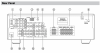
On page 10 there is a rear connector image - the only discrete 5.1 inputs are labelled DVD -
BUT, using a Chromecast or similar device as an external switcher, and feeding a decoder as described above, you could use that to feed Optical or coaxial Audio in, and let the Onkyo decode that digital signal into 5.1

1 DIGITAL IN OPTICAL 1, 2 & COAXIAL These optical and coaxial jacks can be used to connect a CD or DVD player and other components with digital audio outputs.


Screen Shot 2022-04-22 at 7.58.59 AM.png
 
Last edited:
Seems odd the TV does not have a coaxial or optical output, despite having HDMI inputs and several other kinds of I/O.

Given the main connection these days is HDMI, I'd give it a go with a HDMI audio extractor that has either optical/toslink or coaxial output.

Chromecast plugs to the extractor, extractor connects to TV, optical or coaxial connection from extractor connects to your receiver.

An example of HDMI extractor would be something like at this link.

Alternately, and probably better overall, would be getting a newer (and not necessarily brand new) receiver with HDMI.

This looks like a nice device, which would work just fine for my needs!
I didn't know this existed.

Does this have BT transmitter also?
Is this ok for outputting simultaneously to TV + AV receiver 5.1 + some bluetooth device (e.g. headphones)?
Or at least TV + some bluetooth device (e.g. headphones)?

Do you have any reference about its performance?

Are there similar products from other brands?

Thanks!

PS: as for a new receiver, if what you suggested works fine, I would go with it. I see no point in replacing a very good unit, with a likely more expensive solution, with essentially the same result.
 
I'm unsure what bluetooth has to do with passing and decoding a 5.1 signal from Netlix, and I don't have any experience with a Chromecast. The scenario whoaru99 proposed, using an HDMI audio extractor, works quite well, assuming the Chromecast will output output 5.1 audio

With those two caveats, an inexpensive solution if the Chromecast doesn't, would be to pick up a cheap Roku and use the aforementioned extractor.
 
With those two caveats, an inexpensive solution if the Chromecast doesn't, would be to pick up a cheap Roku and use the aforementioned extractor.
Or find an older Roku (still supporting current apps; some don't) that has an optical or coax output.
 
I'm unsure what bluetooth has to do with passing and decoding a 5.1 signal from Netlix, and I don't have any experience with a Chromecast. The scenario whoaru99 proposed, using an HDMI audio extractor, works quite well, assuming the Chromecast will output output 5.1 audio

With those two caveats, an inexpensive solution if the Chromecast doesn't, would be to pick up a cheap Roku and use the aforementioned extractor.

Rokus, from Ultra 4640 (2016) to earlier, had optical output. There are just a few in eBay.
 
Rokus, from Ultra 4640 (2016) to earlier, had optical output. There are just a few in eBay.
I'm aware..I had a Roku 4 and a Roku Ultra that both had spdif outputs, and they worked well,although the newer Ultras no longer have that feature. I use a Shield now because it seems to support more formats than any other single streaming solution, but I always preferred the Roku interface.

The new Roku sticks and boxes are so cheap, as are the HDMI audio splitters,that I figured why mess around with a used, older and usually slower eBay box.
 
This looks like a nice device, which would work just fine for my needs!
I didn't know this existed.

Does this have BT transmitter also?
Is this ok for outputting simultaneously to TV + AV receiver 5.1 + some bluetooth device (e.g. headphones)?
Or at least TV + some bluetooth device (e.g. headphones)?

Do you have any reference about its performance?

Are there similar products from other brands?

Thanks!

PS: as for a new receiver, if what you suggested works fine, I would go with it. I see no point in replacing a very good unit, with a likely more expensive solution, with essentially the same result.

There are many brands and versions of HDMI extractors. I have no particular endorsement as my gear has the necessary connections for my use.

But, the extractors are not new phenomena. People have been using them for years now to do just what you want to do, albeit I don't recall a specific ask for integral BT connection outside of yours.
 
When my older Roku died I replaced it with a Roku Ultra. I had connected the old Roku's optical audio out directly to my pre-amp/processor. I noted that that the Roku Ultra didn't have an optical audio output but my Samsung TV did.

I connected the Roku to the TV via HDMI, then the TV optical out to one of the optical audio inputs on my pre-amp processor. In the pre-amp processor menu I had set up that input as multi-channel when I had the old Roku connected directly to the pre-amp. I did have to tweak on the volume settings for each channel to suit with the new source, i.e., the TV. Then I set the TV audio out to optical and turned off the TV speakers.

And just like that I had 5.1 channel back in play.
 
When my older Roku died I replaced it with a Roku Ultra. I had connected the old Roku's optical audio out directly to my pre-amp/processor. I noted that that the Roku Ultra didn't have an optical audio output but my Samsung TV did.

I connected the Roku to the TV via HDMI, then the TV optical out to one of the optical audio inputs on my pre-amp processor. In the pre-amp processor menu I had set up that input as multi-channel when I had the old Roku connected directly to the pre-amp. I did have to tweak on the volume settings for each channel to suit with the new source, i.e., the TV. Then I set the TV audio out to optical and turned off the TV speakers.

And just like that I had 5.1 channel back in play.

As noted by others in this thread, my TV doesn't have Optical out, so I cannot work it your way...
 
There are many brands and versions of HDMI extractors. I have no particular endorsement as my gear has the necessary connections for my use.

But, the extractors are not new phenomena. People have been using them for years now to do just what you want to do, albeit I don't recall a specific ask for integral BT connection outside of yours.

BT connectivity is not an absolute requirement.
It is simply useful, both for
* RX, so I can stream directly from a BT device to the extractor, and
* TX, so I can use BT headphones on occasion, e.g.
 
It may be a suggestion for upgrade from the older(?) Chromecast, or maybe didn't see you had the Chromecast.
 
Back
Top Bottom