• The move to the new server is done. There are some software and database maintenance updates in process. This has us passing the hat around to help out. We appreciate any donations. Seriously, even a dollar helps. The payment page may be found here - https://www.audiokarma.org/support.html

Grounding TT with no ground post to new phono preamp

Michael Wall

New Member
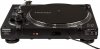
I was recently gifted a Crosley c200 TT which has a built-in phono preamp. I recently decided to upgrade the built-in preamp by switching to a Hagerman Bugle 3. The new phono stage has a grounding post but the TT does not.

I am noticing a small hum when I have the TT connected to the phono stage. I tried moving the phono stage away from the TT, Receiver, and Speakers and am still getting a tiny hum. I am wondering if grounding the phono stage will help remove the hum, however, I'm unable to ground it to the TT.

Does anybody know what might be causing the humming and have suggestions on how to ground the phono stage if the TT doesn't have a pre-built grounding post?
 
Register to hide this ad
So how do you bypass the internal phono stage? Does it have RCA bypass connectors? Or, did you DIY rewire it?
Picture of connections might help.
 
Crosley c200.jpg
Pulled this image off Amazon. Has a switch to select "Phono" or "Line". I would assume "Line" uses the internal pre-amp. I can't see any images that show the cable ends. It looks like you just have R/L RCA cable connectors, and a power cable. I can't imagine a turntable being produced without a ground cable, but that sure seems to be the case here. It may be possible to add a ground cable yourself, but that's above my skill level.
 
Thanks for the reply. The TT has a switch that bypasses the internal phono stage. I am running RCA connectors from the TT to the external phono stage. I have attached pics of the TT and external phono stage. The TT user manual indicates that the internal phono stage is grounded and that there is no external grounding post if you wish to bypass the internal phono stage.
 

Attachments

  • Hagerman Bugel 3 Phono.jpg
    Hagerman Bugel 3 Phono.jpg
    53.7 KB · Views: 29
  • Crosley c200 TT.jpg
    Crosley c200 TT.jpg
    98.8 KB · Views: 29
The phono stage has a ground connection...you need to buy an RCA with grounding wire attached... example...$79 Pangea at AUDIO ADVISOR...there might be cheaper options...look at AUDIO ADVISOR WEBSITE to see the wire I’m describing...
 
The phono stage has a ground connection...you need to buy an RCA with grounding wire attached... example...$79 Pangea at AUDIO ADVISOR...there might be cheaper options...look at AUDIO ADVISOR WEBSITE to see the wire I’m describing...
Thanks Red 111. I see the ground connection on the phono stage but the TT does not have a grounding post. I am wondering if there is another way to ground the TT to the phono stage or if I am able to ground the phono stage to something else.
 
I am wondering if there is another way to ground the TT to the phono stage or if I am able to ground the phono stage to something else.

Hagerman Bugel 3 Phono.jpg

I would try a few things first, a table or the stand alone stage does not have to be grounded, you do it if you have to.

Let's see if we can get rid of your small hum.

I see what looks like a supper cheap pair of RCA cables and they are zip tied to a power line for your Bugle 3, that's a no no. Cut them loose and move the power cord away from the RCAs cables. You also don't want your inputs and output RCAs crossing over each other at the phono stage. In fact I'm not seeing the rest of the system, but you want to try and keep all your phono cables away from everything. If your bunching up and zip tying all you power lines, speaker cables, and RCA cables together behind the system undo all that.

I would try and get better RCA interconnects going from your Bugle to the system. You could try putting the really cheap set from the stage to the table, and the ones you have there now used on the other side.

If your setting up all your electronics together in your room, like your cable box, router right by the system and table there could be issues there as well. Using a turntable can be sensitive to other things around it. Try moving the stage and cables around while you have the system on and the table source selected, see if the hum gets worse or goes away as you move it.

Also, I hope your not saying you hear a hum with the volume way up, with the phono selected. All phono stages make more noise than other inputs.
 
View attachment 1855909

I would try a few things first, a table or the stand alone stage does not have to be grounded, you do it if you have to.

Let's see if we can get rid of your small hum.

I see what looks like a supper cheap pair of RCA cables and they are zip tied to a power line for your Bugle 3, that's a no no. Cut them loose and move the power cord away from the RCAs cables. You also don't want your inputs and output RCAs crossing over each other at the phono stage. In fact I'm not seeing the rest of the system, but you want to try and keep all your phono cables away from everything. If your bunching up and zip tying all you power lines, speaker cables, and RCA cables together behind the system undo all that.

I would try and get better RCA interconnects going from your Bugle to the system. You could try putting the really cheap set from the stage to the table, and the ones you have there now used on the other side.

If your setting up all your electronics together in your room, like your cable box, router right by the system and table there could be issues there as well. Using a turntable can be sensitive to other things around it. Try moving the stage and cables around while you have the system on and the table source selected, see if the hum gets worse or goes away as you move it.

Also, I hope your not saying you hear a hum with the volume way up, with the phono selected. All phono stages make more noise than other inputs.
 
Thanks for the reply. I moved the phono stage further away from the router and it did significantly reduce the hum. However there is still a small hum when connected to the phono stage that is not there when I use the internal phono stage on the TT.

I will do some research on better RCA interconnects to see if that helps. Unfortunately, I am somewhat limited on space so I’ll need to get creative on keeping the RCA cables separated from power cables.
 
Thanks for the reply. I moved the phono stage further away from the router and it did significantly reduce the hum. However there is still a small hum when connected to the phono stage that is not there when I use the internal phono stage on the TT.

I will do some research on better RCA interconnects to see if that helps. Unfortunately, I am somewhat limited on space so I’ll need to get creative on keeping the RCA cables separated from power cables.
Well by you moving the Bugle around and getting results, and stating your router is close to everything, you got work to do. Adding a ground wire might make things worse, you kinda have to do the things I said to do. If some of these things I mention where not a problem, how would I have guessed your router and modem could be a problem, you never said anything about it being right there in the system.

You could also be getting small hums from sharing the same AC power sockets in the house. Other things in the house, like refrigerators, LED light bulbs and dimmer switches. You have a hum from a ground loop, adding ground wires can worsen it. You have to find what's at fault, kill the power to your internet and cable stuff, turn lights off in the room. Things like that, it's a proses of elimination.
 
Last edited:
By the way, having a phono stage incased in plastic housing isn't such a good thing, it doesn't block RFI.
 
Well by you moving the Bugle around and getting results, and stating your router is close to everything, you got work to do. Adding a ground wire might make things worse, you kinda have to do the things I said to do. If some of these things I mention where not a problem, how would I have guessed your router and modem could be a problem, you never said anything about it being right there in the system.

You could also be getting small hums from sharing the same AC power sockets in the house. Other things in the house, like refrigerators, LED light bulbs and dimmer switches. You have a hum from a ground loop, adding ground wires can worsen it. You have to find what's at fault, kill the power to your internet and cable stuff, turn lights off in the room. Things like that, it's a proses of elimination.

Thank you for the suggestions. I will play around with the system and see if I can isolate what is causing the humming.
 
Thank you for the suggestions. I will play around with the system and see if I can isolate what is causing the humming.
Maybe also try wrapping the plastic Bugle housing with aluminum foil, go around it a few times to see if it shields it from radio frequency interference. Do not have it touching any of the RCA jacks, but that may help with your WiFi sitting right next to it.

I'm just spitballing some ideas for you to think about, routing phono cables, and system cables as well as other things in the house is important.
 
Maybe also try wrapping the plastic Bugle housing with aluminum foil, go around it a few times to see if it shields it from radio frequency interference. Do not have it touching any of the RCA jacks, but that may help with your WiFi sitting right next to it.

I'm just spitballing some ideas for you to think about, routing phono cables, an system cables as well as other things in the house is important.

This is something I attempted after moving the Bugle further away from the router. It had no discernable effect on the hum. My wife also warned me that I would need to find a better hiding place if I wanted to wrap it in foil :)
 
By the way, having a phono stage incased in plastic housing isn't such a good thing, it doesn't block RFI.
Absolutely correct.
...try wrapping the plastic Bugle housing with aluminum foil ...
That would offer some benefit.
This is something I attempted after moving the Bugle further away from the router. It had no discernable effect on the hum.
No, it won't have any effect unless it is connected to 0V (aka "earth").

The ground wire on a turntable is connected to the turntable's metal parts, ie the tonearm and the platter etc. Connecting the ground wire to the ground post on the phonostage makes the turntable's metal parts act as a Faraday shield for the cartridge. The RCAs are connected to the four cartridge pins.
The ground wire is usually kept separate from the RCAs, but it doesn't have to be. Rega turntables for example don't have a separate ground wire, they have the metal parts connected to one of the RCAs. I suspect your Crosley is wired the same. Two minutes with a multimeter would verify that if you know what you're looking for.

I don't think you need an extra ground wire, you just need to be careful where you site the turntable and phonostage.
 
The ground wire is usually kept separate from the RCAs, but it doesn't have to be. Rega turntables for example don't have a separate ground wire, they have the metal parts connected to one of the RCAs. I suspect your Crosley is wired the same. Two minutes with a multimeter would verify that if you know what you're looking for.
Yup, this is 100% correct. JVC turntables (at least older ones) were wired the same way.

If it turns out that the chassis ground and cable ground aren't connected, a ground cable isn't anything special (and you certainly don't need a combined ground and RCA cable as someone suggested earlier in this thread). If it turns out that the the RCA grounds and chassis ground aren't connected, any simple insulated wire will work fine as a ground. Wire gauge isn't critical for the short lengths involved, even 24AWG will suffice.
 
Thank you for the replies, everyone. I moved my system around a bit, placed the phono stage as far away from the router as possible, and upgraded to Blue Jeans RCA interconnects. The hum is completely gone and TT sounds great. I appreciate the help!
 
If the TT has a 3 prong plug it is grounded to the electrical system. If thats the case tie the ground lug to the phono preamp section to the pre-amp if it has a three prong AC plug. If it doesn't then put a 6 foot copper stake in damp ground and run a #10 awg wire from the stake to the system and ground everything to the stake, or if you have copper plumbing and it goes under ground tie the equipment to the copper pipe.
 
Last edited:
View attachment 1855806
Pulled this image off Amazon. Has a switch to select "Phono" or "Line". I would assume "Line" uses the internal pre-amp. I can't see any images that show the cable ends. It looks like you just have R/L RCA cable connectors, and a power cable. I can't imagine a turntable being produced without a ground cable, but that sure seems to be the case here. It may be possible to add a ground cable yourself, but that's above my skill level.
Someone beat me to noting some turntables ground via the RCA jack. If it helps, crimp spades to a wire and just use a screw - probably on the bottom of the table - that's to the metal chassis of the table. No need to spend a lot of $ on your ground wire or to get a special RCA interconnect with one. Also, keeping your interconnect cables away from the power cables is also very good advice. I had a stubborn hum problem with my Crown XLi800 amp that powers a passive subwoofer. An Ebtech HumX (now called a Morley Hum Exterminator) knocked it out. BTW, since you seem open to spending a little cash on upgrades for your Crosley, may I suggest you look into getting a line contact stylus for your AT3600L cartridge? Or, at least an elliptical stylus. Conicals are really only good for mono records. An elliptical upgrade is only about $40. You can get a ViVid line contact for about $110. Get the geometry right, though. Line contact styli (I have a Fritz Gyger - essentially a Shibata) really open things up - especially the inner grooves - compared to conicals and even ellipticals, but are notoriously finicky when it comes to alignment. They also need more tracking force. (There's a lot more contact area, so the extra tracking force is dissipated in the grooves and doesn't mean you're wearing the stylus & your records down faster.)
 
Back
Top Bottom