• The move to the new server is done. There are some software and database maintenance updates in process. This has us passing the hat around to help out. We appreciate any donations. Seriously, even a dollar helps. The payment page may be found here - https://www.audiokarma.org/support.html

harman kardon 630 FM faint sound

Jpkwd

Active Member
HI
I've got a fully working HK630 aside from the fact that FM and FM stereo are so faint it can only be heard with volume 3/4 up.

it picks up all the FM stations fine, fm stereo locks in andAM is working fine too.

so far, the info i got from AK threads : the FM multiplex chip could have gone bad. Replaced today, with no effect on behavior (Faint sound) unfortunately.

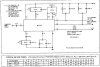
upload_2019-3-31_13-39-23.png

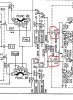
another thread identified one zener diode on the regulator board as being a possible cause, with burn marks on the capacitors next to it. I had that too and did not notice anything else.

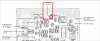
upload_2019-3-31_13-38-59.png

Tested zener out of circuit, which appeared to be good, Although i might not test it correctly. Read about 6 v passed through if my memory serves me well (D809)
recapted the regulator board, and checked the 809 zener voltage today. Reading ~13v at output in circuit from it.

i am assuming the regulator board might not be the issue.

When engaging the FM mute circuit, the FM drop too low to be heard, which i interpreted as being a good sign that is is working correctly.

upload_2019-3-31_13-42-31.png

Any advice welcome. Not too sure where to go from here.
 
Register to hide this ad
[This question/ schematic look familiar - I may have posted to you somewhere else too...anyway]

"FM Muting" switch set to off, mode set to "Stereo". When tuned to a strong FM Stereo station, is the tuning mete active, and does the "Stereo" lamp light up?
 
hi Ylli
someone might have this same
issue, i only posted to ak

i appreciate your answer

fm mute to off, fm stereo selected,
tuned strong radio station, stereo light on ok
meter active (stable at level 5)

faint fm sound audible + hum with the volume at 3/4 up
 
There really isn't much circuitry between the MPX chip and the selector switch. Have you cleaned the selector switch?

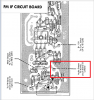
If the switch is not the problem, then we are going to have to have some way of 'signal tracing'. We can try injecting some 'body hum'. With the mode set to FM stereo, and the volume about half way up, physically touch the audio output points of MPX board (use a small metal screwdriver that you are making contact with). Picture attached. You should hear a fairly loud hum, or at least a loud click.
Capture.JPG Capture1.JPG
 
ok switches have been cleaned, selector included. i never set this solution aside if all else fail then i can clean up once more with d5

click heard both channel, more of a click w/ very very faint hum. touching one at a time

actually i wouldn't say loud, but definitely audible from both speakers at a 3 feet distance
 
OK, let's take that as indicating a good signal path between the MPX board and the amplifiers. Curious that the problem is on both channels.

Let's back up and try that hum injection at the bases of TR304 & TR305. Or you can inject the hum on the MPX chip (IC301) pins 11 & 12.
 
click heard both channel, more of a click w/ very very faint hum. touching one at a time
actually i wouldn't say loud, but definitely audible from both speakers at a 3 feet distance

After re-reading that, I'd like to double check the path through the switch.

Using your ohmmeter, confirm continuity between the output points on the MPX board and the points labeled 1 & 1' as shown. Or if it is easier.... With the mode switch (shown on my snippet) set to stereo, measure the resistance between the left and right output signal points on the MPX board. Now move the mode switch to mono. The resistance should drop to very near zero.
Capture.JPG
 
FM stereo selected : Resistance L-R output MPX board = 42.5Kohms
engaging mono switch = 0 ohms

tested continuity between selector switch fm stereo pin and MPX board output succesfully (hoping this is what needed to be tested - i understood correctly)
 
Last edited:
You should be able to take output directly from the FM detector and bypass the multiplex decoder completely. This would isolate the problem to either before or after the detector. The meter can show good signal but the meter is usually upstream from the end of the IF chain in order to give better resolution without limiter action, so a later stage could be bad.
 
HI Fred,
i'm pretty new to this so although i understand generally the statement, i am not exactly sure what i should do to bypass the multiplex decoder board.
when you say take output, do you mean to wire / connect the output of the IF board

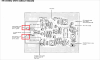
upload_2019-3-31_21-41-2.png

to the multiplex decoder output

upload_2019-3-31_21-39-22.png

let me know if i am reading your comment right, i am learning as i am doing this.
 
Yes. Before you start soldering (you may end up having to do so, but meanwhile....)

I assume the MPX chip is OK because 1- You changed it, and 2- the Stereo lamp lights. But that still could be the problem. You can just use a temporary jumper wire and connect the input of the MXP board to each of the outputs. Signal should get through.
 
Last edited:
perhaps this would be simply bypassing the MPX board

upload_2019-3-31_21-57-43.png

the input being from the IF board as indicated hereunder

upload_2019-3-31_21-59-0.png
 
You might also want to post the voltages you see on the MXP chip pins 11 & 12, and the voltages on TR304 and TR305, B, C, and E.
 
hummm, thanks a million for all the help, greatly appreciated.

so the bypass worked, and volume is normal when bypassed. the issue seems to be with the MPX board.

voltage at mpx chip 11 : 11.61dc
and 12 : 11.63dc
 
Back
Top Bottom