• The move to the new server is done. There are some software and database maintenance updates in process. This has us passing the hat around to help out. We appreciate any donations. Seriously, even a dollar helps. The payment page may be found here - https://www.audiokarma.org/support.html

Heathkit AD-1304 Active Audio Processor

yoho

Member
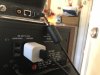
I just acquired a Heathkit AD-1304 from 1970, right now l use it for digital music and COVID produced podcasts and it is very effective. I want it to process my turntable as well without changing the connections. Right now it’s connected to a Sansui 8080 and my Bluetooth adapter is hooked to the tape monitor on the AD-1304. The AD-1304 does have a tape output connection. Where should I connect my turntable to receive audio processing for my LPs?image.jpg28B9CE78-FD3A-41EB-A0F0-9296D5A51B6E.jpeg2B34D4E0-D44B-470F-9D26-F093EB3A39ED.jpeg
 
Register to hide this ad
OK, well you didn't mention the type of turntable you have. If it has a low level output (i.e. no built-in preamp) then plug the turntable into your PHONO1 input on the receiver, plug the bluetooth into the Aux input, and you're done. If it only has a preamp output (some turntables have both low and high level outputs) then plug it into the AUX input on the receiver and keep the Bluetooth plugged into the tape input on the processor. You'll use the tape monitor switch on the processor to choose between Bluetooth and the receiver's source selector. You can also use the second tape input on the receiver for an additional components, although you'll need to adjust the dubbing selector as well in that case.

ETA, I see that you have a CD player as well, which is probably already plugged into the AUX input. I'm going to assume that the processor is connected to tape 1 on the receiver. In that case, if the turntable only has a preamp output, then connect it to TAPE 2 on the receiver. To play the turntable, you'll have to set the TAPE PLAY switch to COPY 2->1/DECK 1; for anything else, set it to DECK 1.

ETA2: Hmm, is the processor connected to the adapter loop? Give more details before I make a fool of myself making more assumptions.
 
Last edited:
Thanks for the advice. The turntable is a Rega RP1, so I believe it has a built in preamp and I have my digital FLAC music files connected to Tape 2 play connection which I use a lot as well. How would you suggest connecting the turntable?


OK, well you didn't mention the type of turntable you have. If it has a low level output (i.e. no built-in preamp) then plug the turntable into your PHONO1 input on the receiver, plug the bluetooth into the Aux input, and you're done. If it only has a preamp output (some turntables have both low and high level outputs) then plug it into the AUX input on the receiver and keep the Bluetooth plugged into the tape input on the processor. You'll use the tape monitor switch on the processor to choose between Bluetooth and the receiver's source selector. You can also use the second tape input on the receiver for an additional components, although you'll need to adjust the dubbing selector as well in that case.

ETA, I see that you have a CD player as well, which is probably already plugged into the AUX input. I'm going to assume that the processor is connected to tape 1 on the receiver. In that case, if the turntable only has a preamp output, then connect it to TAPE 2 on the receiver. To play the turntable, you'll have to set the TAPE PLAY switch to COPY 2->1/DECK 1; for anything else, set it to DECK 1.
OK, well you didn't mention the type of turntable you have. If it has a low level output (i.e. no built-in preamp) then plug the turntable into your PHONO1 input on the receiver, plug the bluetooth into the Aux input, and you're done. If it only has a preamp output (some turntables have both low and high level outputs) then plug it into the AUX input on the receiver and keep the Bluetooth plugged into the tape input on the processor. You'll use the tape monitor switch on the processor to choose between Bluetooth and the receiver's source selector. You can also use the second tape input on the receiver for an additional components, although you'll need to adjust the dubbing selector as well in that case.

ETA, I see that you have a CD player as well, which is probably already plugged into the AUX input. I'm going to assume that the processor is connected to tape 1 on the receiver. In that case, if the turntable only has a preamp output, then connect it to TAPE 2 on the receiver. To play the turntable, you'll have to set the TAPE PLAY switch to COPY 2->1/DECK 1; for anything else, set it to DECK 1.
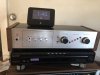
 
I'd try connecting the processor to the Dolby NR/4CH processor loop on the back, then use the associated DOLBY NR/4CH ADAPTER button on the front to enable it. Then connect the turntable to TAPE 1.
 
I'd try connecting the processor to the Dolby NR/4CH processor loop on the back, then use the associated DOLBY NR/4CH ADAPTER button on the front to enable it. Then connect the turntable to TAPE 1.
It works, good thinking. Thank you.
 
I'd try connecting the processor to the Dolby NR/4CH processor loop on the back, then use the associated DOLBY NR/4CH ADAPTER button on the front to enable it. Then connect the turntable to TAPE 1.
The Rega RP1 does not have a preamp but I have a Pro-ject Audio one so I can connect to Tape 1 Play and it works quite well. It still does not process the Turntable because it’s not connected. The processor is connected to the 4 channel/NR adapter, so that’s all it processes. Is there a way to connect the Turntable and Bluetooth so they can both get processed. I should be able to figure this out. Thank you for your consideration.
 
I'd try connecting the processor to the Dolby NR/4CH processor loop on the back, then use the associated DOLBY NR/4CH ADAPTER button on the front to enable it. Then connect the turntable to TAPE 1.
Disregard everything I just typed, it works fine. Mental cobwebs. Thank you again.
 
Back
Top Bottom