• The move to the new server is done. There are some software and database maintenance updates in process. This has us passing the hat around to help out. We appreciate any donations. Seriously, even a dollar helps. The payment page may be found here - https://www.audiokarma.org/support.html

Help Sansui QRX 7500 Powers on but no sound!

Matt Timson

New Member
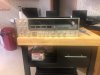
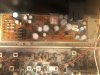
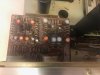
Hey was given this gem for free today and it powers up a lights up fine but there is no sound. I tried hooking up a turntable and I am getting a signal for FM using the tuner but no signal at all with the turntable. regardless of a signal i am getting no sound from this unit just looking for ideas please thanks. Any way to troubleshoot or help would be appreciated!IMG_2114.jpg IMG_2117.jpg
 

Attachments

  • IMG_2115.jpg
    IMG_2115.jpg
    127.7 KB · Views: 20
  • IMG_2116.jpg
    IMG_2116.jpg
    143.4 KB · Views: 18
  • IMG_2118.jpg
    IMG_2118.jpg
    70.6 KB · Views: 20
Register to hide this ad
These Quad units are complicated with a lot of adjustments. If you are not familiar with Sansui Quad units, do some reading in the owner's manual.

So, first, make sure all of the control settings are correct to get sound out. I'd just try FM and headphones to see if you have any sound. Next, check all fuses. Third, clean all switches.
 
These Quad units are complicated with a lot of adjustments. If you are not familiar with Sansui Quad units, do some reading in the owner's manual.

So, first, make sure all of the control settings are correct to get sound out. I'd just try FM and headphones to see if you have any sound. Next, check all fuses. Third, clean all switches.
I will try the headphones and fuses
 
These Quad units are complicated with a lot of adjustments. If you are not familiar with Sansui Quad units, do some reading in the owner's manual.

So, first, make sure all of the control settings are correct to get sound out. I'd just try FM and headphones to see if you have any sound. Next, check all fuses. Third, clean all switches.
After using the headphones no sound either
 
Are the VU meters showing signal present?
Those VU meters are true VU meters in that they show the pre-amp level, they don't work off the power-amp, so if you are not seeing any activity on these meters then there is no audio getting out of the pre-amp, and so no audio to the power-amp....

There is a control on the panel next to the meters called "Level Set", you need to turn this up to "set" the pre-amp level, its something easily overlooked...you'll turn this level set control up to have the meters bouncing around 0db...

Let us know how you get on...
 
Are the VU meters showing signal present?
Those VU meters are true VU meters in that they show the pre-amp level, they don't work off the power-amp, so if you are not seeing any activity on these meters then there is no audio getting out of the pre-amp, and so no audio to the power-amp....

There is a control on the panel next to the meters called "Level Set", you need to turn this up to "set" the pre-amp level, its something easily overlooked...you'll turn this level set control up to have the meters bouncing around 0db...

Let us know how you get on...
Hi thank you if the level set is what your referring to then yes I have messed with it when I had my turntable hooked up to the unit I had no signal at all even at full Level! but with FM I had a signal with it fine but regardless no sound including with headphones on the unit.
 
Hi thank you if the level set is what your referring to then yes I have messed with it when I had my turntable hooked up to the unit I had no signal at all even at full Level! but with FM I had a signal with it fine but regardless no sound including with headphones on the unit.
What were the VU meters doing? Were they moving at all?
It sounds to me like you might have a tape monitor switch set wrong or something like that, something is interrupting the signal and you're getting bleed through the ground scheme...
 
there are open frame switches that may require a good cleaning .
thanks will do!
What were the VU meters doing? Were they moving at all?
It sounds to me like you might have a tape monitor switch set wrong or something like that, something is interrupting the signal and you're getting bleed through the ground scheme...
With the turntable they were not moving at all and please note trying to just test this so was using a 2 CH setup but in FM the signal was working fine and the readers seemed normal
 
Okay, if the meters are moving then you should be getting audio to the power-amp and out the speakers or headphone socket.
So check that the speaker selector is selected to the speaker outputs you are connected to.
Tape Monitor switches are off or set to source.
You can have the mode in 2ch direct 4ch direct or even SQ QS and sound should come out the front speakers.

Whilst you have audio running you can try working the tone controls, work the mode switch, also switch the High and Low filters in and out.....push the tape monitor switches in and out too....

If still no joy, then, you can take the lid off the amp, towards the back on the right there is the power supply, protection board, there is a relay on that board.
You can get something like the butt end of the screwdriver and tap the top of the relay, and see if something changes.

Try all that and let us know what happens...

 
Okay, if the meters are moving then you should be getting audio to the power-amp and out the speakers or headphone socket.
So check that the speaker selector is selected to the speaker outputs you are connected to.
Tape Monitor switches are off or set to source.
You can have the mode in 2ch direct 4ch direct or even SQ QS and sound should come out the front speakers.

Whilst you have audio running you can try working the tone controls, work the mode switch, also switch the High and Low filters in and out.....push the tape monitor switches in and out too....

If still no joy, then, you can take the lid off the amp, towards the back on the right there is the power supply, protection board, there is a relay on that board.
You can get something like the butt end of the screwdriver and tap the top of the relay, and see if something changes.

Try all that and let us know what happens...
To give a brief summary my father and I had the unit open I never tapped the relay so could try that! but we tried everything putting them from front to rear speakers messing with all knobs controls to get any sound to produce via the headphones or speakers so perhaps I will re take it apart later in the day today and try that thank you!
 
Thank you for the help any relative idea on where everything is inside this unit? First time big project with dad.
If I remember correctly there are four fuses in the left rear of the unit (one for each channel). They are hard to miss. You will get no output if they are blown.
 
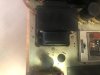
OK, I see the pics now. I'm not sure what is going on with that fuse that's standing up. Looks like the fuse holder broke and someone winged it. Anyway, did you check that all the fuses are good?
 
Really only eyed them not exactly tested!
That was my second suggestion, check all fuses. First was making sure all buttons are set to get sound (source selector, speakers, tape monitor). For the fuses, you'll have to pull each one and test with a multi-meter to determine if the fuse is blown or good.
 
That was my second suggestion, check all fuses. First was making sure all buttons are set to get sound (source selector, speakers, tape monitor). For the fuses, you'll have to pull each one and test with a multimeter to determine if the fuse is blown or good.
Thanks as per what Rey was stating 1 of the fuses were winged and i'm not capable of attaching it and i believe one of the other ones has been messed with as well also please see the pic with the smallboard as one of the caps in the top right corner has leaked as well as the same cap on the board directly under it as well any idea as to what these are! It is the silver to greyish one in pic # 3
 
If you want we can call it a night an i can upload better more precise pictures in the morning of wherever I may need to help me out in this quest thanks again Rey and Keith
 
Back
Top Bottom