• The move to the new server is done. There are some software and database maintenance updates in process. This has us passing the hat around to help out. We appreciate any donations. Seriously, even a dollar helps. The payment page may be found here - https://www.audiokarma.org/support.html

Help tracking down 60hz Phono Hum HK 330C

dups68

New Member
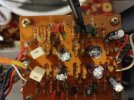
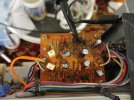
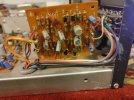
I've been working on restoring a Harman Kardon 330C. I finished recapping the power supply, tone control, amp, and eq/phono board as well as replacing the 2SC1344 and 2SC1345 transistors on those boards with KSC1845's. Was getting ready to put it back together and noticed a faint hum in the phono section. The hum increases with volume. Also, touching (no even turning) any of the controls (including the tuning post), the ground screw, the chassis, etc. results in noise through the speakers/headphones (a crackling addition to the hum). The hum increases in volume if I move my hand towards the phono section.

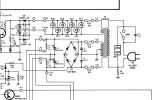
I figured I knocked a ground loss or something while working on it. I continuity checked all the ground lines shown in the manual (shown in the image below) back to the rectifier board and everything seemed to check out.

1708372731961.png

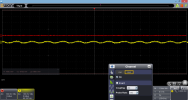
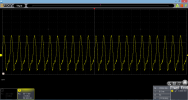
I'm a bit of a newbie with an oscilloscope, but I hooked one up to try and track down the issue. Here are a couple of images from the scope:

Below image: Speaker Outputs Phono No Signal:
Phono_noSig_noVol.PNG

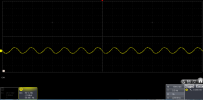
Below image : Speaker Outputs Phono No Signal touching bass control (increase in output noise):
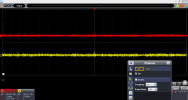
Phono_noSig_noVo_touchBass.PNG


Below image : Speaker Outputs Phono No Signal. Volume Up (60hz Hum):Phono_noSig_Vol_60hz hum.PNG
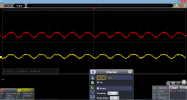
Next shot I hooked the scope up to the input and output pins (LP101 and LP102) on the phono board to see if somehow the input was sending the hum through:
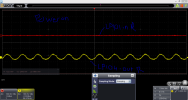
Phono_noSig_Vol_60hz hum_PhonoInOut_PWon.PNG

Next I probed around the board.

Q101 Collector below (scope was jumping, think this was 60hz as well):Q101 Collector.PNG

Q101 emitter:
Q101 Emmittor.PNG


Q103 collector:

Q103 collectpr.PNG
R121(at juncture with C117 and R119):
R121_c117_R119.PNG

Any ideas on where this hum could be coming from? Could it be the 2SA844's? Might it be ripple coming in from the power supply? Any other points that it would be helpful to take a reading at? Any thoughts are appreciated as tracking this down is driving me up the wall!
 

Attachments
  • 1708375951065.png
    1708375951065.png
    244.9 KB · Views: 3
Last edited:
  • Like
Reactions: mbz
Register to hide this ad
Hums are tricky. My general advice for 60Hz hums is to look before the rectifier, converts 60Hz mains into 120Hz half wave, so EQ issues etc should be 120Hz. You may have an issue with the +/-B3 power supply possibly a failing rectifier, put the scope on the +/-B3 pins
 
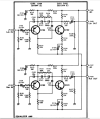
The +/-B3 power supply to the EQ board appears fairly primitive. It's fed from the unregulated supply +/-B1 (to output transistors!!!) via a 1k/1W resistor (only!) so it's not surprising that you have some "noise(should be 120Hz!). Interseting that the +/-B3 also feeds the preamp via L501,2 but with additional smoothing zener, caps. Would have thought that the EQ stage could have used similiar smoothing.

Think you should reach out to someone like @dlucy who will know what is normal for the 330c.
 
First things that come to mind:

  1. Make sure your turntable is grounded to the receiver.
  2. Make sure you've got excellent ground on the PHONO board.
 
  • Like
Reactions: mbz
Thanks for the suggestions everyone! @SkxawngGirl I tried flipping the plug but it didn't have much of an effect.

@dlucy the hum is present even without a turntable connected. I continuity tested the ground pins on the board to chassis ground and it gave good continuity. I also jumpered the ground pins on both sides to the chassis and it didn't have an effect. I also tried jumpering the input pins to the chassis but the hum persisted. Jumpering the output pins to ground does get rid of the hum though.

@mbz tonight I'll hook the scope up to the power rails and see what I get. Do you think it's possible the rectifier is letting some 120hz power leak through?
 
Last edited:
@dlucy would you say a little audible hum on the 330c phono is considered normal or is it "dead quiet"?

Do you think it's possible the rectifier is letting some 120hz power leak through?
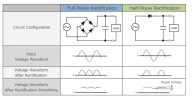
The rectifier bridge converts the incoming AC (sine wave) to full wave rectified (see below). It's the filter caps that smooths the waveform out to something approaching DC, maybe think of it as an AC ripple over DC. The ripple depends on the storage available(caps) and the size of the load (current draw). Certainly some ripple will pass through, this is normal. In most amps the phono power supply is regulated so as to reduce the ripple, 10-20mV ripple would not be unreasonable for older amps. Better amps would be less than 5-10mV.

Now the "problem" I'm having is that the 330c phono power supply has no additional smoothing apart from main caps, so I'd expect some low level hum. Not familiar with the amp so questions posed to dlucy.
 

Attachments

  • Rectification.pdf.png
    Rectification.pdf.png
    179.2 KB · Views: 5
  • 330c_psu.pdf.png
    330c_psu.pdf.png
    54.1 KB · Views: 5
Look at the grounding lug on the back panel, make sure where it connects to the chassis is bare metal (it may be painted metal now, or oxidized). A tiny film of deoxit will promote an excellent connection. Are you running the unit without it's covers attached, this will introduce more noise, especially around certain other electronics, the metal covers are an rf sheild as well as just covers. When moving your hand around is there certain front panel controls that vary the noise the most? If so, clean the chassis and pot nuts to bare metal, apply tiny film of deoxit, retry. Do you feel a fuzzy tingle in your fingers when you move them over metal on the chassis anywhere that generates noise?

Also, keep in mind a with phono selected and no phono source hooked up to the rca jacks, there will be a distinct hum that will increase with loudness.
 
Thanks @Warren-Oates! I'll try cleaning/removing oxidation from around the ground lug and control nuts. Would a brillo pad do the trick? I have some brass brushes but didn't want to go that extreme if it's not needed. I might give the input jacks a cleaning too. The bass knob stem seems to cause the most noise/disruption on the front but touching/turning the ground lug causes the most noise.

The scope images are with the cover off. Maybe I'll try throwing the cover back on and see if it helps out. I tried reinstalling the bottom plate a few days ago but it didn't help any.

On most of my other receivers I do get a hiss/static without a source on the phono input but this was a very distinct hum so it raised a flag.
 
Thanks @Warren-Oates! I'll try cleaning/removing oxidation from around the ground lug and control nuts. Would a brillo pad do the trick? I have some brass brushes but didn't want to go that extreme if it's not needed. I might give the input jacks a cleaning too. The bass knob stem seems to cause the most noise/disruption on the front but touching/turning the ground lug causes the most noise.
I'd probably use neverdull to remove oxidation (because I have it). A brillo pad seems kind of abrasive.
 
I've tried cleaning the ground lugs and control nut with no luck.

Do you feel a fuzzy tingle in your fingers when you move them over metal on the chassis anywhere that generates noise?

Also, keep in mind a with phono selected and no phono source hooked up to the rca jacks, there will be a distinct hum that will increase with loudness.

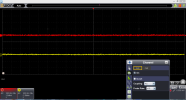
With that in mind, I think there might be a tingling when I'm touching the controls (that generates noise). I took a few more measurements with the scope below. These new images were taken off what I believe is a ground point on my pc oscilloscope used for tuning the probes {OWON vds1022i - tuning on the pins is 5V 1kHz} where the previous measurements were taken grounded to the chassis. What I'm interpreting (which could be completely wrong so someone correct me if so) is that something is leaking AC into the ground?? I'm just not sure how that jives with the previous measurements taken with the receiver chassis as ground.

Anyways here are the scope images:

Below is the ground clip to the oscilloscope pin and the probe to the HK330C Chassis:
1709253707677.png

Below is the ground clip to the oscilloscope pin and the probe to the HK330C Phono Ground Pin LP102 on the input side of the phono board:
1709253884369.png

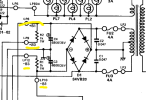
I tested the scope with the probe grounded to the "tuning pin" with the probe to a another receiver chassis and got nothing so I'm thinking the above is where my issue is coming from (could be wrong). Any ideas on what could be leaking this to ground? Looking at the schematic I'm not really sure where the issue could be. I'm running the receiver through a DBT and the bulb isn't lighting up so I wouldn't think that something is shorting to ground but I'm at a loss here. Could one of those 0.047 uF caps before the rectifier be bad and allowing AC through? Or maybe a bad D4 or D5 after the lamps? Where would you start?

1709254195750.png
 
What happens with a turntable hooked up, and properly grounded to the receiver. Do you hear a hum? Do you hear control noise from any o fthe controls you touch?
 
These new images were taken off what I believe is a ground point on my pc oscilloscope used for tuning the probes {OWON vds1022i - tuning on the pins is 5V 1kHz
The unit appears to have a 3.3V 1KHz square wave test pin for probe compensation. You need to adjust your probes so you get 3.3V square wave. That first trace looks a little sick.

As far as I can see the unit does not provide a GND pin. Oscilloscope GND path is probably via the GND clip, probe cable then outer connector to unit.

Agree button it up and see if that cures it...
 
Last edited:
What happens with a turntable hooked up, and properly grounded to the receiver. Do you hear a hum? Do you hear control noise from any o fthe controls you touch?
With a turntable connected the behavior is the same. I'll try putting the case back in this week and see if that has any effect.
 
Back
Top Bottom