• The move to the new server is done. There are some software and database maintenance updates in process. This has us passing the hat around to help out. We appreciate any donations. Seriously, even a dollar helps. The payment page may be found here - https://www.audiokarma.org/support.html

Help Troubleshooting TC-520

Travis Kaupp

New Member
Hey there!

First time posting here, I was hoping someone could give me advice on troubleshooting an issue with my Yamaha TC-520. Here's a link to the video of what's going on:

https://imgur.com/a/owkPYpv

So basically, no sound, just a fluttering popping sound.

Just got this, cleaned the heads as best as I could... I'm guessing it'll need to be recapped? I have 0 experience with these kinds of things but would love to use this as a learning opportunity.
 
Register to hide this ad
Hi & welcome to AK. IMO you shouldn't jump straight into recapping. Get a can of spray cleaner that's designed for electric switches (DeOxit D5 or MG Chemicals 404B are good choices) and use it on the deck's internal switches, starting with the two marked in yellow in the picture. Douse each switch with the cleaner spray, and work it back and forth for a while.

tc520switches.jpg
 
Hi & welcome to AK. IMO you shouldn't jump straight into recapping. Get a can of spray cleaner that's designed for electric switches (DeOxit D5 or MG Chemicals 404B are good choices) and use it on the deck's internal switches, starting with the two marked in yellow in the picture. Douse each switch with the cleaner spray, and work it back and forth for a while.

View attachment 2277093
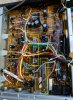
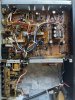
Thanks for the tip! I gave it a shot, but it didn't seem to do anything. That being said, I cracked it open and it looks very, very clean on the inside. The capacitors all look fine (no bulging or anything) so I'm not really sure where to go from here.

IMG_3416.JPG IMG_3417.JPG
 
Thanks for the tip! I gave it a shot, but it didn't seem to do anything.

I should emphasize - the symptom in your video is *almost always* caused by the record/play switch, the one I think I see in the middle of the board. If you put in a blank tape, observe that switch while you go from stop mode to record mode and back to stop. Do you see the plastic shaft move? That confirms it is the R/P switch. If you're willing to humor me, try once more, just on that switch. Give it a good soaking, and then while it's wet, exercise the switch again, but not by hand this time: do it by going in and out of record mode a bunch of times.

If that still doesn't help, it's conceivable that the switch is not merely dirty but has gone bad, but that's quite rare. What spray cleaner did you use?

One other remote possibility - if you *don't* see the shaft of that switch move when starting a recording, then the issue might be mechanical and not electrical.
 
I should emphasize - the symptom in your video is *almost always* caused by the record/play switch, the one I think I see in the middle of the board. If you put in a blank tape, observe that switch while you go from stop mode to record mode and back to stop. Do you see the plastic shaft move? That confirms it is the R/P switch. If you're willing to humor me, try once more, just on that switch. Give it a good soaking, and then while it's wet, exercise the switch again, but not by hand this time: do it by going in and out of record mode a bunch of times.

If that still doesn't help, it's conceivable that the switch is not merely dirty but has gone bad, but that's quite rare. What spray cleaner did you use?

One other remote possibility - if you *don't* see the shaft of that switch move when starting a recording, then the issue might be mechanical and not electrical.

It worked! Thanks so much for your patience and help, I really appreciate it. If you're willing to bear with me a little longer, what exactly was the problem, and what did I just do to fix it?
 
what exactly was the problem, and what did I just do to fix it?

The switch does several things but mainly it's responsible for turning off the recording circuits while in play mode and vice versa. As I understand it, when the contacts get corroded/dirty, a deck can start trying to record and play at the same time, and it makes a sort of internal feedback that comes out as those weird noises.
 
Back
Top Bottom