• Please note that Audiokarma will be offline briefly for updates early on Monday morning, September 28th.

Honestly...What's the Best Way to Clean a CD?

AnzacSonata

Super Member
I've been through the mud and back with this one...and it seems no matter what I use, it just PUTS scratches into the discs...

With vinyl, my cleaning routine is simple and effective (regardless of what's been said about it): Use a drop of Dawn dish soap, mix into a tiny bowl of warm water, apply with soft, clean sponge in the direction of the grooves, rinse, et al...

It seems with the more DURABLE medium -- the Compact Disc -- my results are all over the place, as are the online suggestions for cleaning them. I've tried the toothpaste method, applying car scratch removal ointment (Meguiar's "Scratch-X" to be particular), soap and water, just water, glass cleaner, eyeglass cleaner...

I have found that -- even when applying these chemicals the proper way with CDs, which is to apply and wipe from the inner ring OUTWARD, the opposite of a vinyl LP's routine -- after taking these cleaned discs out of my Marantz changer once they've been played awhile, there are streaks, marks and sometimes even scratches on the playback surfaces that didn't exist before I played them.

This just happened with a Linkin Park CD I cleaned, Meteora -- there didn't seem to be any scratches on the disc when I cleaned it using the dish soap-and-water method, but when I dried it off, there seemed to be tiny microscopic etchings that came to life under the light...

Is this because of my drying method? The chemicals I'm using? Honestly, what's the best way to clean CDs, even if they don't necessarily have scratches?
 
Register to hide this ad
I've bought a fairly large number of Thrift Store CD's over the past 5 years, some 600+, and while I examine the disk's playing surface while in the store, rejecting those with obvious excessive damage, there are still many that need cleaning of dirt, dust and grime / fingerprints.

At first, like you, I was stymied as to how to get the playing surface clear of contaminants. Then as an experiment I tried a bottle of LCD Screen cleaner that I had ( ahem, Monster branded ). Followed their instructions and sprayed the cleaning cloth it came with, then used the Center Out in Straight Lines method on the disk. It worked, removed all the junk and did not leave any additional scratches.

So, I'm into my third bottle of the stuff. I do wash out the cleaning cloth every so often and am satisfied with the results.

Mark Gosdin
 
I've bought a fairly large number of Thrift Store CD's over the past 5 years, some 600+, and while I examine the disk's playing surface while in the store, rejecting those with obvious excessive damage, there are still many that need cleaning of dirt, dust and grime / fingerprints.

At first, like you, I was stymied as to how to get the playing surface clear of contaminants. Then as an experiment I tried a bottle of LCD Screen cleaner that I had ( ahem, Monster branded ). Followed their instructions and sprayed the cleaning cloth it came with, then used the Center Out in Straight Lines method on the disk. It worked, removed all the junk and did not leave any additional scratches.

So, I'm into my third bottle of the stuff. I do wash out the cleaning cloth every so often and am satisfied with the results.

Mark Gosdin

Thanks so much, Mark!

I actually have some screen cleaner from Office Depot that I've used on my computer monitor and bedroom TV...do you think that will suffice?
 
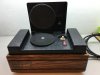
There was one of these on the bay a couple of years ago along with a bidding frenzy. I put a bid in but got blown smoothimg_0110.jpg out of the water.
 
No this one is for CDs.
Google Nitty Gritty CD cleaner for images.
But I don’t think Nitty Gritty makes them anymore but can be found used fairly reasonable.
Like to have one myself sometime.
There was a unit on Audiomart for very short money. The listing is closed but the selling price is still posted.
 
AS: I use either shampoo or also dish soap plus a bit of water, but I spread the stuff over the surface with my left index finger. After that I give it a good rinse under the tap with pretty warm water, then shake off (most of) the rest of the remaining drops with some wild swinging motions - and if there still are some remaining drops, I tap the CD all so slightly onto a cotton towel. That has worked for me without causing any scratches so far.

Greetings from Munich!

Manfred / lini
 
No this one is for CDs.
Google Nitty Gritty CD cleaner for images.
But I don’t think Nitty Gritty makes them anymore but can be found used fairly reasonable.
Like to have one myself sometime.
There was a unit on Audiomart for very short money. The listing is closed but the selling price is still posted.

Oh I see; I think this may be a bit out of budget even if I did hunt one down, but appreciate it.
 
AS: I use either shampoo or also dish soap plus a bit of water, but I spread the stuff over the surface with my left index finger. After that I give it a good rinse under the tap with pretty warm water, then shake off (most of) the rest of the remaining drops with some wild swinging motions - and if there still are some remaining drops, I tap the CD all so slightly onto a cotton towel. That has worked for me without causing any scratches so far.

Greetings from Munich!

Manfred / lini

Thanks lini. Much appreciated.

I tried the soap-and-water method just today to clean the Linkin Park disc, but, as I said, it seemed to bring scratches to the surface or something...I don't know, maybe they were already there and the cleaning brought them out? :dunno:

What's really weird is that even using the Meguiar's Scratch-X car scratch remover, the scratches on some discs don't get buffed out...:rant:
 
AS: Well, who knows, what the sponge you've used is made of? Just needs to be a tiny bit harder than polycarbonate to leave scratches...

Greetings from Munich!

Manfred / lini
 
Thanks lini. Much appreciated.

I tried the soap-and-water method just today to clean the Linkin Park disc, but, as I said, it seemed to bring scratches to the surface or something...I don't know, maybe they were already there and the cleaning brought them out? :dunno:

What's really weird is that even using the Meguiar's Scratch-X car scratch remover, the scratches on some discs don't get buffed out...:rant:

I haven't had the dish soap method fail. One drop, spread with finger tip, rinse thoroughly with lukewarm tap water, carefully dry with a very soft cloth. I've never seen any scratches as a result of this.

At the same time, I have had many used discs that I picked up cheap that had some light scratches on them which played just fine. For more serious scratches which have caused skipping problems, I have used toothpaste, which has worked even though it leaves a dull (obviously very lightly scratched) area, but they still play jus' fine.
 
I haven't had the dish soap method fail. One drop, spread with finger tip, rinse thoroughly with lukewarm tap water, carefully dry with a very soft cloth. I've never seen any scratches as a result of this.

At the same time, I have had many used discs that I picked up cheap that had some light scratches on them which played just fine. For more serious scratches which have caused skipping problems, I have used toothpaste, which has worked even though it leaves a dull (obviously very lightly scratched) area, but they still play jus' fine.

Thanks; perhaps my sponge did it then...I'm hesitant to use my finger for any cleaning method on vinyl or CD surfaces, don't know what it is...

I've read over and over again, though, that you're supposed to clean AND dry a CD from the inner ring outward in straight strokes -- so would using a finger and spreading the soap be wise?

BTW...love your avatar (and I'm also originally from NY, but not as far north as you are. I had an ex that graduated from Syracuse).
 
Thanks; perhaps my sponge did it then...I'm hesitant to use my finger for any cleaning method on vinyl or CD surfaces, don't know what it is...

I've read over and over again, though, that you're supposed to clean AND dry a CD from the inner ring outward in straight strokes -- so would using a finger and spreading the soap be wise?

BTW...love your avatar (and I'm also originally from NY, but not as far north as you are. I had an ex that graduated from Syracuse).

I have always used my fingers with no problems; one drop, spread all over the disc both sides, rinse very thoroughly, and -- most importantly -- careful drying with a very soft cloth. Skin is definitely not harder than the plastic (polycarbonate, I think) and won't scratch it, but other surfaces like sponges, paper towels, etc., definitely can. I have used soft anti-static cloths or cotton T-shirts; very gently, and wiping from inside to the edge as others have already mentioned. I've heard of others using cloth diapers for this. I don't think it's very difficult to scratch polycarbonate. You can see when you use toothpaste to smooth out a bad scratch that even something that is as low-end abrasive as toothpaste very definitely scratches the polycarbonate; of course if it didn't do that, it wouldn't work to smooth out the scratch. But compared to washing an LP, washing a CD is a snap.

Since you mention it, the avatar is my wife. No, seriously, it really is. I initially put it on there to pull her chain a little, but then it turned out that she didn't care. ;)
 
For fingerprints, I use a microfibre glass polishing cloth, and simply breathe on the disc to leave a little misting, and wipe with radial strokes.

If the disc is very dirty, I wet it, use a drop of detergent hand wash, and use my fingers to spread and clean. Then rinse, shake, and finish with the microfibre cloth.

I've done this with hundreds of secondhand discs.

Make sure there is no grit on the cloth...
 
Last edited:
Thanks so much, Mark!

I actually have some screen cleaner from Office Depot that I've used on my computer monitor and bedroom TV...do you think that will suffice?

It probably will work, the thing is that LCD screen cleaner is designed to work with a clear plastic surface ( the LCD ) similar to the playing surface of a CD. There is usually an included cloth with the cleaning kit, use it and no other cloth not even microfiber.

Seemingly clean Soft cloths, Microfiber cloths and even single use Lens cloths all can get "grit" from the CD's surface embedded in them and that can cause additional scratching. The kit cloths are made to avoid that.

Fortunately the CD playback or ripping process is quite tolerant of minor scratching. Out of 600+ Thrift Store CD's I've only had to trash less than a double handful due to scratches / skipping.

Mark Gosdin
 
The one thing you need to.understand is the quality of State side recorded CD disc's have gone way down over the years. I purchase a fair number of CD's from Japan and the difference is striking. Jspanese pressed CD's are thicker and much stiffer than domestic ones. Japanese CD are like the earliest State side CD's I have from the late 1980's.

I use the soap and water technique Using a natural bristle super soft tooth brush to lightly scrub them.. Very important it must be natural bristle, anything else can scratch the protective layer on a CD. Here is the trick for drying, first rinse the CD in tap water to get the soap off finally rinse them in distilled water and them air dry. Make sure the distilled water you get is distilled and not D-ionized.
 
There was one of these on the bay a couple of years ago along with a bidding frenzy. I put a bid in but got blown smoothView attachment 1547005 out of the water.

I have one of those although I rarely use it. Perhaps I should sell it on my local CL.

IME most dirty CD's and DVD/Blu-Ray disks respond well to just about any non abrasive household cleaner and a Micro Fiber cloth.

For really scratched and cloudy CD and DVD/Blu-Ray disks I use Flitz metal polish.
 
Back
Top Bottom