• The move to the new server is done. There are some software and database maintenance updates in process. This has us passing the hat around to help out. We appreciate any donations. Seriously, even a dollar helps. The payment page may be found here - https://www.audiokarma.org/support.html

Hooking up a couple components to my receiver ....

DJGregg

New Member
Hello All :)

I wanted to hook up a CD and DVD (all region) player to my STR-DA5200ES receiver. The CD player is an Onkyo DX-C390 and the DVD player is a Pioneer DV-320. Years ago, this old analog guy could follow an instruction manual and even sort it out himself without one.

* My issue is the digital part of the setup. I have the connecting cables. It seems in addition to those red/white hookups, there are these additional options. I wonder if the digital is in addition to the red/white hookups or instead of - as in a choice or do you have to do both?

The backs of both my components have no option for HDMI. The CD and DVD players have the option for optical connection. I have one of these optical chords. I notice coaxial hookups on both components, too. I have the cables. Might be short one of the digital cables, though. Looking for the optimal hookup ....

I will also hook up a smart TV too. Going the inexpensive route - not one of those snazzy OLED things. More Roku. I can take good pictures of the back of the components if we get that far. I appreciate any help someone(s) could offer.

Thank you,
Gregg
 
Register to hide this ad
Optical or analog(your choice) from the cd changer into the sony, optical from the tv into the sony(for smart stuff), component a/v out of the dvd into the sony(it upconverts video).. hdmi out of the sony to the tv..(for dvd video)
Keep the remotes handy for switching inputs...
 
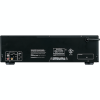
Wow, I took some pictures, but yours are better. That's the components. So, if I leave out the RCAs, I am good? With the CD player, I can go with 3 choices: optical (see image}, or coaxial, or RCA. Which would be the best? I noted that the optical seem to be labeled with video though. Somehow my connection does not seem correct.

I am learning. Thanks for your reply.
 

Attachments

  • CD to AV.JPG
    CD to AV.JPG
    106.7 KB · Views: 10
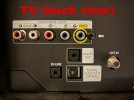
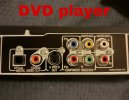
Here are my images. I am well-stocked with HDMIs. Only one optical. No coaxial. I am willing to purchase whatever makes the best setup
 

Attachments

  • TV (side view).JPEG
    TV (side view).JPEG
    60.9 KB · Views: 12
  • TV (back view).JPEG
    TV (back view).JPEG
    76.6 KB · Views: 13
  • DVD player.JPEG
    DVD player.JPEG
    94.1 KB · Views: 13
  • CD player.JPEG
    CD player.JPEG
    103.4 KB · Views: 13
Digital inputs (Coax, optical) are in addition to your analog (R/W) inputs. Given the connections on the back of your receiver you have some options.

There are plenty of optical inputs to connect your TV & CD player.

If you want to use the DAC in the STR vs. the DAC in the CD player then give it a try with an optical connection and see if you like the sound better than hooking the CD player via analog RCA cables.

I would definitely use optical for the TV output and let the STR decode the signal to take advantage of the different sound fields available in the STR.

The DVD player has two options for video, one being S-video and the other is component video. You can use either. If I was faced with those choices I'd find a DVD player with an HDMI video output and an optical audio output. The optical goes to the receiver, the HDMI goes to the TV.

Good luck!
 
Thank you Yamaki and Swokie63. I'm going to distill all I have learned from you both, and put it to test. I'm actually thinking, based on my pictures and what I think I know, that I should get another optical. I have a lot of PAL DVDs so I really have to stick with this player. It is handy. It would play a pancake. *I'm not sure I know what DAC and STR mean, exactly.
 
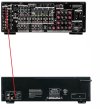
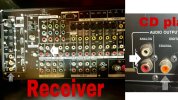
My intended CD player to Receiver hookup. RCAs labeled "1" on the two components. Coaxial labeled "2". I'll have to purchase that. Does this look correct for the CD player? Again, thanks for your attention and help.
 

Attachments

  • Receiver to CD.jpg
    Receiver to CD.jpg
    117.5 KB · Views: 11
STR is your Sony receiver..
DAC is digital to analog converter.. the cd player has one(converts the digital media on the disc to an analog output, the red and white rca's) the way your pic above shows your intended connections. They are correct, using the cd players internal dac..
The optical or coaxial(digital) outputs would send a digital signal to the sony, and its internal dac would convert the signal to the analog you'll hear thru the speakers.. one of the dacs may sound better than the other, but you'll have to experiment with that..
 
You didn't bring it up, but analog RCA audio cables are not necessarily compatible with digital co-ax connections. They might be, or they might not be; digital uses 75Ω impedance cables (don't worry about what cable impedance really means, as it's more info than you really need, but if you're curious, you can try this article), as does analog video, but because audio frequencies are low compared with video or digital, impedance doesn't really matter.

At any rate, if you're using a co-ax connection, and you hear digital artifacts, such as noise or dropouts, replace that cable with a video cable and see if it resolves the problem.
 
Most likely, you want to use digital outputs on both the DVD player and the CD player. It does not matter whether you choose optical or coaxial, as both can deliver the same data.

The reason to use the digital outputs, in the case of the DVD player, is that more formats are possible than just 2 channel stereo that can be sent via a digital connection (like Dolby Digital 5.1 and dts). In the case of the CD player, if you are using any digital processing in your receiver, all analog inputs will be converted to digital for processing, so it is better to just give it a digital signal instead of converting it to analog to send to the receiver and then have the receiver convert it back to digital for processing and then convert it back to analog for you to hear it.

I recommend not connecting the analog connections at all, so that you won't accidentally select the analog connections.

For video from your DVD player, the order, from best to worst, are HDMI, component video (which is three connections), S-Video, and composite video. I believe your player's best video connection is component video, so use that.

For the TV, you will want an HDMI output from the receiver to the TV. If any sources come from the TV, you will want audio from it connected to the receiver. Again, use a digital connection. It does not matter if it is optical or coaxial.

(If your receiver were newer and had HDMI ARC, then just the one HDMI connection would be good enough, as it would allow audio to go both ways. But I am pretty sure that your receiver does not have that option.)
 
I may be misreading this, but why can’t the line RCA connection be used? That is, red white yellow from the DVD player to the DVD receiver input and red white from the CD player to the CD receiver input?
 
I may be misreading this, but why can’t the line RCA connection be used? That is, red white yellow from the DVD player to the DVD receiver input and red white from the CD player to the CD receiver input?

You can do that. You will be able to see a picture and hear sound that way. But if you do, the video quality will not be as good, because you are using a composite connection instead of the component connection. (If there were no advantages to S-Video and component connections, they never would have been added to equipment. Here you can read a very brief explanation of what is going on; you can do some searching online if you want more detail.) For the audio connections, you also will miss out on the surround sound from Dolby Digital 5.1 and dts DVDs, having those formats down-converted to 2 channels from 5.1 (or even 6.1, depending on the disc).

Additionally, if one engages any digital processing of the audio in the receiver, the receiver will convert the analog audio that you are outputting (that was digital on the disc) back to digital for processing, and then it will be reconverted to analog for you to hear it. Many surround receivers use digital processing for bass management, so if you use a subwoofer, then you will have this conversion back and forth going on, in most cases. If everything is working as it should, this will not make an audible difference, but it isn't doing the signal any good to convert it back and forth like that. There are more steps of processing that way, and if any of those extra steps have an audible problem, you will get that audible problem.

So, it is better to just send the audio to the receiver digitally, if the source is digital. Both CDs and DVDs are digital, so it is best to keep it that way to send to the receiver.
 
Thanks for the thorough and reasonable explanation especially for the digital audio. Having never used either S-Video or optical, I'll have to take your word for it. But I seem to recall both optical and S-Video are below HD quality so there will be an upper limit to how good things will appear. I am interested to hear how this gets resolved for sure. :thumbsup:
 
Your CD has analog outputs which means it has an internal DAC (digital to analog converter) and it is internally decoding the digital signal from the CD media when you connect the two components using the RCA analog cables.

Conversely, since your receiver has digital inputs it also has a DAC in it and if you connect the CD player to the receiver using an optical cable then the receiver will decode the digital signal.

It's possible that these two connection schemes may sound different from each other. One may sound better to you or they may sound the same. You won't know unless you try them both. I'd make up both connections from the CD player to the receiver, then do a comparison of the two signals by changing the input you are listening to on the receiver controls. In other words, switch back and forth between the optical input and the analog input. Listen so some music you are very familiar with.
 
Thank you Yamaki and Swokie63. I'm going to distill all I have learned from you both, and put it to test. I'm actually thinking, based on my pictures and what I think I know, that I should get another optical. I have a lot of PAL DVDs so I really have to stick with this player. It is handy. It would play a pancake. *I'm not sure I know what DAC and STR mean, exactly.
220 Electronics sells all region DVD and Blu-ray players for the US market. They also sell 220 volt versions of many devices.


I have a Sony DVD S-1500 all region DVD/Blu-ray/CD player in my bedroom feeding an HT receiver and a 4K TV. For my main system I have an all-region Sony UDP-X700 4K/SACD/Blu-ray/DVD/CD player feeding an HT pre/pro and a 4K TV. Both players came from 220 Electronics.

One of my favorite movies is Life Force. I have a PAL copy and an NTSC copy (both on DVD). Both copies play in both players. The only disc I have that won't play on either player is a CD-i of the original Total Recall (the remake sucks big time). It will only play on computer optical drives. An NTSC version of Total Recall (the original) is also part of my collection.
 
This is all valuable information. I am taking it all in. So, if I do not use the RCAs and instead go with the coaxial option instead, I would not use the CD option on the receiver.
 
DAC is digital to analog converter. To keep everything super simple, I would use a stereo RCA cable for the CD and S-Video for the DVD. That will be as high quality as the gear supports and only 2 cables. But as you’ve heard here it can work in many ways.
 
To keep everything super simple, I would use a stereo RCA cable for the CD and S-Video for the DVD. That will be as high quality as the gear supports and only 2 cables. But as you’ve heard here it can work in many ways.
While your connection method might be simple easy, however, using the already available Component (RGB) will provide a much, much better resolution picture (superior) from the DVD player, being the older DVD player has no HDMI video output, and the use of the Component video, only requires two inexpensive and easily purchased Component video cables that are simple to connect, as all three RCA cable ends are RGB color band marked, as well as the equipment`s respective RGB RCA sockets.

The receiver supports all three types of analog video inputs, plus HDMI, and the OP`s TV also provides a Component video input, so why not inexpensively exploit that higher quality video signal availability, until the OPs finds a more modern all region replacement player with HDMI output, which currently the OP`s setup`s ultimate picture quality limitations ?

While DVD`s video resolution is limited to 1080I, I know for a fact that my older 2009 purchased Sony BR/DVD Universal player`s Component video output provides full 1080P resolution as my various Flat screen TV`s report when their Component video input is selected with the Sony player is engaged and sending a Component video signal to them.
 
Back
Top Bottom