• The move to the new server is done. There are some software and database maintenance updates in process. This has us passing the hat around to help out. We appreciate any donations. Seriously, even a dollar helps. The payment page may be found here - https://www.audiokarma.org/support.html

Hooking up a Nakamichi TA-1

johnferguson

New Member
Owner's manuals for these things online don't seem to exist. I have a TA-1 which seems to be in great shape or at least it plays well. But the inputs are hard to understand. It has Phone/Video/ and CD in one group on the back and then tape- record and play in another group.

There is no tape select key on front per se. there is Tuner. Video, Phono, and CD. they work as expected.
then there is a Tape Monitor selector which gives choice of source or tape.

I'd supposed this could be used wither with a 3 head or a 2 head tape deck. In this case I'm fresh out of 3 head decks so I used an old Denon 2 head. NADA. I expected to get ouput from the tape deck on play and source, but nothing. I don't have the record output hooked up.

There is no other way to play tape through the TA-1 other than to hook it up to either CD or Video.

If you have one of these things, what did you do?

And better yet, if you have the Owner's Manual can you be enticed into scanning it?
 
Register to hide this ad
Yes, it's a receiver. and no, the manual on hifiengine is the service manual, not the owner's manual. Based on my experience with my other Nakamichi equipment, the service manuals seldom provide the kind of advice I'm looking for. Selecting the tape monitor switch on the front is not providing the effect I'm looking for which would swtich between whatever the input (source) going to the tape recorder is and what the tape is outputting. and when it's set to tape, the source should be off.

not happening. could be a problem with the receiver, but more probable, I'm expecting something that it doesn't do, no matter how reasonable what you suggest is.
 
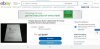
There's an owners manual on ebay for 10 bucks..

Screenshot_20220217-184332_Chrome~2.jpg

I don't if that'll help..

And just out of curiosity, I'd connect the 'out' of the rcvr to the 'in' of the denon to see if you get audio from 'source' on monitor.. fm or whatever else you can connect to cd, video, or phono if you have a tt..
 
Last edited:
If you ONLY want to play tapes try the tape out to the cd in and see if you get sound. Select cd on the Nak. Or use that as a test to see if the tape deck works and produces sound.

I'm wondering if the monitor switch is bad...

You are switching the monitor to "tape" when attempting to use the tape deck?
"Source" should only affect CD, Tuner, Video, and Phono.

And always remember, when using a tape deck it's always connected IN to OUT and OUT to IN. You probably know that but just in case...
 
Last edited:
There is no tape select key on front per se. there is Tuner. Video, Phono, and CD. they work as expected.


There is no other way to play tape through the TA-1 other than to hook it up to either CD or Video.
the tape select is the source/tape switch.. it lets you hear what is being played.. or recorded(if that is what you are doing) it's a monitor..

If you ONLY want to play tapes try the tape out to the cd in and see if you get sound. Select cd on the Nak. Or use that as a test to see if the tape deck works and produces sound.

I'm wondering if the monitor switch is bad...

You are switching the monitor to "tape" when attempting to use the tape deck?
"Source" should only affect CD, Tuner, Video, and Phono.

And always remember, when using a tape deck it's always connected IN to OUT and OUT to IN. You probably know that but just in case...

I assumed, based on the underlined comment in the op, that the highlighted part of your post was already tried..
 
The way I read it he might not have been selecting "tape" based on these statements..
"I expected to get ouput from the tape deck on play and source, but nothing."
and "There is no tape select key on front per se. there is Tuner. Video, Phono, and CD. they work as expected."

Tape doesn't have its own "pushbutton" on his unit like the other sources but I'm assuming switching the source/tape switch to "tape" would enable the cassette deck to work.
That is if it is a true tape monitor.
Maybe I'm wrong...
 
Last edited:
Tape doesn't have its own "pushbutton" on his unit like the other sources but I'm assuming switching the source/tape switch to "tape" would enable the cassette deck to work.
That is if it is a true tape monitor.
Maybe I'm wrong...

I think that also, so maybe we're both wrong.. @the skipper, help..! :D
 
Last edited:
Since there were no pictures posted of the wiring connections on the casstte deck or back of the Nak, or the face plate of the Nak I went to ebay and looked for his unit, and then used zoom to see the faceplate switches and rear connections available. Then came up with my last, "best" guess.
 
Since there were no pictures posted of the wiring connections on the casstte deck or back of the Nak, or the face plate of the Nak I went to ebay and looked for his unit, and then used zoom to see the faceplate switches and rear connections available. Then came up with my last, "best" guess.

Yep, pics definitely help.. I did the same thing.. but with google images.. :thumbsup:
 
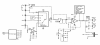
I just looked at the service manual. The "tape monitor" is a completely conventional circuit. If you plug a working tape deck into the tape "play" input jacks, and then select "Tape" on the front panel, the deck should play. If the deck also has a tape/source switch, make sure it's in "tape" also.

Nak_TA-1.png
 
^^^
That's what it looks like to me too. But, I did not see any other tape switch except for the Tape Monitor Source/Tape knob.

To play a tape the knob has to be set to Tape. To play any other source it has to set to Source. If you want to monitor what's being recorded then it has to be set to Tape, using a 3-head deck, and of course the source selected one wants to record and monitor.
 
While I don't think this is related to the OP's problem, I hate when they use that 9152/3 switching IC. They do that just so they can have nice "soft-touch" front panel controls. I have a really nice Luxman R-115 that's quasi-bricked because of the 9153 IC having gone bad.
 
OOPS, I caused the problem.

I should have revealed the entire setup in the first post ans save all your time. We bought a place which came with a room which had a tv with soundbar and sub-woofer. I do have a good system, TA-4 with B&O speakers in living room.

Having more equipment that I should, I thought it would be interesting to feed the soundbar system with a TA-1. The soundbar has a line input so I connected the tape recording output to the soundbar. I used a CD drive for a source and this setup worked fine.

I'd just revived a Denon DRM-550 and thought it would be good to have a tape deck in this room. I hooked the tape deck up to the tape-play inputs and had the problem I identified in the beginning of this thread. no matter what I did with the tape selector switch i got CD and not tape. This makes sense if you assume that when this system is set up properly, there is no reason why output to recorder would ever be switched, and it seems not to be.

So the answer to the problem if want to keep running this is to have the CD on the CD input and the Denon Tape Deck on the Video.

I apologize profusely for wasting everyone's time with this.

As to how the soundbar and sub-woofer sound? About the same as a better boombox. I suppose there are really good soundbar systems out there, but this isn't one of them.
 
OOPS, I caused the problem.

I should have revealed the entire setup in the first post ans save all your time. We bought a place which came with a room which had a tv with soundbar and sub-woofer. I do have a good system, TA-4 with B&O speakers in living room.

Having more equipment that I should, I thought it would be interesting to feed the soundbar system with a TA-1. The soundbar has a line input so I connected the tape recording output to the soundbar. I used a CD drive for a source and this setup worked fine.

I'd just revived a Denon DRM-550 and thought it would be good to have a tape deck in this room. I hooked the tape deck up to the tape-play inputs and had the problem I identified in the beginning of this thread. no matter what I did with the tape selector switch i got CD and not tape. This makes sense if you assume that when this system is set up properly, there is no reason why output to recorder would ever be switched, and it seems not to be.

So the answer to the problem if want to keep running this is to have the CD on the CD input and the Denon Tape Deck on the Video.

I apologize profusely for wasting everyone's time with this.

As to how the soundbar and sub-woofer sound? About the same as a better boombox. I suppose there are really good soundbar systems out there, but this isn't one of them.

Yeah, it was a waste of time, but I like a mystery so no big deal with me.
Happy to try to help out.

That's what AK is all about.
 
Back
Top Bottom