• The move to the new server is done. There are some software and database maintenance updates in process. This has us passing the hat around to help out. We appreciate any donations. Seriously, even a dollar helps. The payment page may be found here - https://www.audiokarma.org/support.html

How do I setup ADS 910's?

llamaCannon

New Member
I've been browsing all over trying to get this figured out and all I've really discovered is A. there's a whole lot about speakers I don't know and B. I should come ask here.

I inherited a pair of ADS 910 speakers and I'd really like to use them. I'm amateur hour at music recording but it's something I enjoy, so discovering that these are really nice studio speakers is kind of a jackpot if I can get it up and running. I've searched all over and I don't see where to even plug in a cable of any kind. I found elsewhere something about crossovers for this system, but I have no idea what that means so... ELI5 I guess? Thanks in advance.
 
Register to hide this ad
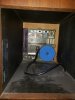
Post pictures of the backs of the speakers so we know what you're working with. Maybe also a picture of the upper left quadrant of the front of the speaker (with the grille removed). But from what you've said, it sounds like you may be used to "active" speakers with built-in amplification. These need a separate amplifier.
 
First, welcome to AK LLamaCannon! Second, Congratulations on your inherited pair of 910 and please accept my condolences if it's appropriate. Did you get the metal stands with them? Should you have any issues with them, you can contact a Richard So with ADS speaker repair service. He's the go to guy for ADS speaker repairs.

This link should help you with connections. It should take you to the manual.

http://sportsbil.com/ads/l-910-ownersmanual.pdf
 
So I guess this raises the question: what electronics do you have to connect to them? And if you don't have an appropriate amplifier, are you willing to invest in one to take advantage of these fantastic speakers?
 
Take care on the above question about your current electronics. You may feel you are drinking from the firehose a bit if you are just getting into higher end audio gear. One important thing to understand about speakers is their impedance rating. The lower the impedance, the more strain it can put on the amp. Most speakers are either 8 ohm or 4 ohm (some are also 16 and 6, but not important at the moment). The 910 is a 4 ohm speaker, so that means you need a quality amp that can handle 4 ohm loads. Check the manual of your current amp to see if it can handle 4 ohm speakers.

Secondly, I restored a few sets of ADS last year. I had 710, 810 and 910 sets. Both the 710 and 810 had tweeters that were blown (which were rebuilt by Richard So), however, of the two sets of 910, neither set had any blown drivers. What is an issue is that the more complex crossover (where you connect the speaker wires) can require some cleaning to get the signal through to the drivers. So, when you go to test, just know that if all drivers are not working, it could be an issue with the crossover and be an easy fix.
 
Sure thing -

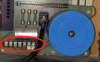
The crossovers are removeable from the front of the speakers to make the wire connections shown in post #5 easier. Unscrew the the silver posts 1/4 to 1/2 turn counterclockwise and gently pull the crossover out from the speaker. Be careful not to drop it because it is kinda heavy and difficult to hold just using the posts.

When you have the crossovers out you can look to see that the fuses are not blown.

The black wire that plugs into the crossover can unplug. Sometimes this connection can be loose and cause connectivity issues, but gently squeezing the prongs inward can help to ensure a good connection.

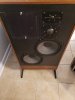
Your dome midrange and tweeter drivers look to be in very good condition. They are shiny and not dark and encrusted in crud. You also have the metal stands, which do not always come with the speakers.
Congrats on your score! They are great speakers.
 
Last edited:
You’ve got a spectacular set of speakers! The 910s are end game speakers for many. Great way to join the ADS fan club! I also started with a set. Yours are the earlier version with veneer on the back side of the cabs. Later versions have black painted backs, the bean counters wanted to save some money. The crossovers are on the plate, which is removable from the front by turning the two locking hand screws. Be careful, it’s heavy. As noted, being 4ohms, the more power you feed them the better.
Can you post more pics, and pics of the serial numbers?
That plug that plugs into the crossovers is known to be finicky, and at times, you may not hear a tweeter or mid range driver working. You’ll need to tighten the plugs by very slightly twisting-bending the male prongs for better contact. It’s also a good idea to get Deoxit, and clean the female plug receptacles on the crossover board.
Once you have them singing, be prepared! They are stunning! The bass is outstanding, mids are spacious and dimensional, highs very detailed, but not at all harsh. These are easy to listen to all day at good volumes.

Cheers Glenn
 
Last edited:
So I guess this raises the question: what electronics do you have to connect to them? And if you don't have an appropriate amplifier, are you willing to invest in one to take advantage of these fantastic speakers?
I am willing. From what I'm seeing these are pretty great to luck into and I'd be silly not to try to get them up and running. I am still hoping to not completely break the bank on it though... Do you have a suggestion for what amplifier(s) would be good to get?
 
The crossovers are removeable from the front of the speakers to make the wire connections shown in post #5 easier. Unscrew the the silver posts 1/4 to 1/2 turn counterclockwise and gently pull the crossover out from the speaker. Be careful not to drop it because it is kinda heavy and difficult to hold just using the posts.

When you have the crossovers out you can look to see that the fuses are not blown.

The black wire that plugs into the crossover can unplug. Sometimes this connection can be loose and cause connectivity issues, but gently squeezing the prongs inward can help to ensure a good connection.

Your dome midrange and tweeter drivers look to be in very good condition. They are shiny and not dark and encrusted in crud. You also have the metal stands, which do not always come with the speakers.
Congrats on your score! They are great speakers.

Cool, thanks. I am not familiar with pretty much any of this but am willing to learn. Is there a resource that might help out a novice like myself like a youtube video or some such you're aware of? It'd be really helpful to see someone working through something similar. I searched around and didn't find anything.
 
I am willing. From what I'm seeing these are pretty great to luck into and I'd be silly not to try to get them up and running. I am still hoping to not completely break the bank on it though... Do you have a suggestion for what amplifier(s) would be good to get?
I guess I should note that this is what I'm using thus far with my speakers I have. It's far from fancy, but I've also never had something like these 910's before. I have it connected to my computer and have 4 speakers connected into it (2 as left speakers 2 as right speakers). Regardless, I do still want to have the 910's connected to my computer.
SpeakerPic.jpeg
 
That will not do them justice, and might not like the 4Ω impedance of the speakers. If you want to use them only with your computer, then I'd recommend at the very minimum an integrated amp or receiver capable of dealing with a 4Ω load, with at least 100 watts/channel RMS. I'd also recommend a separate USB DAC for the computer, as most built-in audio is sub-par. Something like this would be fine, although there are plenty of other higher end models. For the amp or receiver you can buy either new or used/vintage, but many lower priced newer amps don't deal well with 4Ω.

Is it possible that you'd want to add other signal sources in the future? Maybe a CD player, turntable, Bluetooth, or external streaming device?
 
Cool, thanks. I am not familiar with pretty much any of this but am willing to learn. Is there a resource that might help out a novice like myself like a youtube video or some such you're aware of?

Hmm, good question. I am not sure. You would think there should be a stereo 101 video on Youtube somewhere. Where are you located?

I agree with Swechsler that your Aiwa is underpowered to really do a good job with the ADS 910s, so an integrated amp or a reciever capable of driving a 4 ohm load would be better. Also, don't try to drive two pairs of speakers with the Aiwa once you get the ADS hooked up.
 
Fun thread!

That’s quite a jump from that aiwa set up to 910s!

Step 1: Read the 910 manual. Then read it again.
Step 2: Hang out on audiokarma for awhile. Ask lots of questions.
Step 3: Save some coin for some killer gear to go with those 910s. You just hit the speaker jackpot my friend! There may even be an AK member near you who will set you up.
 
I guess I should note that this is what I'm using thus far with my speakers I have. It's far from fancy, but I've also never had something like these 910's before. I have it connected to my computer and have 4 speakers connected into it (2 as left speakers 2 as right speakers). Regardless, I do still want to have the 910's connected to my computer.
View attachment 2217048
Oh no, that simply will not do! The 910's need big power. If you become a subscriber, $25.00, and supports the forum, you'll have access to Barter Town. Always lots of great gear listed there. Chances are good you'll find a good amp for these.

And, don't count out tube amps!
Here's a video with a Scott LK-72 that puts out around 35 wpc.

And a video with SS power, around 200wpc.
 
Regardless, I do still want to have the 910's connected to my computer.

Tell us more about your knowledge of audio equipment, are you just getting into it? I ask because speakers don't connect to a computer.

If you plan on using the computer as source you will need to connect it to a receiver or amplifier which you would connect the speakers to
 
Back
Top Bottom