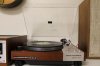
There are a few Ebay sellers that offer replica dust covers for Marantz turntables. They are high quality and look great, but they don't have a Marantz badge like what is on the original.
You may be replacing the original dust cover because it is cracked, chipped, scratched up, and otherwise not useful anymore. Before you throw it away you might consider salvaging the Marantz badges to put on the replica dust cover (there are two, one on top and one underneath). Here is how to do it.
Ok I'll be up front: this will require some special tools to do it correctly but I will explain how you COULD do it with minimal special tooling. (EDIT: See steerpike2's post below to most likely do in place of steps 1-3). A well outfitted basement woodworking shop will have the tools you need. If you don't have such a shop, perhaps a neighbor or buddy can help you out.
Tools needed:
Dremel Tool
Block plane
Band saw (or thin kerf hand saw)
combination square
hair dryer
Exacto knife
box cutter knife blade
Materials needed:
blue painters tape (or similar)
fine sand paper (~320-400 grit)
thin double stick tape
Here we go...
EDIT: See steerpike2's post below to most likely do in place of steps 1-3.
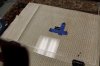
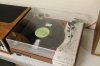
Here is my Marantz 6300 turntable dust cover. As you can see, it is cracked and chipped beyond repair so I decided to get a new replica dust cover.

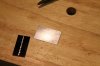
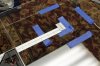
1. Use a Dremel tool with a straight bit to cut out the badge. Leave a some extra on one side to help safely guide the cut-out piece through the band saw (or hold in a clamp for a hand saw - see step 3 option).

2. Use a block plane to true up one edge of the piece you just cut out so it will ride easily on the band saw table.

3. Carefully line up the fence on the band saw and cut the piece right down the middle to release each badge (aluminum on top, and a black badge directly beneath on the underside).
OPTION: If you don't have a bandsaw you could use a thin kerf hand saw.

4. The badges are held on with double stick tape. Use a hair dryer on the hot setting to help release the glue on the tape and carefully pry off the badge from the plastic.
OPTION: You can skip steps 1-3 and attempt to pry off the badges with a box cutter, and hair dryer to loosen the glue. I don't recommend doing this because the badges are tightly held in place and there is little room to get the box cutter around the edges to pry up the badge. It would be easy to scratch the badge doing this...but if you don't have the proper tools, this might be worth a shot. OR use steerpike2's method below.

5. Use a sharp box cutter blade to remove the old tape on the back of the badges. Use a hair dryer to help loosen the glue. Use fine sandpaper to remove any excess tape/glue remaining being careful not to round the edges/corners. You could skip this step, just make sure there aren't any boogers of glue (the bottom of the badge needs to be flat)...but keep in mind that part of the underside of the top badge will show on the underside of the dust cover because the underside badge is smaller.

Looks like I have maxed out the amount of pictures I can post. To be continued...
You may be replacing the original dust cover because it is cracked, chipped, scratched up, and otherwise not useful anymore. Before you throw it away you might consider salvaging the Marantz badges to put on the replica dust cover (there are two, one on top and one underneath). Here is how to do it.
Ok I'll be up front: this will require some special tools to do it correctly but I will explain how you COULD do it with minimal special tooling. (EDIT: See steerpike2's post below to most likely do in place of steps 1-3). A well outfitted basement woodworking shop will have the tools you need. If you don't have such a shop, perhaps a neighbor or buddy can help you out.
Tools needed:
Dremel Tool
Block plane
Band saw (or thin kerf hand saw)
combination square
hair dryer
Exacto knife
box cutter knife blade
Materials needed:
blue painters tape (or similar)
fine sand paper (~320-400 grit)
thin double stick tape
Here we go...
EDIT: See steerpike2's post below to most likely do in place of steps 1-3.
Here is my Marantz 6300 turntable dust cover. As you can see, it is cracked and chipped beyond repair so I decided to get a new replica dust cover.
1. Use a Dremel tool with a straight bit to cut out the badge. Leave a some extra on one side to help safely guide the cut-out piece through the band saw (or hold in a clamp for a hand saw - see step 3 option).
2. Use a block plane to true up one edge of the piece you just cut out so it will ride easily on the band saw table.
3. Carefully line up the fence on the band saw and cut the piece right down the middle to release each badge (aluminum on top, and a black badge directly beneath on the underside).
OPTION: If you don't have a bandsaw you could use a thin kerf hand saw.
4. The badges are held on with double stick tape. Use a hair dryer on the hot setting to help release the glue on the tape and carefully pry off the badge from the plastic.
OPTION: You can skip steps 1-3 and attempt to pry off the badges with a box cutter, and hair dryer to loosen the glue. I don't recommend doing this because the badges are tightly held in place and there is little room to get the box cutter around the edges to pry up the badge. It would be easy to scratch the badge doing this...but if you don't have the proper tools, this might be worth a shot. OR use steerpike2's method below.
5. Use a sharp box cutter blade to remove the old tape on the back of the badges. Use a hair dryer to help loosen the glue. Use fine sandpaper to remove any excess tape/glue remaining being careful not to round the edges/corners. You could skip this step, just make sure there aren't any boogers of glue (the bottom of the badge needs to be flat)...but keep in mind that part of the underside of the top badge will show on the underside of the dust cover because the underside badge is smaller.
Looks like I have maxed out the amount of pictures I can post. To be continued...
Last edited: