I am the owner of a Saba 9241 Digital receiver which utilizes DIN input and output connections. Currently, I have a TT connected to phono, and a bluetooth audio adaptor connected to aux. The receiver has a monitor and record function which was used to replicate high quality audio onto tapes if desired. I connected my PC (using a 3.5mm jack to 180 degree 5 din male) to the monitor input in an attempt to see if a PC could pick up audio signal when the monitor function was on. No dice. The idea behind doing this in the first place is to have the ability to stream and record music digitally from whatever analog source I have connected to my receiver. Maybe I am thinking about this backwards but I feel a custom cable (3.5mm TRS to 270 degree 5 din) which would connect to the headphone output jack COULD work? Am I an idiot? Would the PC still be unable to recognize an audio source like this? How would you personally go about having your PC receive recordable/streamable audio from a vintage turntable, cassette deck, or receiver?


You are using an out of date browser. It may not display this or other websites correctly.
You should upgrade or use an alternative browser.
You should upgrade or use an alternative browser.
How would you connect a vintage receiver's output to a PC for recording and streaming?
Register to hide this ad
You can use the headphone ouptut, to another component input. However, you have to keep in mind that Loudness on, and any tone control, and volume will all be going through that output, at least on most receivers.
Are you sure you had your source/tape switched correctly, and your input selector right? The monitor in should have worked.
Are you sure you had your source/tape switched correctly, and your input selector right? The monitor in should have worked.

the skipper
Professional Curmudgeon
if you want to send TO your computer, you should use the monitor output.

Oops.....yes, I guess he is trying to go TO the computer. He should be able to come out of the headphone jack, and into a Line Input on the computer, with the same conditions mentioned about volume, etc. And just select his source on the receiver.
However, now he will have to make sure the settings for line in are correct at the computer. Sometimes it will need to be set at Line In, or Stereo Mix for instance, depending on what program he is using to record with.
However, now he will have to make sure the settings for line in are correct at the computer. Sometimes it will need to be set at Line In, or Stereo Mix for instance, depending on what program he is using to record with.
I might not have things plugged in correctly, but I feel the 3.5mm TRS to 270 degree 5 DIN plugging in at 29 on the attached image could be the best bet. I enjoy the idea of using my receiver for volume, tone control, etc.in this particular situation; recording/streaming the actual performance of the receiver and source (the "präsenz" presence amplification on this receiver is wonderful). The receiver doesn't have a monitor output. On the image below 9 is the "monitor socket", 7/8 are "tape/cassette sockets".
The manual states for the monitor socket "Monitor: A tape recorder with the record monitor feature connected to socket (9(monitor)) via stereo cable RVK 2 (which was a 5 din to 5 din) enables the quality of the program being recorded to be continuously monitored during the recording sequence. If the "Monitor" button (38) is not pressed (LED not lit), then the current program is reproduced directly. When the button (38) is pressed, however, the program just recorded may be heard with a slight delay as a continuous check on the sound quality. Do not forget however, to reset the monitor function by pressing the "monitor" button (38) again (LED not lit), otherwise all other types of program (radio, records etc.) will not be reproduced. The "Monitor" socket (9) is suitable for connecting table units with a high level ("Line" output)."
Now like I said prior, I have a 3.5mm TRS to 180 degree 5 DIN which can connect my PC to the monitor socket. I've tried every combination of the monitor button, but my PC still receives no viable audio signal. Tried connecting to the Stereo Mix as well.
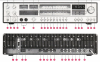
Now the other option is to connect through inputs 7/8. The manual states for the tape/cassette sockets: "Tape recorder/cassette recorder: Two stereo tape or cassette recorders may be connected via sockets (8) and (7) for either record or replay, and also transcribing from one tape to the other. The sockets are identical and conform to DIN 45500. Please use 5 pole connector cables (e.g. SABA RVK 2). This means that any program passing through the 9241 (with the exception of signals fed in via the "Monitor" socket), may be recorded and replayed in stereo with HiFi quality. The recordings are not influenced by the volume and tone settings of the 9241. For replay, press the corresponding button (41) or (42). The LEDS of the display (23) indicate the type of operation in progress. With two tape/cassette recorders connected the following combinations are possible.
Button (41) "band 1" pressed:
-replay from tape unit 1
-record on tape unit 2.
Button (42) "band 2" pressed:
-replay from tape unit 2
-record on tape unit 1"
I tried every combination of this and still my PC receives no audio signal from the 3.5mm line in.
So with this information, how would you all proceed? I am relatively uninformed on this sort of thing.
The manual states for the monitor socket "Monitor: A tape recorder with the record monitor feature connected to socket (9(monitor)) via stereo cable RVK 2 (which was a 5 din to 5 din) enables the quality of the program being recorded to be continuously monitored during the recording sequence. If the "Monitor" button (38) is not pressed (LED not lit), then the current program is reproduced directly. When the button (38) is pressed, however, the program just recorded may be heard with a slight delay as a continuous check on the sound quality. Do not forget however, to reset the monitor function by pressing the "monitor" button (38) again (LED not lit), otherwise all other types of program (radio, records etc.) will not be reproduced. The "Monitor" socket (9) is suitable for connecting table units with a high level ("Line" output)."
Now like I said prior, I have a 3.5mm TRS to 180 degree 5 DIN which can connect my PC to the monitor socket. I've tried every combination of the monitor button, but my PC still receives no viable audio signal. Tried connecting to the Stereo Mix as well.
Now the other option is to connect through inputs 7/8. The manual states for the tape/cassette sockets: "Tape recorder/cassette recorder: Two stereo tape or cassette recorders may be connected via sockets (8) and (7) for either record or replay, and also transcribing from one tape to the other. The sockets are identical and conform to DIN 45500. Please use 5 pole connector cables (e.g. SABA RVK 2). This means that any program passing through the 9241 (with the exception of signals fed in via the "Monitor" socket), may be recorded and replayed in stereo with HiFi quality. The recordings are not influenced by the volume and tone settings of the 9241. For replay, press the corresponding button (41) or (42). The LEDS of the display (23) indicate the type of operation in progress. With two tape/cassette recorders connected the following combinations are possible.
Button (41) "band 1" pressed:
-replay from tape unit 1
-record on tape unit 2.
Button (42) "band 2" pressed:
-replay from tape unit 2
-record on tape unit 1"
I tried every combination of this and still my PC receives no audio signal from the 3.5mm line in.
So with this information, how would you all proceed? I am relatively uninformed on this sort of thing.
Attachments
Now that I'm thinking about it more, the reason the 3.5mm to 5 DIN might not be working is that a 3.5mm TRS only has a ground, left, and right, so when it connects to the 5 pin, it's only utilizing 3 pins. The unused pins could have been for more complex functions present in the older recorders, so the receiver isn't properly sending the output signal as described in the manual. Essentially, the cable would only work as an input, if my brain is jumping through the right hoops. With that being said, would creating a functional 3.5mm to headphone output be as simple as ground, left, right, (copying a pin layout from a compatible din headset) or are other pin connections required to functionally receive a signal?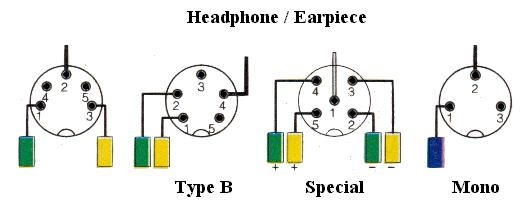
Last edited:

lini
just me...
DS: Are you sure, you've got the correct cable? DIN is a bit trickky in that regard, 'cause a DIN tape connection only requires a single cable, as that will carry both the input and output signals. So if your miniTRS to 180° DIN adaptor cable is wired tip to pin 3 (left signal), ring to pin 5 (right signal) and sleeve to pin 2 (signal ground), the miniTRS side would be the source and the DIN side the sink - and with such a cable you could of course try all day long to receive anything on the miniTRS side without any chance for success, as you'd rather need a cable, that's wired tip to pin 1, ring to pin 4 and sleeve to pin 2 instead.
So I'd suggest you to either measure the cable, if you happen to have a multimeter at hand, or alternatively try to send a signal from the line/headphone-out of your computer to one of the suitable inputs of the Saba (i.e. aux, tape 1, tape 2, monitor), 'cause if sending from miniTRS to DIN works with that cable, it's obviously the wrong type.
Greetings from Munich!
Manfred / lini
So I'd suggest you to either measure the cable, if you happen to have a multimeter at hand, or alternatively try to send a signal from the line/headphone-out of your computer to one of the suitable inputs of the Saba (i.e. aux, tape 1, tape 2, monitor), 'cause if sending from miniTRS to DIN works with that cable, it's obviously the wrong type.
Greetings from Munich!
Manfred / lini
Sorry, but I must be thick-headed today. I don't understand why you are dealing with all these DIN jacks. Seems like all you need is a cable with a jack that fits your headphone output on the receiver, to a mini-jack that fits your computer line-in which you can find anywhere. I can't tell exactly by your picture what the headphone out looks like. Is it a regular mini-jack, like cell phones use for earphone?DS: Are you sure, you've got the correct cable? DIN is a bit trickky in that regard, 'cause a DIN tape connection only requires a single cable, as that will carry both the input and output signals. So if your miniTRS to 180° DIN adaptor cable is wired tip to pin 3 (left signal), ring to pin 5 (right signal) and sleeve to pin 2 (signal ground), the miniTRS side would be the source and the DIN side the sink - and with such a cable you could of course try all day long to receive anything on the miniTRS side without any chance for success, as you'd rather need a cable, that's wired tip to pin 1, ring to pin 4 and sleeve to pin 2 instead.
So I'd suggest you to either measure the cable, if you happen to have a multimeter at hand, or alternatively try to send a signal from the line/headphone-out of your computer to one of the suitable inputs of the Saba (i.e. aux, tape 1, tape 2, monitor), 'cause if sending from miniTRS to DIN works with that cable, it's obviously the wrong type.
Greetings from Munich!
Manfred / lini
Are you able to hear your decks though the headphones on the receiver? If so, the cable I described above is all you need, like the one on this site.
https://www.sfcable.com/12ft-3-5mm-...MI5Inq4Kb37gIVC5ezCh2K8A3QEAQYEiABEgKAoPD_BwE

lini: Your appearance has been a bit of a life saver. This makes so much more sense now, and yes you're right, the cable only functions as an input from my PC to monitor, meaning it's pinned to 2, 3, 5. I feel you may be just the person to ask this next question to as I cannot for the life of me find a definitive answer through my online searching. What would be the ideal pin configuration when building a miniTRS to 270 degree/dice 5 DIN? Is the image I posted above accurate in regard to the 1970's style German headphone DINs? I would assume for my intended purpose, using an identical pin configuration to the headphones would produce the desired results? Unfortunately, as I said I have no concrete idea of what the headphone DIN pin layouts were like. My curiosity has been getting the best of me and I have started looking for a pair of audiophile German era-matching headphones; there's something fascinating about all this classic German hi-fi equipment.
59volvo: While that would work, as lini mentioned above, the 180 degree 5 DIN sockets in the rear of the SABA receiver functionally operated as both a potential input OR output (given selecting the proper settings) through the use of a single 5 DIN cable. To my knowledge I have been unable to find a modern cable which fits the bill for my end goal. This is why I need to build a DIN cable, but unfortunately many DIN cable pin configurations are application specific, both a blessing and a curse it seems
59volvo: While that would work, as lini mentioned above, the 180 degree 5 DIN sockets in the rear of the SABA receiver functionally operated as both a potential input OR output (given selecting the proper settings) through the use of a single 5 DIN cable. To my knowledge I have been unable to find a modern cable which fits the bill for my end goal. This is why I need to build a DIN cable, but unfortunately many DIN cable pin configurations are application specific, both a blessing and a curse it seems
lini
just me...
DS: Colours/channels would appear wrong in that illustration. I.e., pin 5 should be right signal and pin 4 left signal and pin 3 theoretically right ground and pin 2 thoretically left ground (in practice both pin 2 and pin 3 will be common ground on your Saba).
Greetings from Munich!
Manfred / lini
Greetings from Munich!
Manfred / lini
lini
just me...
DS: Another addendum: If you're going to make yourself a custom cable anyway, you could of course also make it bidirectional with another miniTRS connected to pin 3, pin 5 and pin 2, so you could also feed the output of the computer into the Saba. With a pretty thin cable type that would still be no problem.
How long would the cable run need to be in your case, btw?
Greetings from Munich!
Manfred / lini
How long would the cable run need to be in your case, btw?
Greetings from Munich!
Manfred / lini
LOL. I had no idea that any headphone output could be a DIN!! Sorry I couldn't help.Zygmo: Your suggested cable won't help. DS' Saba is all DIN - including the headphone outs, which are DIN "dice 5".
Greetings from Munich!
Manfred / lini