• The move to the new server is done. There are some software and database maintenance updates in process. This has us passing the hat around to help out. We appreciate any donations. Seriously, even a dollar helps. The payment page may be found here - https://www.audiokarma.org/support.html

Hum Troubleshooting Sansui 9090DB

akadrhouse

SuchaNoob
Subscriber
I have a nice Sansui 9090DB I'm troubleshooting for a friend. It has a quite discernible hum in both channels. It had been thoroughly recapped when he bought it, but not main filter caps. They used good caps too and were quite thorough in that regard. I decided to replace the main filter caps (see my other post in here).

They are in and that was a great idea sonically in terms of bass response and transient power draws. However, no effect on hum :(. Hum was there before and still is with no changes in characteristics.

Advice on where to troubleshoot much appreciated!

Information:
  • Sonically, once music is louder than hum, sounds fantastic
  • No real static from any controls. I redid fader lube on all pots the two tone bypass switches on the tone control board
  • Hum is present with zero gain, more pronounced as gain increases
  • Hum is present equally in both channels
  • Hum is present equally on speaker A or B
  • No hum before relay comes out of protection on start up
  • Hum is present independent of source -> turn to FM, zero gain -> unchanged hum
  • Hum is absent when using main in from another source indicating source of hum prior to amplification
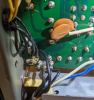
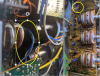
  • touching the wires from the volume pot to the tone board changes pitch of hum (See pic)
upload_2021-8-18_13-43-21.png

I have a scope, but my experience tracing down something with it is zero so far.
 
Register to hide this ad
Make sure you have no ground wires from the preamp boards connected to the same ground pad that the filter caps use. The ground wires from the tone control board are the important ones to get on a good chassis ground. On the power supply board the ground lug has several solder pads to use. Ground the tone control wires to one of the pads farthest away from the filter caps ground. That worked for me.
 
Make sure you have no ground wires from the preamp boards connected to the same ground pad that the filter caps use. The ground wires from the tone control board are the important ones to get on a good chassis ground. On the power supply board the ground lug has several solder pads to use. Ground the tone control wires to one of the pads farthest away from the filter caps ground. That worked for me.
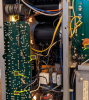
You mean this mess here?
It does look like main filter grounds part of all the grounds.

upload_2021-8-18_14-36-23.png
 
Those blue wires are your signal.

Was it like this before or after the recap? Doesn't matter too much.

Pull the preamp / power on jumpers on the back. Hook up your cell phone, tablet or similar into the power in. Make sure the volume is set to minimum or one click above minimum before turning on the speaker selector. Do you still have the hum?

It's likely something the person who recapped did or did not do. Keep it simple, make sure all the nuts are securing the controls to the chassis, try different AC outlet, try different source (FM) etc.
 
Those blue wires are your signal.

Was it like this before or after the recap? Doesn't matter too much.

Pull the preamp / power on jumpers on the back. Hook up your cell phone, tablet or similar into the power in. Make sure the volume is set to minimum or one click above minimum before turning on the speaker selector. Do you still have the hum?

It's likely something the person who recapped did or did not do. Keep it simple, make sure all the nuts are securing the controls to the chassis, try different AC outlet, try different source (FM) etc.

In order of your questions and advice:
  • Overall Recap - not me, not friend no idea
  • Main filter cap replacement - No change in hum characteristics
  • I think your point about the phone input was addressed in my initial post concerning information - Using a preamp into this unit and thus bypassing the 9090db preamp completely eliminated the hum
  • Different Source input- no change in Hum
  • I will go back and further secure controls, as well as checking the grounding solders/screws
Thanks
 
You mean this mess here?
It does look like main filter grounds part of all the grounds.

View attachment 2318488
that area you show may be your problem. I had an issue where that phillips screw holds the board, and supplied a hard connection from the board to the metal chassis, has loosened, but you won't know because it is also soldered to the board. I unsoldered from the screw using solder wick, and found I was able to get a full turn to turn and a half of the screw, and hum went away. I also resoldered the screw in place. Actually using a good ground strap connected to the chassis, and going to that point where the black wires connect to the the board by the screw should also eliminate, or reduce greatly the hum (as a test)
 
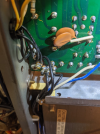
Using folks advice here, I powered on the 9090db and connected a 16 gauge to the chassis, and went about testing the 6 points shown here.

Results:
  1. Comes from Volume Pot - Changed Hum pitched - very little attenuation
  2. This wire comes from the Dolby board - see second pic- Just moving this wire change hum volume. Grounding to chassis attenuated
  3. Direct Ground from Tone that leads to 6 on the power supply. Touching from here to the chassis had the greatest attenuation. Not audible at zero gain. Minor Audible at 50% gain
  4. Second ground from Tone to 6 on power supply - No effect from additional chassis ground.
  5. - no 5....
  6. The mess of ground - touching in here had some effect, but not nearly as much as 2 or 3.

My plan:
  • reflow solder to all points, especially the nasty scar on the dolby board leading down to 2.
  • clean and reflow all solder at the power supply board (6)
  • if needed, run direct from 2 -> 6
Anything else I should think of?
I know the 9090 sometimes had a shield on the volume pot. Am I missing one here on the 9090DB ?
Is there anything better I can do with the problem wire that runs from the dolby wire to 2?

upload_2021-8-19_13-52-3.png

upload_2021-8-19_13-57-29.png
 
I would suggest you unsolder that screw by the bundle of ground wires on the power supply board, tighten the screw, then resolder. I would try that first before "ADDING" additional ground wires, which can create ground loops.
 
I would suggest you unsolder that screw by the bundle of ground wires, tighten the screw, then resolder. I would try that first before "ADDING" additional ground wires, which can creat ground loops.

That is what I just finished doing and the problem is 90% fixed! The hum is inaudible until you get to about 50% gain now which is very doable as that's loud enough to blow you out of the house. I did not add any wires but I did reflow all the solder points that I showed in my diagrams and took apart that nightmare jumble and reload everything around it by putting the screw back in with a small electric cap wire that I wrapped around it and flowed from each of the other points. Thank you everybody!

I still don't like that big wire that goes from the Dolby board to the tone board and touching it still does cause noticeable hum. I'm just hoping that after I get it all put back together and the faceplate and controls all properly tightened to the chassis that it will still be a non-issue.
 
Make sure the nuts that hold the tone pots to the front rail of the chassis are tight and that the front rail is properly screwed to the rest of the chassis. If the frames of the tone pots aren't properly grounded you will get a hum.

- Pete
 
Hoping to revive this thread for ideas for a 2000a with a 120Hz hum I can't get lower than 10 mV p-p on the speaker outputs.

Recapped, fully functional, amp tested and meets/beats original specs

10mV p-p hum/noise measured at zero volume - constant for all selector settings (FM, AUX, etc)
Both channels show the exact same noise waveform/amplitude
Adding volume eventually quiets it a bit before static noise takes over
Pulling the preamp out/ main in jumpers kills this hum
Grounding the amp signal inputs does not
I probed all amp connections and the only ones with measurable 60/120 Hz component were :
70V supply (60mV RMS ripple)
upper driver base (has same noise amplitude/appearance as the speaker terminal)
channel output (same noise) - note this feeds back into the amp so an input, too
The amp board input signals, protection power supply and grounds were clean
I disconnected the wire to the output cap and all the speaker-related wiring tied to the other end of that (thought that was the culprit) but no change to noise on amp output
I tied in an extra 1000 uF on the 2200uF 70V supply cap and the ripple dropped to ~30mV RMS - but the noise did not diminish.
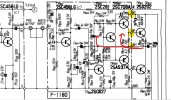
I probed all around within the amp the same signature noise showing up in the regions where I have the red arrows in the schematic snippet I attached.
Also shown are yellow highlights on the amp board pins with noise of any kind plus red arrows showing feedback polluting the "upper" amp pre-drivers.

My current theory is that the hum is coming into the amp from the "upper" final TO3 drivers which are tied to the 70V rail (and the 60mV RMS ripple)
These drivers have the entire case (collector) tied to the 70V supply. Seems like a lot of AC noise radiating from that (?)
Could the supply ripple be bleeding into the base or emitter of the driver and be causing the hum?
Given both channels do it identically, I was discounting this was due to the top drivers being bad, but would replacing the drivers make sense?

As is often the case, the amp sounds great once you actually play music rather than power it on looking for hum...

Anyone else run into something like this?

thanks,

Tom
 

Attachments

  • 2000a amp hum.jpg
    2000a amp hum.jpg
    121.5 KB · Views: 10
I was thinking more about this.

The fact that pulling the preamp/amp jumpers kills the noise is not consistent with suspecting the the output drivers leaking 70V ripple to the base/emitter. The amp gain is such that a 10mV output that I can see on the scope translates to something "un-seeably" tiny on the input. My "ground the amp input" experiment will be redone more carefully as that not helping threw me a curve ball yesterday.

I will proceed under the assumption that it is either the pre-amp supply ripple coming through or a ground loop causing the amp to perceive noise on the preamp input.

Hopefully coming back soon with good news on this :)
 
On the 9090DB. I spent a lot of time tracking things down. I never did completely eliminate it, but I did get it so that you could not hear it on my 101db sensitive speakers until your ear was 2 feet away.
What fixed it for me was completely resoldering the area on the board where all the grounds collected.
Picture included.
Good luck.

1698155578803.png
 
I redid the "ground the amp input test" by tacking in a short wire to the amp connector and this did kill the noise.
So the amp and output drivers are not to blame and it is ground loop and/or preamp supply noise.
I then followed the advice given above and removed solder and then resoldered the main chassis ground points.
This knocked the noise down to 5mV p-p (1.77 mV RMS).

You can still hear it faintly with headphones or with your ear against the speaker.

I looked at the Sansui 2000a spec and they say "Hum and Noise (IHF)" = 75db or better for the AUX input (PHONO is only 70db, so picking the highest)
I can run the amp to 17V RMS before clipping (a tad over the 35W per channel spec).
If I divide 17V/.00177V I get a S/N ratio of 9604 (= 79.65db) so if I did the math right, I am beating the original spec at this noise level.

No matter the measurements or specs, it comes down to what the user agrees is acceptable (if not absolute dead silence).

Curious what others have decided on chasing hum (ie, what level is "good enough", etc)

As for this 2000a, it is going on the shelf as ready for use.
 
I redid the "ground the amp input test" by tacking in a short wire to the amp connector and this did kill the noise.
So the amp and output drivers are not to blame and it is ground loop and/or preamp supply noise.
I then followed the advice given above and removed solder and then resoldered the main chassis ground points.
This knocked the noise down to 5mV p-p (1.77 mV RMS).

You can still hear it faintly with headphones or with your ear against the speaker.

I looked at the Sansui 2000a spec and they say "Hum and Noise (IHF)" = 75db or better for the AUX input (PHONO is only 70db, so picking the highest)
I can run the amp to 17V RMS before clipping (a tad over the 35W per channel spec).
If I divide 17V/.00177V I get a S/N ratio of 9604 (= 79.65db) so if I did the math right, I am beating the original spec at this noise level.

No matter the measurements or specs, it comes down to what the user agrees is acceptable (if not absolute dead silence).

Curious what others have decided on chasing hum (ie, what level is "good enough", etc)

As for this 2000a, it is going on the shelf as ready for use.
Good job. For me, if I have to be < 3 feet away to hear it on my speakers, most won't hear it at all, and I don't worry about it.
Especially when dealing with 70's Sansui---this is a common problem.
Even more common is a very slight hiss which I assume is from transistors I've not isolated yet :(.

The hiss - my 555a, my 2000a, my 2000, my 551 etc....
 
Back
Top Bottom