• The move to the new server is done. There are some software and database maintenance updates in process. This has us passing the hat around to help out. We appreciate any donations. Seriously, even a dollar helps. The payment page may be found here - https://www.audiokarma.org/support.html

Just getting started with my music server project. What should I do next?

B_Karl

New Member
I have a music library consisting of about 21000 FLAC files (about 350GB). All files have completed ID-tags including normalized album images. I have a media cabinet in my garage, and I have ethernet CAT6 as well as RG6 coax cables from this cabinet to my media room. I would like to use my TV to select and play a music piece or select a play list and listen to the music through my receiver.

My TV is a LG OLED of latest model. My late vintage receiver has a digital coax Input as well as ethernet. When playing a piece of music, I would like to be able to view the Title, Composer, Artist and Album name as well as the Album image on the TV.

I have a Synology DS218+ NAS with 4TB in my media cabinet and was thinking of storing the music files on it (or possibly on a 2nd HD in the NAS. I do not want to use my PC for this at all but I'm looking for software and dedicated hardware to facilitate it a simple as possible without sacrificing quality of the sound. I’m not interested in solutions that include getting additional media information pulled from Internet based on what I’m playing as I already have my music tagged with the essential information i need.

I’m looking for suggestions on how to accomplish this and some recommendations for software and hardware that I need to acquire for this to work (seamlessly from my listening chair).
 
Register to hide this ad
You can use any computer, laptop, whatever and learn to use Foobar2000. It’s free, it’s extremely configurable and it plays everything bit perfect when properly set up. You can stream from the server and HDMI directly from laptop to receiver. If you have an older receiver you may need a dac too. But, if the receiver is HDMI, then a modern laptop, even a cheap one,will do great for that. Biggest risk is image burn in on the oled using computer graphics. You can set up screen saver for that.

Then you get a wireless keyboard/mouse pad, and it becomes the remote for your HTPC.
 
I should mention, it has a fantastic app for iPad called MonkeyMoteHD, I use it and it makes it super easy to browse your collection and control everything.

Works for surround music as well, one of my primary uses.
 
I would also use a Raspberry Pi but set it up a little differently because you want to use your TV. Here is a basic summary
  1. Enable Logitech Media Server on your Synology DS218+ NAS
  2. Connect Pi to TV via HDMI
  3. Connect Ethernet net cable
  4. Connect Pi to receiver (for best sound a USB DAC is recommended)
  5. Download NOOBS and burn it to a microSD card and insert it into the RPi
  6. Power on RPi and follow instructions on screen to install Raspbian
  7. SSH into RPi and install Squeezelite http://www.gerrelt.nl/RaspberryPi/wordpress/tutorial-installing-squeezelite-player-on-raspbian/
  8. Open browser from Pi's desktop and point it towards LMS. NAS' ip address followed by :9000
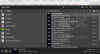
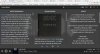
Here are a few screen shots of what it would look like on your TV using the Material skin plugin:

Logitech Media Server - Google Chrome_006.png Logitech Media Server - Google Chrome_007.png Logitech Media Server - Google Chrome_008.jpg

The player can be controlled via a phone, tablet (via apps for phone and tablet) or any computer on the network. You can stream your own library, streaming services like Spotify, internet radio and podcasts. It will play almost all formats and resolutions including DSD with the proper DAC.
 
Last edited:
I would also use a Raspberry Pi but set it up a little differently because you want to use your TV. Here is a basic summary
  1. Enable Logitech Media Server on your Synology DS218+ NAS
  2. Connect Pi to TV via HDMI
  3. Connect Ethernet net cable
  4. Connect Pi to receiver (for best sound a USB DAC is recommended)
  5. Download NOOBS and burn it to a microSD card and insert it into the RPi
  6. Power on RPi and follow instructions on screen to install Raspbian
  7. SSH into RPi and install Squeezelite http://www.gerrelt.nl/RaspberryPi/wordpress/tutorial-installing-squeezelite-player-on-raspbian/
  8. Open browser from Pi's desktop and point it towards LMS. NAS' ip address followed by :9000
Here are a few screen shots of what it would look like on your TV using the Material skin plugin:

View attachment 1664702 View attachment 1664703 View attachment 1664704

The player can be controlled via a phone, tablet (via apps for phone and tablet) or any computer on the network. You can stream your own library, streaming services like Spotify, internet radio and podcasts. It will play almost all formats and resolutions including DSD with the proper DAC.

Side note, I have been thinking of adding a few more raspberry pis to my system. One as a dedicated LMS, and one for the home theater system so I can listen there. I was content to go headless, but NOOBS looks like it could be fun and provide some info while playing...

For the sake of OP, I also endorse the raspberry pi, though I acknowledge sometimes it can take some futzing about to get it to its ideal setting, but not always. There are some good HATs (Hardware Attached on Top) out there to improve your digital audio out from the raspberry pi, though that will increase your cost, but all in all, it is still rather reasonable.
 
In 2015 I also was looking for some digital music solutions in the form of storage and a server plus a software package to control it all.

I purchased a Synology D415+ 4 bay NAS, added some Samsung 2TB SSDs and built a CAPS 3 server, which is a basic PC with an Intel chipset and Windows OS.

Based on a recommendation I found here at AK I purchased JRiver - V17 or something like that - and pulled it all together within a hard wired LAN.

The last step was to install TeamViewer's free non-comercial use software to remote control the server from my laptop.

Building the CAPS 3 server was easy as was setting up the LAN and installing the software packages.

Since then I've upgraded from JRiver to Roon - making the server the Roon Endpoint - and now use an Android tablet as my remote control. I can still operate the system from my laptop using the aforementioned TeamViewer software.
 
I have a Synology DS218+ NAS with 4TB in my media cabinet and was thinking of storing the music files on it (or possibly on a 2nd HD in the NAS.

Enable the DLNA server on the Synology.

Assuming your TV is 'smart', connect its SPDIF o/p to the receiver, and use the TV's DLNA client to browse the DLNA server, and play music.

If the TV SPDIF o/p is optical, check to see if the receiver has an optical SPDIF i/p. Otherwise, buy an optical to coax converter.

Job done...

https://www.synology.com/en-us/know...on_Synology_NAS_with_DLNA_UPnP_compliant_DMAs

If you want to use a remote control, get a DLNA app for your phone, and use it as a DLNA DMC to control the DLNA server to cast to the DLNA renderer in the TV.
 
Last edited:
Back
Top Bottom