
• The move to the new server is done. There are some software and database maintenance updates in process. This has us passing the hat around to help out. We appreciate any donations. Seriously, even a dollar helps. The payment page may be found here - https://www.audiokarma.org/support.html

KLH Model 17 Woofer Clicking

So interestingly...after looking at some pictures later. I had already flipped the woofers (accidentally) when I put them back (after re-cap and re-caulk). So I've had the other flipped back for about a week now and, yeah--no change.

The more I thought about this--I think I heard that clicking when I did my initial frequency sweep prior to working on them so was probably there from the beginning.

It's a mild annoyance that really only becomes a problem with certain songs--as of right now (luckily).

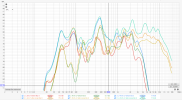
p.s. I'm glad I measured before and after re-cap because aside from the obvious audible difference I can only tell people about--this proves the effect it had (you see three dipping sharply--that was before the re-cap):
1775512792495.png
 
Which speaker in the graphs is the one that clicks? L or R? There sure seems to be a difference between the two below 200Hz. It seems to track with the individual speakers through the crossover change. Looks like the Right side has a big "hole" between 50Hz and 150Hz. Or is that a measurement anomaly? Just mic placement or the measurement environment? Might be a clue ...
 
Which speaker in the graphs is the one that clicks? L or R? There sure seems to be a difference between the two below 200Hz. It seems to track with the individual speakers through the crossover change. Looks like the Right side has a big "hole" between 50Hz and 150Hz. Or is that a measurement anomaly? Just mic placement or the measurement environment? Might be a clue ...
I think the hole in the "right speaker" is the room...it's a small room, wooden walls (no treatment--in case that wasn't obvious)...I might have to measure again since I've moved my subwoofer--realizing now my sub probably could fill in some of that gap (although hesitant to set the crossover on sub so high).
 
So the graphs include contribution from a subwoofer too? I guess that might account for the relatively strong showing at 40Hz for both "sides" ... I realize you were attempting to give a relative showing of the high frequency effects of the cap replacement. Onward!
 
no those graphs are no subwoofer...I looked at some I did with the sub and the same hole was there...but I also had the crossover set at like 50 Hz, thinking I wanted it as low as possible. Might re-think that in the future.
 
You used RoyC's Magic Butyl Sauce on the surrounds, right? Is it possible that you applied enough of it so that it soaked through and is now causing it to slightly stick somewhere to the steel frame on the inside? Longshot I guess. That cloth roll seems to butt up pretty close to the frame on my Model 30s.
New development here. I believe I have isolated the problem to where the cloth surround attaches to the cone.

TLDR: that's likely the problem, but still not sure the solution.

Disclaimer (I don't recommend anyone doing this):

Decided to fiddle with it while it was going. Started with a 30 Hz tone, could clearly hear the vibration (clicking). Using cotton swabs (no-shed...and seems I did get quality ones--and I used a lot) and rubbing alcohol. I tried to go over where the cone and cloth surround meet. This 100% helped.

Eventually I realized I still had the brush I used when re-sealing (also high quality brush that didn't shed) sitting in some rubbing alcohol (still definitely had goo on it). So I started using that instead--again with 99% isopropyl alcohol. Got it to the point where I couldn't really here clicking any more. Performed a sweep and heard some other spots now (high frequency).

Ended up listening to a 400 Hz tone until I almost gave myself hearing loss (possibly did--probably already had though prior to this). But was able to, with the brush, kind of work around some spots and get the offending sound almost completely gone! (p.s. here--yes I did try with ear plugs--but couldn't hear the rattling sound with them in)

As I somewhat expected to happen, the next day, now almost 12 hours later, the click is back!

So I was able to get rid of it temporarily, by softening up the surround where it attaches to the cone. But then once it dried, it just came back.

Any ideas going forward? Better than rubbing alcohol?? The paint brush seems like a reasonable tool though (not the cotton swabs). I did start to get worried I might completely loosen the surround from the cone.
 
More actual sealant? Maybe some on the back side of that seam? Seems the most ideal...

Otherwise something like aileens is a pretty safe bet, but I don't know how the sealant might affect the bond.
 
Once you get the clicking figured out you should redope the cloth surrounds. They are so porous in their current condition.
 
I think right now...I'm going to (when I get the gumption to do it...) try Gemini's suggestion with the Aleene's tacky glue:
The "Penetrating Re-Bond" (The Permanent Fix)
Since you've already "cleaned" the area with alcohol, the paper fibers are primed. You need an adhesive that will soak into the junction rather than sitting on top of it.

The Solution: Use Aleene’s Tacky Glue thinned slightly with a few drops of water (about a 4:1 ratio of glue to water).

The Technique: Use that same high-quality brush. Apply a very thin "wash" of this thinned glue exactly where the cloth surround meets the paper cone.

Why this works: The water allows the PVA glue to "wick" into the gap where the clicking is happening. Once it dries, it creates a flexible, rubbery bond that replaces the "brittle" sound of the old glue.
 
I think right now...I'm going to (when I get the gumption to do it...) try Gemini's suggestion with the Aleene's tacky glue:
IT WORKED!!!!

...or so far is working after 24 hour cure: no clicking sound at low frequencies. Sweep from 10-2000 was clean (or sort of-- see ps).

I had medium hopes for this--didn't really think the clicking could be "so easy" if you will.

I followed the instructions Gemini laid out (similar to what some others suggested):
  1. squeezed some of the glue into a small container (mainly just narrow)
  2. Used a plastic straw as dropper and mixer: eyeballed 4:1 ratio by dropping in distilled water, mixing, until I thought it was just wet enough
  3. Applied a very thin coat (or tried to) to ONLY the surround-cone junction: tried to cover the "corner" but tried to avoid the side wall mostly.
    • dabbed a line of spots to get the glue off the brush (really think "painting" mode here)
    • then quickly went over those spots until I saw it wick into the surround
    • made sure I saw that wicking and then moved on: so I made sure I could see the water-glue soaking into the surround but once it "soaked", I went to next spot
    • worked my way around, trying to make sure I didn't overlap too much from where I had started
    • when I was done, there was very little evidence of a white glue: it was a little shiny, but the coat was thin enough to where it had already mostly disappeared.
  4. Let sit for full 24 hours (in air conditioned room--technically window unit with "dry" mode)...main thing here would be avoid humidity
Overall I give myself a B+ on the job. Seemed to have worked, so it's passing, and looks good except you can see one little dab of white (left in picture) where I had put too much (and then didn't smooth it out quickly enough, I guess).

So now, I'm thinking: I should go ahead and apply the same job to the right speaker preemptively; even though it does not currently show this problem.

p.s.

I did hear some (minor) problems in my sweep but I believe at least one of them was: positive backpost is ever so slightly loose and vibrates around 400 Hz. I tightened it from the back and that helped a little. It's not worth me taking everything out again to try and tighten from the inside too--so probably going to just live with that one unless anyone has any other tricks without having to remove the woofer and take out all of fiberglass.
 

Attachments

  • after-fixed.jpg
    after-fixed.jpg
    202.3 KB · Views: 7
Last edited:
Little bit of an update on this. I still believe this is the correct fix however, I have had trouble making it a permanent fix. The click came back shortly after first attempt (maybe a day or two). I initially chalked this up to driving it too hard before letting it fully cure (more than 24 hours). I subsequently treated both speakers (i.e. left speaker a second time) and let it cure for 2 days. Made a pact with myself to drive it "not too hard" for the first week. And Now, about 4 days in (almost a week from initial re-apply) I can tell there is a problem that seems to be getting worse with more time (but still--approx. a week in, and it's definitely improved from initial--so far).

I will plan to apply a 3rd time more aggressively and will try to record this for posterity. I think my problem is kind of twofold: not enough glue and not enough rest (cure time).
 
Were you able to find an actual separation between the cone and surround at the "clicking" location? Sounds like you just "painted over" the cloth that is sitting on top of the cone material. I don't claim to be an adhesives engineer but seems like Aleen's PVA glue might have a hard time actually making it into the cone material through the Butyl soaked cloth. It might be more successful if the joint was opened slightly, cleaned out with Toluene and whatever adhesive you use was applied into that joint area directly. I also don't know how alcohol fares as a solvent with the unknown(?) original adhesive that was applied at the factory. It may be that the ancient adhesive is keeping things from bonding ... hope you get it working!
 
Haven't heard the wrap-up on this and was curious. Did the fix finally take? I found a SINGLE Model 17 and looking for a mate in ANY condition ...
 
Haven't heard the wrap-up on this and was curious. Did the fix finally take? I found a SINGLE Model 17 and looking for a mate in ANY condition ...
I've been lazy...mainly because I was a little too pessimistic about the second try. It's actually held up pretty well (my low freq. sweeps are not showing the problem).

Still working out a few rattles. One is the damn binding post (so I think I will eventually get back into it--but not any time soon). But overall I've been happy enough with the sound (it's hard to tell when I hear a rattle, if it's the speaker or the room shaking lol).

Too bad on the single Model 17. I have one working Model 32 and one that (I think) I burned the voice coil out of (which is what lead me to these 17s--very very happy coincidence).
 
Back
Top Bottom