• The move to the new server is done. There are some software and database maintenance updates in process. This has us passing the hat around to help out. We appreciate any donations. Seriously, even a dollar helps. The payment page may be found here - https://www.audiokarma.org/support.html

Laser discs are not good?

I run my CDV-488 on a modern Samsung PN64F8500 plasma using composite and honestly it looks really close to a BlueRay without all the banding or other artifacts of the modern digital formats. Granted the plasma does have a DSP to make the composite "look better" and I turn all of this enhancement off some of the A/D artifacts are present.


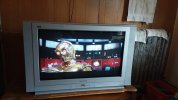
Here's a live image snapped from the first STAR WARS laserdisc (original) on a 34" Panasonic TAU Series CRT widescreen running in straight composite. It would give a BlueRay a good run for the money in terms of "average viewing" quality.
1784703838761.jpeg


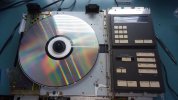
Said VP-1000 laserdisc player with the disc running on the bench. Been in the family since new.
1784703815299.jpeg
 
the top loader machines are neat. The one I have was given to me by @leesonic, a Pioneer CLD1030
My first LD player was a Sylvania top loader demo model that I inexpensively bought as a trial test to see if I wanted to upgrade my video media performance.
Even that lower end model out performed my VHS, & Beta machines !

Once I moved into this house (my first) in 1989, my great room`s big open wall begged for a HQ 3 tube, with optional low F# glass lenses Barco projector in 1991, so I bought that, and a HQ Pioneer LD player and started buying LD movies as they were released ever month.
While I still had my highly rated JVC VHS, & then I upgraded to JVC Super VHS machine, my frequently visiting friends always requested the selections of my ever increasing LD library offerings, with sometimes one of them would bring a brand new unopened commercial VHS movie tape to request us to first view it on that HQ projection system.

All video type machines video connections were S-Video that the projector provided along with composite inputs, & when I first connected the setup I hooked both type video signal type inputs to be able to flip between both types on the fly for comparing which was deemed higher quality multiple friends & times, S-Video picture quality won out every time.
With this 7.0 HT setup using my 1990 purchased Mc XRT-22 line array bi-amplified speaker system with a Velodyne 400watt servo powered 15" subwoofer, I found myself & my system to be popular as word got around.

I still have that first Pioneer LD player and changed out to a Mc. LD player I bought used of eBay over 10 yrs. back.
As to the LD rot, I haven`t encountered it yet, even my first LD purchases from the mid eighties (Star Wars, I guess I took better care of storing mine, after all they were not inexpensive in their era.

When I upgraded my great room`s HT in 2011 to true 4K projector, I sought out a HQ multi type input video Scaler through Markertec for only that system, as I already had separate S-Video, composite, and VGA, Component distributed video feeds via ethernet cables to 5 rooms of my house`s 2009 purchased various sized 1080P flat screen TVs which selectable inputs that did the video type scaling to 1080P internally.

Yeah, the picture from LDs aren`t as good as a BR/DVD transfer, but I know & accept that going in when I occasionally wish to watch a LD that will probably never be "commercially" released on a BR or DVD.

Still have around 100 LDs, including the excellent not released on BR/DVD" original" 1989 Pink Floyd Delicate Sound of Thunder Concert production that was only released on VHS and LD, with the more recent PF`s lame in sound and performance release of the cutting room`s floor sweepings of the same concert, but apparently different nights, instead of the original production release, all confirmed by multiple curious friends attending here after I bought the BR disc when it became available some yrs. back.

 
I have one bad one, its got lots of weird static in it. The rot seems to be one of those things that's pressing plant dependant more than storage condition.
 
Yes, the disc rot is a product of how well the outer edge was "sealed" when the disc was pressed. Apparently, the plastic portion of the discs were put together in two halves. Failure of the outer edges of the two halves to bond together adequately led to the reflective layer being exposed to atmospheric intrusion, and eventually oxidation and breakdown of the reflective material takes place as a result. I came across a site some time back that was attempting to discern patterns (particular titles, or pressing plants) that were known to be susceptible to this issue.

And of course, nothing has really changed, since we are now dealing with disc rot on DVD's that are less than 20 years old. These mostly appear to be titles pressed in one plant, but it affects a wide range of titles and a huge overall quantity of discs pressed over a period of multiple years.
 
I guess that's the case. Based on what I've read, the outer edge, having a longer linear length that is susceptible to being compromised, was presumed to be the big issue. But there's really no reason the inner edge couldn't be a problem, also.
 
It is funny,but on the 1080p tv the picture sucked.so took it to the basement movie setup.hooked to a denon
730h reciever and a Samsung ju7100 4k tv.the picture was much better,not great but very watchable.
 
All video type machines video connections were S-Video that the projector provided along with composite inputs, & when I first connected the setup I hooked both type video signal type inputs to be able to flip between both types on the fly for comparing which was deemed higher quality multiple friends & times, S-Video picture quality won out every time.

It's not an issue of whether Composite or S-Video is better, it's an issue of where do you want the comb filtering to occur?

The actual video on a Laserdisc is a Composite signal. In that regard, there is no downside to using the Composite output as it's simply passing along the raw signal as it is read from the disc.

A Composite video signal combines the Luma (luminance) and Chroma (chrominance) signals onto one wire. S-Video and other more modern formats separates them via the use of a Comb Filter.

Using the S-Video output on your Laserdisc player means that you are using the Comb Filter that is built-in to your Laserdisc player. Alternatively, you can pass the raw Composite signal to an external device to handle the Comb Filtering. It's not a given which will be better. On one hand, most Laserdisc players, including their internal Comb Filters, are now 30-40 years old. On the other hand, many newer TVs and other display devices didn't put much thought into the quality of their Comb Filters.

If you're willing to put a bit of effort into it though, it's not difficult to do comb filtering better than what was capable 30-40 years ago, typically alongside modern de-interlacing, and advanced up-scaling (potentially AI up-scaling / temporal up-scaling).
 
It's not an issue of whether Composite or S-Video is better, it's an issue of where do you want the comb filtering to occur?

The actual video on a Laserdisc is a Composite signal. In that regard, there is no downside to using the Composite output as it's simply passing along the raw signal as it is read from the disc.

A Composite video signal combines the Luma (luminance) and Chroma (chrominance) signals onto one wire. S-Video and other more modern formats separates them via the use of a Comb Filter.

Using the S-Video output on your Laserdisc player means that you are using the Comb Filter that is built-in to your Laserdisc player. Alternatively, you can pass the raw Composite signal to an external device to handle the Comb Filtering. It's not a given which will be better. On one hand, most Laserdisc players, including their internal Comb Filters, are now 30-40 years old. On the other hand, many newer TVs and other display devices didn't put much thought into the quality of their Comb Filters.

If you're willing to put a bit of effort into it though, it's not difficult to do comb filtering better than what was capable 30-40 years ago, typically alongside modern de-interlacing, and advanced up-scaling (potentially AI up-scaling / temporal up-scaling).
Yes I`m aware of all of that, hence my multiple careful selections of my selected scaler for my living room`s high res. scaler for the true 4K projector, as Amazon`s Prime liberal return purchase policy returns to find the best for the money scaler via Markertek`s highly rated offering, which I confirmed visually before committing the scaler purchase.
I could even use the scalar to feed my multi-room HDMI1080P resolution feeds, being able to switch between S-Video, Composite, and the scaler to the hard wired Ethernet cabled Atlona brand 1080P HDMI distribution feeds, all selectable feeding the remote room`s simultaneously fed to the flat screens attempting to determine the best visual results.
 
What did you end up using exactly? Also does that do composite input? My LD player doesn't have s-video output. It looks OK just run right into the TV but there are some weird artifacts sometimes and I suspect its either an upscaling problem, or something about the analog conversion process and maybe an external scaler would improve the situation.

my tv doesn't do 4K either.
 
What did you end up using exactly? Also does that do composite input? My LD player doesn't have s-video output. It looks OK just run right into the TV but there are some weird artifacts sometimes and I suspect its either an upscaling problem, or something about the analog conversion process and maybe an external scaler would improve the situation.

my tv doesn't do 4K either.
Ok G73, what scaler I ended up buying for various reasons was the well respected Co. :"Hall Research" model SC180-H, which its 5 different remote control + front panel buttons as well selectable video type inputs cover all of my video signal type requirements now and in the future should I have to replace any of most of my current 1080P flat screen TVs that have direct scaling conversion for the Composite, S-Video, SVGA, & Component (RGB) to a HDMI 1080P output + a HDMI 1080/P input .
I has a internal menu for various tweaking of the scaling/scanning conversion + tweaking the contrast/sharpness & other adjustable picture display performance elements.

After buying the first one to deal with a 10 yr. old Samsung master bedroom flat screen which the original 2010 purchased Atlona scaler couldn`t handle my higher resolution requirements from my A/V rack`s laptop desired display resolution feeding my multiple rooms via SVGA (HD-15) connector distribution, I was so impressed with its (the Hall Research model after buying off Amazon for generous return privalages, I purchased 2 more as standby/ & to replace another older purchased (2010) Atlona scaler used in the living room`s HT setup so that A/V rack laptop could feed my Sony true 4 K projector at the high resolution I desired .
The 2010 purchased Sony digital theater grade projector doesn`t have but 2 HDMI + 1 Component input, so I needed an external HQ scaler if I was to be able to easily select an video signal type the projector had no provision for like my other multi type video signals are available like the LD player, supplemental wireless security camera systems, both Composite & S-Video as well .

Try it, via Amazon, and see if you like it or easily return for free within 30 days if a Prime cutomer.
 
I'm curious as to why it "needs" to be scaled in the first place. I drive my Samsung plasma directly from the video out of my Laserdisc player and it looks just as good as a modern DVD or Digital Betacam that's running in Y R-Y B-Y.
 
maybe scaling isn't quite the right term, but whatever happens to turn an analog composite video signal into whatever appears on a 55" LCD made about 10 years ago. I get strange ghosting around text primarily but it can be seen slightly on any high contrast thing. A face with a very dark background will show a ghost image of the face slightly shifted to the right. Its more obvious with credits on a dark background. I don't know if thats a problem in the player, or whatever the TV does to things in order to make it show up on something made this century. If an external magic box will fix that, I'm good with it.

and no, I'm not going to buy a CRT.
 
I don't get any of the artifacts on the analog composite side, I'd say the issue is with the A/D conversion chain of your flat screen and to be honest doesn't surprise me as analog side even a decade ago was only a secondary consideration for consumer electronics as the big selling points were how good the HDMI & digital side was.

The only "real" magic box would be something newer or possibly one of those composite to HDMI adapters however given the shotty state of consumer electronics of today I doubt you're going to find anything that will do better unless you move into the professional arena with the likes of Black Magic Designs.

At present I'm using a Samsung PN64F8500 plasma from 2014 and with all of the digital enhancements disabled the analog composite looks as good as a 720P digital signal however most everything I'm using is last generation broadcast be it type-c or digital betacam (HDCAM) and it looks just as good as a broadcast or YouTube feed from a computer running off the Display Port.
 
yea I was figuring it was something in the conversion process. I just don't know the right name of whatever box is required to get it from a composite signal to whatever else the TV will accept. I also won't swear its not some gremlin in the late 1980s LD player.

This is a Samsung something from about the same era, but its an LED LCD. It was a freebie, boss got a newer, fancier tv and asked me if I wanted it, otherwise it was going to e-waste. It was an upgrade from what I had previously so I took it home.
 
Back
Top Bottom